Hi,
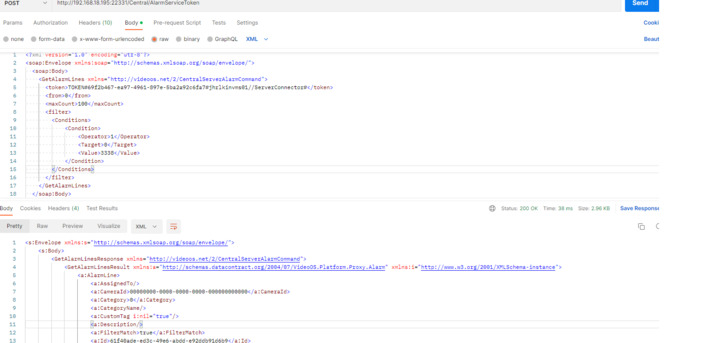
Is there a way to filter the alarm list based on date and time on retrival?
We are using protocol integration through alarmcommand service,
Regards,
Lee
Hi,
Is there a way to filter the alarm list based on date and time on retrival?
We are using protocol integration through alarmcommand service,
Regards,
Lee
The GetAlarmLines method allows you to provide an AlarmFilter which among others can specify time. For further details you can have a look at the IAlarmClient interface documentation (the alarmcommand service expose the same): https://doc.developer.milestonesys.com/html/index.html?base=miphelp/interface_video_o_s_1_1_platform_1_1_proxy_1_1_alarm_client_1_1_i_alarm_client.html&tree=tree_search.html?search=alarmcommand
Hi,
We tried the filter parameters in our scripts but its doesn’t filter and yet return all the available alarm in the system. We didn’t get any error message.
From your screenshot it seems like you are querying all alarms for which LocalId NotEquals 3338? That would return most of the alarms in the database (except maybe one), so not sure I follow?
Hi Peter,
Yes. But in the result we still getting LocalID 3338.
We have asked the developers to look into this and get back to you.
Hi Peter,
Any luck on this?
Good morning Sun Shung Lee,
As a member of the teams that knows this functionality, I am looking into the issue at hand. I will add my findings here as soon as possible.
Good morning Sun Shung Lee,
I have checked the Protocol Sample - Alarm List project and everything is working as we expect. I guess you must be applying the filters in the wrong way.
I have tried with the Not equal operator and it is doing what is expected. It filters out the input.
In the case of date I have input a custom date and filtered it with no problem. My only guess is that the format you are using might not be the same as the one stored and then maybe there are some issues in the comparison.
I would suggest you run the protocol sample project and check the values you are getting there. It is very intuitive to follow.
For the date this is the condition I have used:
private void ConfigureFilter()
{
    // Create a new list of conditions
    List<VideoOS.Platform.Proxy.Alarm.Condition> cList = new List<VideoOS.Platform.Proxy.Alarm.Condition>();

    // Create a new condition.
    VideoOS.Platform.Proxy.Alarm.Condition cond = new VideoOS.Platform.Proxy.Alarm.Condition();

    //My custom filter for the date
    cond.Operator = Operator.GreaterThan;
    cond.Target = Target.Timestamp;
    var time = new DateTime(2022, 12, 12, 13, 01, 00);
    cond.Value = time;
    // Add the condition to the list of conditions
    cList.Add(cond);

    // Apply the list of conditions to our alarm filter
    _filter.Conditions = cList.ToArray();

    // We want the newest alarms first
    _orderBy.Order = Order.Descending;
    _orderBy.Target =Target.Timestamp;
    _filter.Orders = new OrderBy[] { _orderBy };
}
Hi Carlos,
We tried to filter using only the Alarm → LocalID without the date. But the filter doesn’t seen like working. It still return all the alarm.
Thanks.
Where do you get the LocalID you are using? It is not commonly used and as Carlos previously mentioned LocalID is not so commonly used - it is more often the ID that makes sense.
If you still think it is a LocalID you have, then please try to do a query with Operator = Operator.Equals instead of NotEquals to see if you get any results using that.
Good morning Sun Shung Lee,
Apologies for replying so late, I have been away till today. The current filter is saying:
Operator: Not equal
Target: LocalId
Value: 3338
Which in other words is: Local Id is not equal to 3338. The return should be a list with all the alarms except the one with LocalId 3338.
The local Id should be numerical, while the Id is the Guid of the alarm. I encourage you to check directly in the database in the alarm table to verify the fields you are using are the correct ones. Also, try applying the filter in the sample protocol project provided by MIP
Alternatively I recommend to apply the opposite filter (Operator: Equals “0”). This way you will see it returns only 1 entry.