I am not sure about “FRS Alert” that you wrote, could you please explain about it?
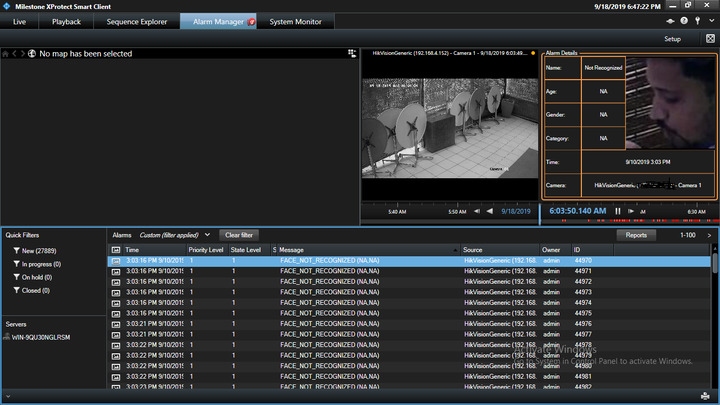
Above is the screenshot for FRS(face recognition system) Alarm. How to get the image of person which is showing in Alarm in .net SDK code.
I’m awaiting for your reply, please revert back soon on this regards.
Only the developer who developed FRS Alert knows, you might have to ask the developer.
I am willing to do a wild guess. The image might be saved in an VideoOS.Platform.Data.SnapshotList VideoOS.Platform.Data.Alarm.SnapshotList object - Ref. https://doc.developer.milestonesys.com/html/index.html?base=miphelp/class_video_o_s_1_1_platform_1_1_data_1_1_alarm.html#details&tree=tree_search.html?search=alarm
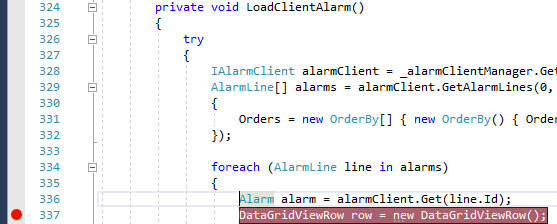
Since you are asking here you might be in the situation that you cannot ask the developer. I suggest you do the following: Run the Alarm and Event Viewer sample, make a breakpoint in MainForm.cs line 336, when the breakpoint is hit, make sure you have an alarm that pertains to FRS, if it does the investigate the content of the Alarm object. (Added bonus; this shows you how to get the Alarm out of the system.)
If you do not find it there at all you will have to ask the developer, in that case I see no other options..
FRS - VideoOS.Platform.Data.SnapshotList count is 1 but image is null. Is their is any other way from which I can get the person Image
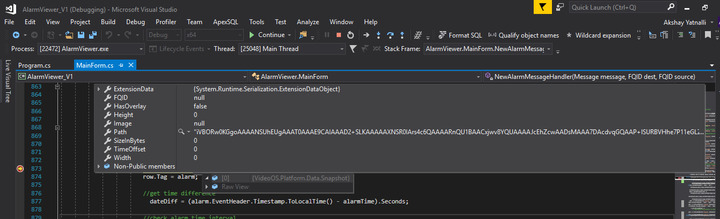
The image could be stored elsewhere in the Alarm object, so if you have not explore the object fully I recommend to try. If the image is not in the Alarm data it must be stored outside Milestone XProtect in the FRS system somehow. If stored outside XProtect you have to ask FRS.