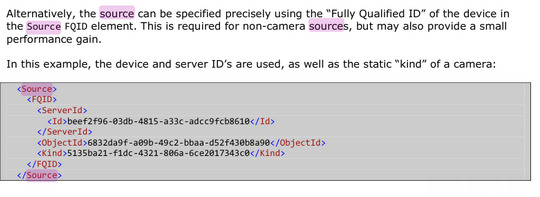
This page might be helpful. It says - Obtain the device GUID using ServerCommandService.GetConfiguration in the middle of the page.
But which service/protocol are you using?
I want to send an alarm to a specific camera using analytics events (in XML). I already have the camera id but I am missing the server id
How can i get this?
I will offer two answers:
If you know the id of the camera you must have that information from the ServerCommandService if you are using protocol integration. The Camera object has a DevicveId and a RecorderId, the first is what you use as ObjectId the latter is what you use as ServerId.Id.
Instead of-
D2D2CFC7-317A-476C-BB01-78BE649E8B47
5DC666F1-A656-40AE-B20C-8340786F5FAC
0
5135ba21-f1dc-4321-806a-6ce2017343c0
There is a even simpler way-
5DC666F1-A656-40AE-B20C-8340786F5FAC
This will work, that it works is a paradox in the sense that if you validate this against the XSD it will fail.
Test with
--
Actually a third option: If you do not have the id from ServerCommandService.GetConfiguration I must speculate if you are using the components instead, please consider doing so. Please explore this sample instead:
Recommended read:
https://developer.milestonesys.com/s/article/exploring-the-MIP-SDK-recommended-top-SDK-samples
https://download.milestonesys.com/MIPSDK/Samples/TriggerAlarmFromExternal-ConceptSolution.pdf
Is there no option to get the id from Milestone client itself?
I don’t see it very practical to tell my clients that they have to make a request to the server to get the id of their server
To get the id of the camera, I use this:
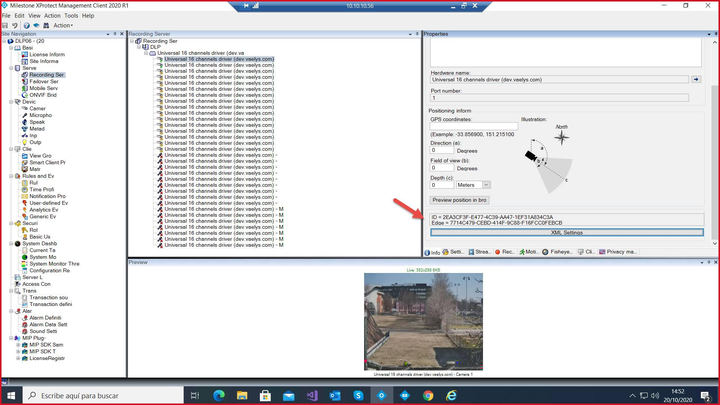
I am sorry, I did not think of this possibility where you look up stuff in the Management Client. I would ask you to consider other solutions. The default is actually to use the cameras IP.
You cannot get the id you need here from the Management Client.