We are using the MIPSDK 2019 R2 (13.2a) version. We can not use a newer version because we still have XPortect Enterprice recording servers.
We have a lot of complains that the live camera images are frequently (not always) 3 to 10 seconds delayed.
We added the clock of the camera in overlay to compare this with the local time on the PC’s viewing the camera images. There we see that 1 camera is more then 3 seconds behind. All clocks are synchronised with the time server.
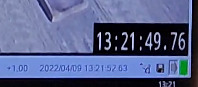 Our operators recorded this with their smartphone where we can see the crane is already moving on one camera but not on the other camera.
If we review the recording, we do not see this delay.
How can we avoid this delay in the live image?
What can we do to show a message on the screen that this camera image is delayed?
Is it correct we user this is our code:
_imageMileStoneViewerControl.SetVideoQuality(0, 1);
Thanks for helping us.