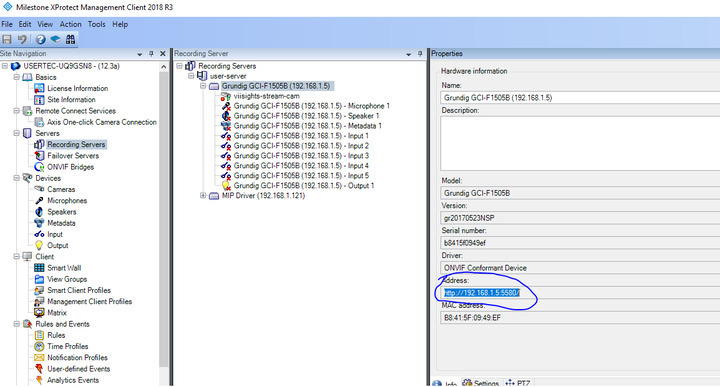
i used the sample CameraStreamResolution but i am missing the source->name information.
how can i use this information to send analytic events to a camera?
i tried using the source-FQID without the source-name, but it didnot work.
i used the sample CameraStreamResolution but i am missing the source->name information.
how can i use this information to send analytic events to a camera?
i tried using the source-FQID without the source-name, but it didnot work.
I do not understand how your code snippet would ever work (what is cameraList?), so I will try to direct you to something else..
Please dive into the FindCamera() method, this method has the full configuration and all cameras when it has done -
List<Item> list = Configuration.Instance.GetItemsByKind(Kind.Camera);
I recommend the ConfigAccessViaSDK sample or ConfigDump plugin sample to get a better understanding of the configuration in MIP.
the problem is that you separate between the camera to the hardware.
configAccessViaSDK, what i get:
what i need:
On the PlaybackWpfUser sample explore the “IP” button.
A better way.
Do not use the IP address but use the GUID instead. Format the Analytics Event XML like this.
<Source>
<!-- Insert camera URI here, if you don't have the GUID. -->
<!-- (For multichannel devices, URI may contain channel number after ',') -->
<FQID>
<ObjectId>
F62D32D1-B02A-49BF-A429-753338A5E820
</ObjectId>
</FQID>
</Source>
PS.
I had a hard time understanding what you wanted to do. I sincerely hope that I now have understood.
Hope this answer is the perfect fit for your need.

thanks, i was just about to ask if it is possible to use the information i already have.