I am trying to execute the below code for status viewer what I have observed is -
the status are shown only for recording server and not for cameras. Whenever I restart the Recording server I see the status going from responding to not responding, which is fine. I did the same for camera but nothing shown in the status window. Could you let me know on this?
https://doc.developer.milestonesys.com/html/index.html?base=samples/componentsamples/statusviewer/readme.html&tree=tree_2.html
There was a license issue and its sorted now and I see statues.
Is there a way where I can get listed of cameras which are not responding? I also use mobile server so is there a direct API which can give me this list?
I guess the sample shows you. If you would like to ask about the status rather than subscribing to status then it might be worth noting that the sample starts with using a “ProvideCurrentStateResponse”, you can start with trying the sample where you only use this..
The Mobile Server or Mobile SDK does unfortunately not give you this kind of status information.
If looking for something else the information could be retrieved using the Status Service SOAP Protocol. https://doc.developer.milestonesys.com/html/index.html?base=statushelp/index.html&tree=tree_3.html
Could you please elaborate on the below point?
- I guess the sample shows you. If you would like to ask about the status rather than subscribing to status then it might be worth noting that the sample starts with using a “ProvideCurrentStateResponse”, you can start with trying the sample where you only use this
You asked: Is there a way where I can get listed of cameras which are not responding?
If you explore the sample, look into the OnLoad method, there are four registrations (RegisterCommunicationFilter), the first three are about subscribing to events as they happen, the fourth is ProvideCurrentStateResponse. A little later the ProvideCurrentStateRequest makes this active one time. What I was suggesting was that you remove or comment out the first three and then see if the sample does what you need. If it does you have code that can be used when you implement your solution.
You can debug and see the response (ProvideCurrentStateResponseHandlerProvideCurrentStateResponseHandler), I am thinking that what you need is in the response
I hope my answer is clearer now, I hope I am not creating more confusion.
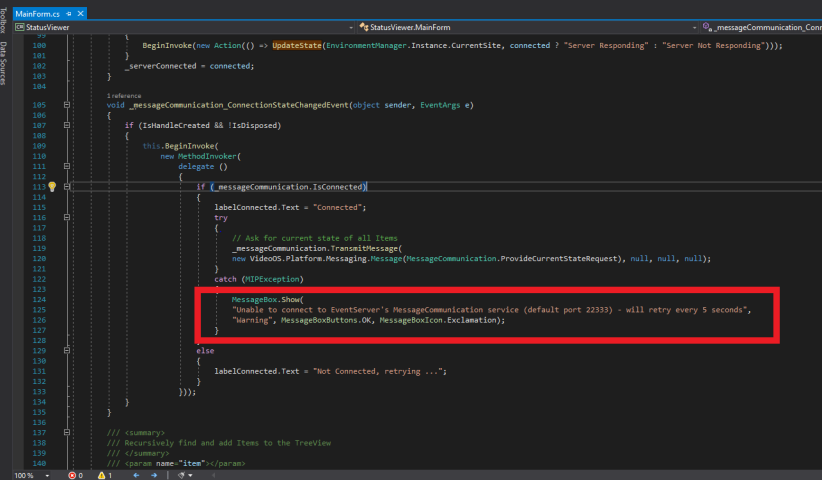
The coded worked for me in dev environment where I had 2 cameras but its failing when I try to connect it on prod environment. I have attached the screenshot where the code fails and a message box comes up with message - “Unbale to connect event server…”.
I have verified and the event server is running fine
What could be the issue here?
I tried this on the server
http://:22331/Central/MapService - working fine
http://:22331/Central/statusservice - working fine
http://:22333/CommunicationService - not reachable
I tried telnet to ports 22331 and 22333 and its working fine.
But still my earlier error exists, what could be the issue here?
Could you try to run the sample in the server itself?
If it can run there but not from a different PC then we know that it not the server being down but must be firewall or network routing or similar.
Should http://:22333/CommunicationService be working on server? This link is not working even on server.