I need to get cameras to show in a plugin in the Management Client. I know how to get cameras listed under the “Devices” → “Cameras” section (i.e. camera groups). But I would like to instead get the devices listed under the “Recording Server”. Can you tell me how to do this please? Is there an example?
Try the ConfigAccesViaSDK sample, this will illustrate how the configuration is ordered in a tree structure. In the sample notice the option “Physical Hierarchy”. Notice that when this is used cameras will no longer be grouped by configured camera groups but will instead be grouped by physical setup -recording servers.
https://doc.developer.milestonesys.com/html/index.html?base=samples/componentsamples/configaccessviasdk/readme.html&tree=tree_2.html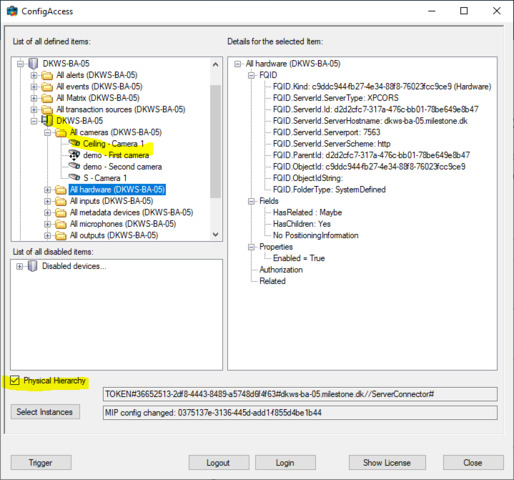
See also
-virtual List<Item> VideoOS.Platform.Configuration.GetItems (ItemHierarchyitemHierarchy)
-When getting items, the ItemHierarchy is used to specify which hierarchy to return. The UserDefined hierarchy returns user defined groups and content , when possible. The SystemDefined hierarchy returns ManagementServer, Recorderer, Items.
Both hierarchys, with top level server available 2 times.
EnumeratorUserDefined
The hierarchy defined via the device groups in the Management Client.
SystemDefined
The hierarchy defined via the recorders and devices on that recorder
Both