Hi,
How can I get the view name?
With smart client 2023 r3 not the event
ViewChangedHandler does not report the view name correctly
_currentView = message.Data as ViewAndLayoutItem; does not work properly with smart client 2023 r3
_selectedViewChanged = EnvironmentManager.Instance.RegisterReceiver(ViewChangedHandler, new MessageIdFilter(MessageId.SmartClient.SelectedViewChangedIndication));
private object ViewChangedHandler(VideoOS.Platform.Messaging.Message message, FQID s, FQID r)
{

  \_currentView = message.Data as ViewAndLayoutItem;

  return null;

}
Br Francesco
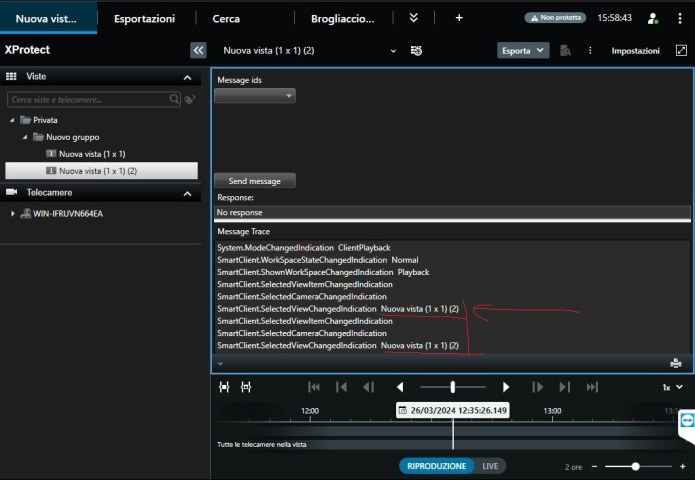
I tried to reproduce the simplest way I know.
I used the MessageTester sample and put a breakpoint in the MessageReceiver method. In my testing the Name was always correct.
Can you reproduce with the sample?
Depending on what you find, if you still see the issue, please give me further details how I might be able to reproduce.
https://doc.developer.milestonesys.com/html/index.html?base=samples/pluginsamples/messagetester/readme.html&tree=tree_1.html
https://github.com/milestonesys
when switching from one view to another the name is no longer intercepted
up to version 2022 r3 everything works correctly
I can now see the issue and it happens in all Smart Client versions that are newer than 2022R3.
Before I report this to Milestone Development there is one clarification that I would like to ask. The way I read your first post I understood that you got the event but it contained a wrong name. With your post on how you can see the issue using the sample it seems that the expected event does not come at all.
I suspect my first understanding was wrong but please clarify..
Which is correct?
The event does not come which means your plugin does not get the name of the view.
or
The event comes but does not contain a name or contains a wrong name.
I am made aware that there is already a patch that should fix this issue..
Please see https://developer.milestonesys.com/s/article/XProtect-Smart-Client-2023-R3-cumulative-patch-installers
Please apply the patch and let us know if it solves the issue for you.
Hi Bo,
I installed the patch…but the problem persists…
Br
Dario
Please answer the question above, I need to be sure that I understand the situation correctly.. (No event or event with wrong info.)
Milestone Development is investigating. We cannot yet say anything more..
Milestone Development has now developed a fix. Please use the Smart Client 2023R3 patch..
https://supportcommunity.milestonesys.com/KBRedir?art=000056001&lang=en_US