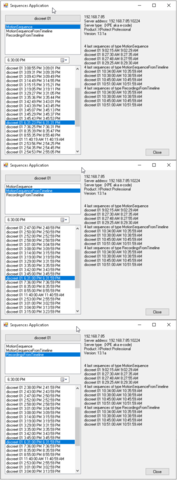
We have been carefully comparing sequences on the server against the exports from our solution. We’ve encountered a sequence of length of about 5 seconds on the server that did not get discovered by our GetData.
We’re running a GetData for 1 hour for the maxTimeAfter.
Within that time period, the server has only the one 5s sequence.
job.SegmentExport = 1 hour
var list = ds.GetData(utcStartTime, TimeSpan.FromSeconds(60), int.MaxValue, TimeSpan.FromHours(job.SegmentExport), int.MaxValue);
Hi. May I clarify regarding “Server has it”? Does this mean that you exported via Smart Client? I would like to reproduce this symptom for further investigation so could you please tell us what you did for this comparing?
by ‘server has it’ I mean that if viewing the timeline in the SC, there is a ~5s sequence of a person walking by the camera.
With our SC Workspace/component plugin, we encountered a situation where that sequence did not get retrieved.
Our plugin has a GUI in the workspace and a exe which runs as a windows service(which does the actual sequence exports). Our plugin allows for scheduled exports and uses GetData to build the export list and VideoOS.Platform.Data.IExporter.StartExport to ultimately get the sequence(in database format).
It was a difficult sequence to identify that it was missing as it required a manual comparison of all of the multi-day export from our plugin against the SC running on the server. Wasn’t actually expecting to see any missing data as I had visually had two SC windows running. One with the SC on the Playback tab. And the other SC loaded the data via a database type export(project.scp file). I hit play on each close together so I could watch the two together.
For the videoos.platform.dll we have v:13.2.90.1
Recording server= XProtect Professional R1 13.1a 1548097
We created exports with our plugin for just that hour with various parameters in GetData but it never returned anything.
2. Is there one or multiple sequences of footage missing when you get the result from (SequenceDataSource) GetData?
3. When you see this symptom, does it happen as a general issue or has this only been observed once? Or does it happen in a special occasion; such as in the morning or after reboot the recording server etc.? (Do you see any kind of pattern if seeing multiple occurrences?)
4. Can you see the red recording line in the Playback workspace in Smart Client? (This part of the timeline is rendered from sequence data so it would be interesting whether bits are missing in the Smart Client concerning this.)
only one small sequence as outlined in the message above.
We haven’t tried to export everything and do a perfect manual inspection. I assume that this issue can occur in other places. Do not believe that it is a moment surrounding a reboot. No matter what parameters we use for GetData during that timeframe, we cannot extract that particular sequence. See message above.
in the Playback tab in the smart client during the period in question, we see the sequence(the filled red section of the timeline bar).
If you need more, we invite you to schedule a remote session so that we can remedy.
We’re intending to deploy our solution to a prominent customer and cannot have any situations where there is a potential loss of data.
Here it is stated that e-code does not support RecordingSequence type.
When you ask for RecordingSequence type you will get a MotionSequence type, and the side-effect is that on e-code server there can be recorded footage that is not covered by the MotionSequence type.
I recommend that you use the small sample I made on “Sequences” to understand what is available and possibly to trouble shoot the situation.
You can be in a situation (my guess) that there is recorded footage outside the periods covered by the sequences data. In that case your solution might have to be changed, and I think if you ask the export to cover the whole period wanted instead of filtering on sequences data you can export all of the footage.
Thanks, Bo. Looks like this sample might help. With it, I was able to see that on each of the methods for getting data, there is a way to get a result for the particular sequence we are hunting.
maxCountBefore will work this way: The GetData will return sequences before the ‘start time’ but will stop including sequences on two conditions; either the you get out of the time span maxTimeBefore or you get over the count of maxCountBefore.
An example. You specify that you want the last day and 10 sequences. You know there are 99 sequences. However you specify a maxCountBefore of 10 and this means that GetData will only return 10 sequences.
maxCountAfter and maxTimeAfter works same way as maxCountBefore and maxTimeBefore only on sequences after ‘start time’.