Am I correct in thinking that SequencesGet in RecorderCommandService is the correct way to retrieve a list of recorded video? I’ve tried getting a list for the past hour or past day on a camera that I know has recordings (I’ve checked using the TcpVideoViewer sample) but always the list that comes back is empty. I’ve used a different camera ID (same result) as well as an incorrect camera ID, which gives an error result so I know I’m making the request properly. The thing that confuses me is that I’m using the sequence types listed on https://doc.developer.milestonesys.com/html/RecorderSOAPhelp/class_recorder_command_service.html#a91ee744326e989d0fcd7911cf2f694df but it doesn’t seem to matter what I use - valid UUID; or valid UUID in braces; or invalid UUID - I don’t get an error and I get an empty list back. Looking at the TcpVideoViewer, this doesn’t seem to be using the RecorderCommandService at all, but I was told this is what I should be using. Am I misunderstanding what the SequencesGet call does?
UPDATE:
I’ve now managed to get a list of recordings via the Image Server API, as the TcpVIdeoViewer sample does, but I’m still none the wiser about what SequencesGet does nor why it doesn’t complain when I use an invalid SequenceType GUID.
I would prefer to use SOAP to get a list of recordings because it feels a bit more robust and easier to handle than the XML (or not XML) coming back from the Image Server API.
TCPVideoViewer uses Alarms, see the code in ImageServerConnection.cs – GetSequences()
Recorder Command Service -GetSequences should work even if no sample shows it used. From the information at hand, I have a hard time seeing what might be wrong. I wonder at first, do you have other methods on Recorder Command Service that do work for you?
Thanks Rie, and yes, Alarms is the approach I have had to use for now.
Excellent question about whether anything else on the Recorder Command Service works…! What would be a basic call to try?
I do get a sensible-looking response from the GetSequences call, I should add: I get back a SequencesGetResponse object, which contains an ArrayOfSequenceEntry which yields a List, albeit an empty one.
Both were compactly formatted, but I reformatted them for clarity.
As mentioned previously, the result is the same regardless of what I use for sequenceType - with or without curly brackets, any UUID - always the response is an empty list.
@Rie Kiuchi (Milestone Systems) Just checking you’ve seen my previous comment; not sure if you would have been alerted without me mentioning you like this…
OK, done that. Seems to make no difference whether I use {} or not. The response is always the same, which is that there are no recordings (but there definitely are). In fact, it seems I can put any value in for either and it doesn’t complain, it just returns an empty list of recordings.
Apologies about the tagging thing - I find it’s not at all clear whether anyone has seen my responses and sometimes many days go by with no response, so I assume my reply has been missed!
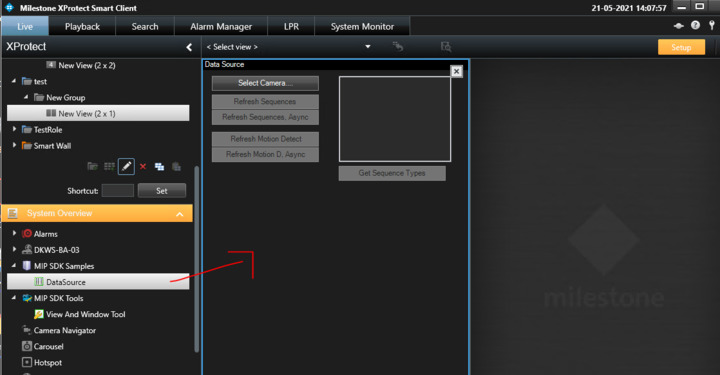
Thanks for that. I’ve built the DataSource project and copied the DataSource.dll and plugin.def files (from the project’s \bin\Debug and \ folders respectively) into a new folder I created called [C:\Program](file:C:/Program) Files\Milestone\XProtect Smart Client\MIPPlugins\DataSource.Plugin. I restarted the client but nothing appeared. I’ve not used plugins before so I don’t know if I did everything I need to. Did I miss something…?
Let me give you an instruction for the plugin. First, please delete the folder that you created for deploying the dll because there should be a specific folder already here - [C:\Program](file:C:/Program) Files\Milestone\MIPPlugins\DataSource if you install SDK, please check the folder, dll and def file .
And you will be able to see following setting in Smart Client.
The DataSource sample worked, so I used Wireshark to look at the SOAP that was being sent; the method used was SequencesGetAroundWithSpan, not SequencesGet (which is what I was using). I tried that from my Java code, and it did indeed work. So I then tried SequencesGetAround instead; this also worked. So I tried SequencesGet again and it didn’t work. The only difference I could see was that I didn’t specify a maximum count of recordings to include in the results list, assuming (incorrectly, it turns out) that if you don’t specify a limit, there won’t be one. When I added in a maximum count, it suddenly worked!
So rather bizarrely, the default value for “maximum count” is zero, meaning that every request will return an empty list!
Also, just to confirm, the UID for the sequence type should be specified without curly brackets.
Thanks for the guidance.
UPDATE: I have just discovered that when limiting the number of recordings in the list, the limit starts at the start of the specified time, which isn’t quite what I want: I want the N most recent recordings (possibly with the added condition that they are in the last 24h), so I think I will have to use SequencesGetAround (or, if also wanting to specify the last 24h, SequencesGetAroundWithSpan). Any chance the API documentation could be updated to include complete descriptions and some examples along with what to expect back…?