My AlarmCommandClient is retrieved from the method.
AlarmClientManager _alarmClientManager = new AlarmClientManager();
alarmCommandClient = alarmClientManager.GetAlarmClient(EnvironmentManager.Instance.MasterSite.ServerId);
then I use this to get Alarm Lines
_alarmCommandClient.GetAlarmLines(offset, count, filter)?.ToList()
but I get the exception with the message “An error occurred when verifying security for the message.” And here is the stack trace from GetAlarmLines
System.IO.IOException: Failed Getting Alarm Data ---> System.ServiceModel.FaultException: An error occurred when verifying security for the message.

Server stack trace:
   at System.ServiceModel.Channels.ServiceChannel.HandleReply(ProxyOperationRuntime operation, ProxyRpc& rpc)
   at System.ServiceModel.Channels.ServiceChannel.Call(String action, Boolean oneway, ProxyOperationRuntime operation, Object[] ins, Object[] outs, TimeSpan timeout)
   at System.ServiceModel.Channels.ServiceChannelProxy.InvokeService(IMethodCallMessage methodCall, ProxyOperationRuntime operation)
   at System.ServiceModel.Channels.ServiceChannelProxy.Invoke(IMessage message)

Exception rethrown at [0]:
   at System.Runtime.Remoting.Proxies.RealProxy.HandleReturnMessage(IMessage reqMsg, IMessage retMsg)
   at System.Runtime.Remoting.Proxies.RealProxy.PrivateInvoke(MessageData& msgData, Int32 type)
   at IAlarmCommand.GetAlarmLines(Int32 from, Int32 maxCount, AlarmFilter filter)
   at VideoOS.Platform.Proxy.AlarmClient.AlarmClientCredentials.GetAlarmLines(Int32 from, Int32 maxCount, AlarmFilter filter)
Am I missing any configuration? I logged into Smart Client using a windows user.
There are so many rights to configure, I guess the setup has been verified that the same user when using the Smart Client can see the alarms, can you confirm this?
Do you see this error consistently or only sometimes?
Do you see this in one installation while your test setup and other installations work fine?
Does the user belong to the administrators role or a different role? Does it make a difference? (Please test if you do not know whether it makes a difference.)
What product and version is the XProtect VMS?
Hi Bo
Thanks for the response. I forgot to mention this happen when I use Smart Client 2023 R3 to connect to either a 2023 R2 or 2023 R3 Milestone System. It only seems to be the problem of Smart Client 2023 R3, the call to GetAlarmsLines passed when using the Smart Client 2023 R2 to either server 2023 R2 or R3.
Multiple users were used across multiple servers. The user was a Windows user and had administrator Roles.
It looks like it is working when connecting to a 2023 R3 Milestone server using a basic user that has an administrator role.
Our system doesn’t have any encryption setup.
Is this a Smart Client plugin?
I want you to test using the Smart Client Alarm Manager, does the same user see the alarms?
I asked for the VMS product.
I have an idea that this might be XProtect Essential+. In XProtect Essential+ there is no support for alarm management, this could be the explanation.
https://www.milestonesys.com/products/software/product-index/
Hi Bo, it is a smart Client Plugin. Alarm Manager works fine for both Windows users and basic users (both with administrator role). But my plugin only works with basic user currently.
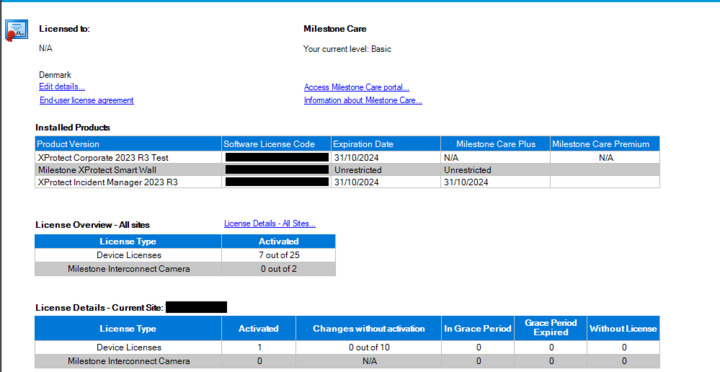
Hi Bo, the product I installed is Xprotec Corporate, and the license I got looks like this
Are you building the plugin using the latest MilestoneSystems.VideoOS.Platform NuGet?
Are you doing this in a BackGroundPlugin? If not, what class are you calling this from?
PS. I tried a doing a GetAlarmLines from a BackgroundPlugin and saw no exception, it would be best if I could reproduce the issue, if you have ideas how I might reproduce please tell me.
Hi Bo, yes I built the plugin using the latest Milestone Nuget. The plugin type that access these alarm lines was SidePanelPlugin and ViewItemPlugin.
Hi Bo,
I also encounter the same behaviour as stated in this thread.
When I try to retrieve the AlarmLines via AlarmClient, I also receive the message “An error occurred when verifying security for the message.”
I am running this code from a BackgroundPlugin loaded in the EventServer of a 2023 R3 (Unencrypted).
My plugin was running just fine for the last ~8 versions, so something seems to have changed.
BR
Simon
Please tell me, what is the product version? (Corporate, Expert, Professional+, Express+, Essential+ -?)
I am running Corporate on my test system
Simon, I have to ask the same question as for mr. Tram Ngo.. Are you building the plugin using the latest MilestoneSystems.VideoOS.Platform from NuGet?
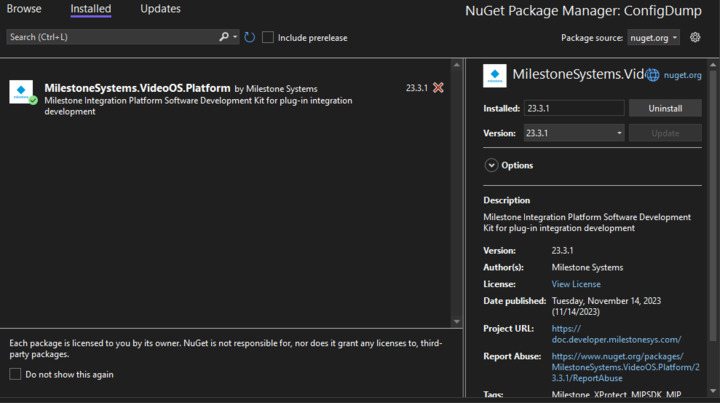
I am running the latest (23.3.1) MilestoneSystems.VideoOS.Platform Nuget package:
I added the following lines to the latest ConfigDump-Sample to verify that the problem also occurs outside of my plugin:
var alarmClientManager = new AlarmClientManager();
var alarmClient = alarmClientManager.GetAlarmClient(EnvironmentManager.Instance.MasterSite.ServerId);
//Defining the alarm filter
var alarmFilter = new AlarmFilter();
List cList = new List();
var condition = new Condition();
condition.Operator = Operator.BeginsWith;
condition.Target = Target.CustomTag;
condition.Value = “test”;
cList.Add(condition);
alarmFilter.Conditions = cList.ToArray();
var alarmLines = alarmClient.GetAlarmLines(0, 10, alarmFilter);
Executing the last line will cause the exception.
Were you able to reproduce the problem?
I did several attemps after reinstalling and trying with different alarmfilter properties but nothing seems to work.
I also tried to use a different alarm filter and it didn’t help. I also moved that Windows user to a different role which has all alarm-related rights to be full control and it doesn’t work. There is this log that might be helpful which can be enabled by going to Smart Client Settings / Advanced/ Logging (for technical support) (ensure you restart smart client after setting it) . Here is the error in my MIP log output which can be accessed via [C:\ProgramData\Milestone\XProtect](file:C:/ProgramData/Milestone/XProtect) Smart Client\MIPLog.txt. However I get this exception in both working (logged in as basic user with admin rights) and non working case
2023-12-01 18:46:45.888+10:00 [     1] DEBUG      - ......Exception:VMO60325: Could not retrieve information for the security namespace. The namespace does not exist.   at VideoOS.Platform.Util.Security.SecurityClientXPCO.HasPermission(Guid kind, String objectId, String actionId)
   at VideoOS.Platform.Util.Security.SecurityClientXPCOWrapper.CheckPermission(Guid kind, String objectId, String actionId)
   at VideoOS.Platform.Util.SecurityAccess.CheckPermission(Item item, String actionId)
   at VideoOS.Plugins.Common.Permission.RolePermissionProvider.IsAllowedTo(String actionId)
2023-12-01 18:46:45.888+10:00 [     1] DEBUG      - Error: IsAllowedTo (RolePermissionProvider):Error checking GENERIC_READ permission on 34992814-0e16-4724-9975-9d73933cdddf
I made a new attempt to reproduce and this time I was successful. Using a modified ConfigDump and running in the Event Server background.
I have an idea that the issue is tied to the fact that you run unencrypted, at least that is the differentiator between my first attempt to reproduce which did not succeed, and my second attempt that did succeed.
Maybe you will be able to solve the issue for now by doing a secure setup where you use a certificate and enable encryption. If you attempt this please let me know if it works.
The issue together with the reproduction is now reported to Milestone Development. i will let you know what they find when they analyze this.
Thanks for the answer.
I encrypted the Eventserver communication and now it seems to work, thank you.
Let me know once you fixed the issue while running without encryption of the Eventserver, so I can also test this.