I have to integrate our component based on MIP SDK and build an installer for our customer. When I use the .msi file to install on target machine. It will show the message:
Could not load file or assembly ‘VideoOS.Toolkit.dll’ or one of its dependencies. The specified module could not be found. Unhandled exception: VideoOS.Platform.MIPException: VideoOS.Platform.SDK.Export.Environment.Initialize() not called.
Current SDK version: 2022 R3 22.3.23.2
Milestone XProtect version on build machine: 2022 R3 22.3a internal version: 37
Windows version on build machine: windows 10 pro 21H2 19044.2130
Milestone XProtect version on target machine: 2020 R1a
Windows version on target machine: Windows Server 2012 R2 Standard
The target machine has been installed prerequisites:
Microsoft Visual C++ 2015-2022 Redistributable (x86) - 14.32.31332
Microsoft Visual C++ 2015-2022 Redistributable (x64) - 14.32.31332
.Net Framework 4.7.2
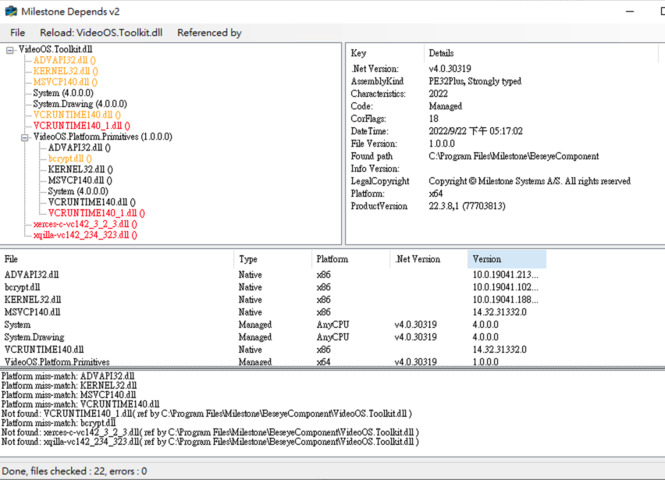
Use MDpends.exe to load ‘VideoOS.Toolkit.dll’ in the installation folder. Platform miss-match dependencies are as below:
When you have built the standalone component, it is important that all the files are included.
If you simply deploy the build target folder and all content, do you see the same error? If that works, I must suspect something is wrong with your installer.
Sure. I got the same error even I copied the build target folder include all contents to target machine(even the same windows version). The only workable way is run the application in Visual Studio IDE. But this way is too bad. We supposed not to expose our source code to customer and I think they also won’t like to run it with IDE. I’d like to provide more information if you need.
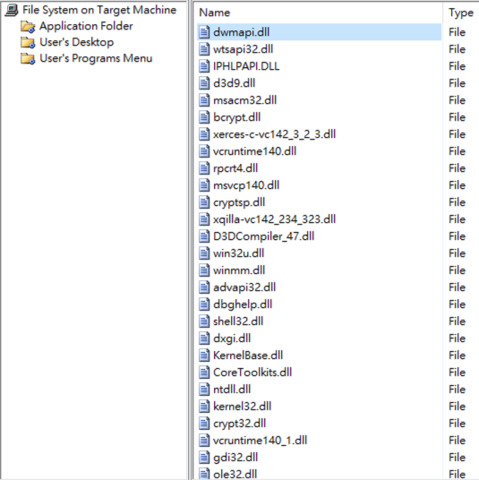
I know there are a little bit different between Windows 10 and Windows Server. I’ve solve the dependencies problem as below.
However, it still shows unhandled exception regarding System.BadImageFormatException. it cannot load the VideoOS.Platform.SDK.Export. Finally, the application will be terminated. Do I miss something?
System.BadImageFormatException means that 32bit and 64 bit is being mixed.
I have a nagging feeling you must have a wrong dll in the mix. Please make sure you empty the target folder and then build again using the NuGet. (Don’t copy any files just the NuGet building.)
You see the issue deploying on a Windows Server 2012 R2 Standard, do you see the same issue deploying on a Windows 10?
If you in the development machine exit the Visual Studio IDE and then execute the program, do you see the error even then?
Thanks for your help. I found the latest version will invoke the windows update when login the milestone management server. Due to no internet, the program throws the exception of server not found after the timeout of windows update occurs. I’ve downgrade my SDK version to 22.1.0, and the problem has gone.
One more question. How could I package all debug folder as an installer. I used to make the installer with the extension of Microsoft Visual Studio Installer Projects. However, it doesn’t work cause the dependencies. Is there a better way to do so?
If you copy the target / output folder when you build the MIP SDK based stand-alone application, this should be the perfect way to deploy. This would be the case except if the MIP SDK doesn’t support the OS on which the application is copied / deployed (as we found to be the issue here).
Unfortunately we have no experts in Milestone Support on whether (or how) this can be achieved using Microsoft Visual Studio Installer Projects or other installer frameworks, this falls a little outside our area of expertise.
I am hoping other developers following this forum might know and offer ideas.