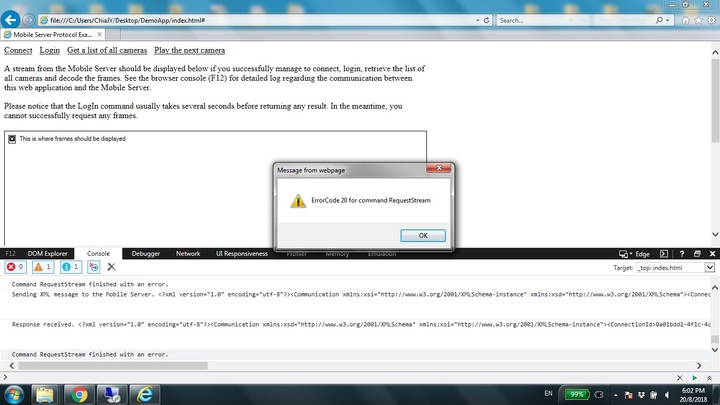
Calling for any kind soul who can advise on this. 
Previously integrating with Milestone XProtect Coporate 2014, this issue was not encountered, but only with Milestone Version XPC 2018 R1.
This issue usually happens when the request is new. After a few tries, the request maybe successfully. The success rate maybe higher if “GetViews” command is performed before “RequestStream”.
Following is the request:
var requestStreamXMLMessage = generateXMLMessage({
sequenceId: 1, // just a random number, we are not going to track the sequenceId
connectionId: connect.connectionId,
command: ‘RequestStream’,
inputParams: {
CameraId: ‘a6fa3469-d9af-46d9-a7b1-58ea2556a731’,
DestWidth: 800,
DestHeight: 600,
MethodType: ‘Pull’,
SignalType: ‘Live’,
Fps: 10,
ComprLevel: 70,
KeyFramesOnly: ‘No’
}
});
Following is the log when request comes to a stop:
2018-08-06;4:30:59 PM;Info;CommunicationCommandQueue.LogCommands();administrator
2018-08-06;4:31:02 PM;Info;MetaChannel.ProcessCommandRequestStream;800 x 600
2018-08-06;4:31:02 PM;Info;CommunicationCommandQueue.LogCommands();56932fea-4f3d-4894-8edf-3aa0d217f80b;a6fa3469-d9af-46d9-a7b1-58ea2556a731
Hi Chia,
Unfortunately this is a known issue for R1 and R2.
We were able to reproduce it only custom integrations.
Difference with Milestone clients is that they are calling “GetAllViewsAndCameras” and “GetOutputsAndEvents” between “LogIn” and “RequestStream”.
So your observation "The success rate maybe higher if “GetViews” command is performed before “RequestStream” is most probably correct.
Seems that some initialization happens slowly on background.
I could only advise you to try two things:
- Delay “RequestStream” from the “LogIn” on some time (you could try with binary search what will be the value that works for you - 10 s, 5 s, 2.5 s);
- Try to call both commands after login (“GetAllViewsAndCameras” and “GetOutputsAndEvents” ) in order to see if there is a difference.
Chia,
We still are not able to reproduce it in-house with prepared test application.
Is it possible there to be some environment specifics ?
For example MFA VMS and this particular camera to be from the slave ?
Or something else?
Hi Petar,
Thanks very much for your reply. Will be trying out your recommendation soon.
Meanwhile, to answer you about our environment.
Our environment is a simple test environment with the following specification:
- Total 2 servers (VMware Esxi 5.1).
- → Server 1 (Recording and Management Server) 2 CPU, 4 GB RAM
- → Server 2 (Mobile Server) 2CPU, 4GB RAM
-
Both servers running Windows Server 2016 Std
-
No AD, no domain
-
One AXIS M5014 IP Camera directly integrated
-
Not using Multi-factor authentication (MFA)
-
No firewall, no vLAN
Attached are the coding files used. Changes made to the DemoApp files:
-
CommandChannel (environment config change)
-
requestStream
-
videoChannel (environment config change)
Hi Chia,
I’ve looked the DemoApp you have provided.
With it I was able to reproduce the case (of course when changed address of the mobile server and camera id  ).
).
Now I’ve got what happened.
Probably we haven’t explained it well in the DemoApp, but client application have to wait for completeness of the “Connect” and “Login” commands, in order to fire new ones.
In other words the correct workflow is :
- Call connect.
- On connect response call login.
- On login response call request stream.
I’ve modified the DemoApp in order to show this workflow.
There is new button “Connect + Login + Play” which demonstrates it.
Processing is made by all.js.
There are minor changes in the connect and login and of course you have to revert your server address and camera id.
With the new workflow I wasn’t able to reproduce the case any more.
Btw since 2018 R1 DemoApp is obsolete and from 2019 R1 will be deprecated (meaning not supported any more).
I’ll highly encourage you to migrate to the XPMobileSDK. It is available since 2018 R1, constantly evolving and with increased number of samples (In 2018 R3 they will be tripled compared to 2018 R1).
XPMobileSDK is used in the Milestone Web Client and is always up to date and working.
Hi Petar
Thanks for your customized DemoApp. We have tried the DemoApp and your earlier suggestion having “GetAllViewsAndCameras” and “GetOutputsAndEvents,” but still having issue logging in smoothly.
Attached is the full log from Mobile Server and extracted log for only logging in successfully after multiple attempts.
Usually a fresh login will have no issue.
There are 2 scenarios that can produce the issue.
Scenario One: User logged out and re-login shortly after logged out successfully.
Scenario Two: Second user logged in while there is an active session with the same user account.
Hi Chia,
Can you make wireshark trace when issue is reproduced ?
Btw what is the name of the camera (how it is shown in the MC) ?
One colleague guess is that it is something on different character set (non english).
Also is the OS internationalized (eg on different display language) ?
Another thing - what kid of user you are using for login ?
Basic or local machine windows (administrator) ?
Hi Petar, apologies for my slow reply.
OS used is in English. The user account type is local windows (administrator).
Error Code 20 appears if re-attempt to login within 1 minute. Notice after 1 minute, login most likely successful. Attached is the screenshot
For wireshark trace might be a bit difficult for my as the mobile server is behind proxy.