I’m working on an application, which uses the SDK, where I need to implement a recording feature that switches between HD-quality and lower-quality recoding video depending on user commands (“Manual Recording HD-Quality” or “Manual Recording Lower-Quality”). According to what I gathered from Milestone’s whitepaper on Edge Storage, recording servers can store low-quality video in their database, while HD-quality video is stored in the edge (camera’s SD card) and can be retrieved by the Smart Client. The SVQR feature allows flexible retrieval options: the recording server can automatically pull the HD video in the background, or users can manually retrieve it through the Smart Client.
I’m a bit uncertain about a few aspects of this implementation in my application, specifically how it works with the SDK’s PlaybackWpfUserControl and the recording command (MessageId.Control.StartRecordingCommand). I’m particularly wondering if the PlaybackWpfUserControl itself can handle switching recording quality seamlessly. Also, I’m not sure if I need to implement a manual retrieval panel for users, as described in this example from Milestone’s documentation(https://doc.developer.milestonesys.com/html/index.html?base=samples/componentsamples/remoteretrievaltasksample/readme.html&tree=tree_2.html), or if automatic retrieval can be set up through the default rule to start and stop feeds from devices. Plus, I’m unclear if anything specific needs to be implemented for the StartRecordingCommand.
Any insights or explanations about how it works would be greatly appreciated!
The ImageViewerWpfConttrol and the PlaybackController in the MIP SDK works same way, to a large degree is the same, as the Smart Client camera view.
Just like the Smart Client camera view you can have automatic use of the streams based on resolution. (= Adaptive streaming.)
The ImageViewerClient sample shows both how to manually control which stream is used (dropdown pick a stream) or enable adaptive streaming (option setting).
https://doc.developer.milestonesys.com/html/index.html?base=samples/componentsamples/imageviewerclient/readme.html&tree=tree_2.html
Hello,
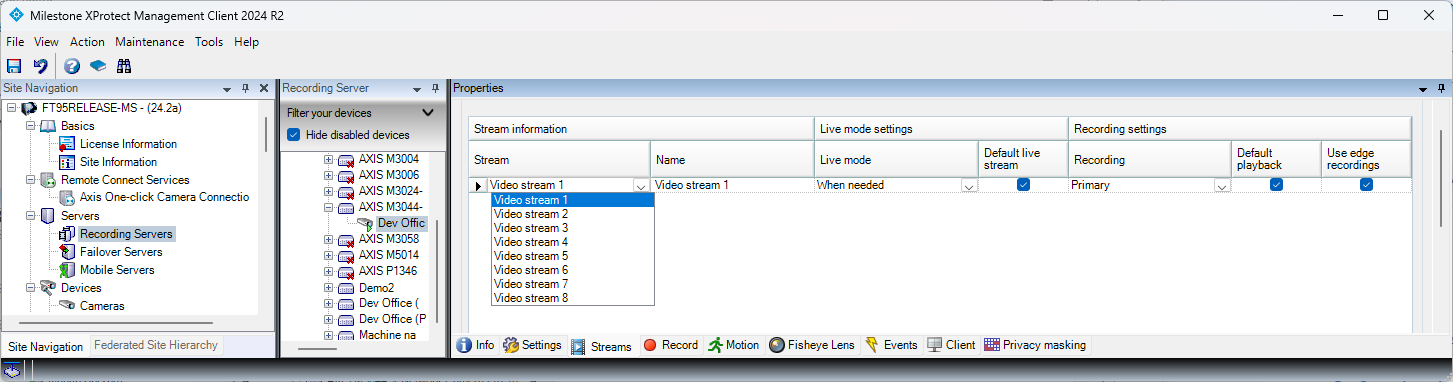
I’ve read the attached article, and from what I understand, I should be able to configure two streams for recording. Then, depending on the stream I’m using for live video, when I switch to playback, I should be able to use the same one. However, I assume that due to my license, I’m unable to set up two streams for recording. See the attached image.
So, I understand that I should use the edge storage option instead of adaptive streaming. My question, then, is: when I send a manual recording command from my application, or an event triggers the recording, will the camera start saving video to its SD card, while the recording server simultaneously stores low-quality video in its database? Then, if I create a button labeled “retrieve data,” would the HD video be saved in parallel with the low-quality video in the recording server database, and would the PlaybackController handle displaying the HD video to the operator? Is that correct?
I am curious what is the version you have and what product variant?
https://www.milestonesys.com/products/software/xprotect-comparison/
When you send a manual recording command you ask the recording server to record, this is not governing recording on the SD card (edge).
If the stream that the camera records internally is different compared to the stream the recording server records, then you can get another stream by doing a retrieval job (SC or MIP SDK). The playback would then after the retrieval use the retrieved data (SC camera view or MIP SDK ImageViewerWpfControl) .
You might find more information in this white paper. https://doc.milestonesys.com/latest/en-US/portal/htm/chapter-page-wp-edge-storage.htm
This functionality is not different in the MIP SDK compared to the Smart Client. You might get better help from the partners using the support community. https://supportcommunity.milestonesys.com
Hello,
Thanks for your answer. I have the Corporate version, and I am unable to set up two streams for recording. Anyway, I think we could create a workaround and use the rules. That is, if I generate a user event that triggers a rule to change the stream recording settings, this way, when the “Manual Recording HD” click event occurs, it would start recording in HD. When the high-quality recording stops, it could revert to the original settings. Do you think this solution could work? If so, how would you design it so that I can select which cameras to change the stream settings for? I would like to make all this transparent for the user, and for that, I could use the SDK or the APIs.
Thanks again.
Best regards,
Sergio Salmerón.
In the rules that you can make today in the Management Client (MC) you can change settings for a camera, this is corresponding to the settings tab in the MC. There is no functionality to change the active stream for a camera.
Using the Configuration API (REST API, Configurtaion API Soap, or MIP VideoOS.Platform.ConfigurationItems classes) you can change the stream for a camera (this is corresponding to the streams tab in the MC.).
Whether changing the stream in this way will always change the video streaming immediately and whether the streaming might be paused while the recording server makes changes is not something I am aware of, and to my knowledge hasn’t been tested. You can do the experiment and test this.
Best solution might be to develop a new rule action. With a new rule action the administrator of the XProtect VMS can create a rule to make the stream switch on whatever event or timing is needed.
There is a sample that implements a new rule action named BatAction..
https://doc.developer.milestonesys.com/html/index.html?base=samples/pluginsamples/bataction/readme.html&tree=tree_search.html?search=rule
Hello again, thank you very much for your response. We would like to test the topic you mentioned regarding the bat file, but we do not fully understand how to proceed. We came across this post: https://developer.milestonesys.com/s/question/0D53X000065liDfSAI/change-record-stream-on-motion-started. It explains that using the rule results in a one-second recording loss. It also mentions that they tried using the bat file and encountered the same issue. Could you assist us with this?
Also, is there any way of changing the record stream directly as stated in the forum that I mentioned in the Milestone client?
Changing the setting causes the stream to be stopped and a new stream from the camera to be initiated, if this causes a one-second recording loss it will do so no matter if you change the setting manually in the Management Client (MC), by a rule, or by a rule action that you have developed. It is base functionality that streams with cameras are opened and closed.
Did you test by changing settings manually?
Perhaps this is the question..
Please note that I do not suggest that you change setting by using a bat file or similar, my suggestion was to develop a rule action, that instead of executing a bat file changes camera settings.
This suggestion is only practical if you find that settings can be changed without causing an unacceptable recording pause, I find it likely that this is not possible to change the settings without causing a pause.
Note that XProtect Corporate does support two streams of recording, I must suspect you have an older version where this was not yet introduced.