Hello - I have a Bosch MIC IP dynamic 7000 HD Camera that responds to a PTZMoveHome SOAP command, but we do not get any response when we try to perform an absolute movement with a PTZMoveAbsolute command. Could this be an unsolved issue (see ref below)?

Could this be related to:

https://developer.milestonesys.com/s/question/0D50O00003cxo5kSAA/details-on-soap-recordercommandservice-method-ptzmovestart?t=1612779152771

The PTZArgs we use are the following:

{

‘movement’: {

‘name’: ‘pan’,

‘value’: -1},

‘speed’: {

‘name’: ‘pan’,

‘value’: 1},

‘Normalized’: False

}

For completeness - this the response from GetConfiguration server client command:

{

‘RecorderId’: ‘’,

‘HardwareId’: ‘’,

‘DeviceId’: ‘’,

‘Name’: ‘’,

‘Description’: None,

‘Shortcut’: None,

‘DeviceIndex’: 0,

‘GisPoint’: ‘POINT EMPTY’,

‘ShortName’: None,

‘Icon’: 0,

‘CoverageDirection’: 0.0,

‘CoverageDepth’: 0.0,

‘CoverageFieldOfView’: 0.0,

‘MaxFPS’: 0.0,

‘BrowsableStream’: False,

‘Streams’: {

‘StreamInfo’: [

{

‘StreamId’: ‘’,

‘Name’: ‘Video stream 1’,

‘Default’: True

}

]

},

‘Tracks’: {

‘TrackInfo’: [

{

‘TrackId’: ‘’,

‘Edge’: True

},

{

‘TrackId’: ‘’,

‘Edge’: False

}

]

},

‘CameraSecurity’: {

‘Live’: True,

‘Browse’: False,

‘ExportAvi’: False,

‘ExportJpeg’: False,

‘SmartSearch’: False,

‘GetSequences’: False,

‘ExportDatabase’: False,

‘StartRecording’: False,

‘StopRecording’: False,

‘PtzSecurity’: {

‘ManualControl’: True,

‘PresetControl’: True,

‘ReserveControl’: True

},

‘BookmarkView’: False,

‘BookmarkAdd’: False,

‘BookmarkEdit’: False,

‘BookmarkDelete’: False,

‘RetentionView’: False,

‘RetentionCreate’: False,

‘RetentionRemove’: False,

‘ManagePresets’: True,

‘ManagePatrollingProfiles’: True,

‘ManagePresetLocks’: True,

‘RetrieveEdgeRecordings’: False

},

‘PtzSettings’: {

‘PtzEnabled’: True,

‘Presets’: None,

‘Capabilities’: {

‘CapabilityInfo’: [

{

‘CapabilityId’: ‘’,

‘Name’: ‘pan’,

‘Absolute’: True,

‘Relative’: True,

‘Start’: True,

‘Stop’: True,

‘Speed’: True,

‘Automatic’: False

},

{

‘CapabilityId’: ‘’,

‘Name’: ‘tilt’,

‘Absolute’: True,

‘Relative’: True,

‘Start’: True,

‘Stop’: True,

‘Speed’: True,

‘Automatic’: False

},

{

‘CapabilityId’: ‘’,

‘Name’: ‘zoom’,

‘Absolute’: True,

‘Relative’: True,

‘Start’: True,

‘Stop’: True,

‘Speed’: True,

‘Automatic’: False

}

]

},

‘IsCenterOnPositionInViewSupported’: True,

‘IsPtzCenterAndZoomToRectangleSupported’: True,

‘IsPtzHomeSupported’: False,

‘IsPtzDiagonalSupported’: True,

‘EditPreset’: True

},

‘IpixSettings’: {

‘IpixEnabled’: False,

‘Hemisphere’: None,

‘Homeposition’: None,

‘CeilingMounted’: False

},

‘PanoramicLensSettings’: {

‘PanoramicLensEnabled’: False,

‘PanoramicLensType’: None,

‘CameraMount’: None,

‘ImmerVision’: None

},

‘MulticastEnabled’: False,

‘EdgeStorageSupported’: True,

‘EdgeStoragePlayback’: False,

‘StopManualRecordingSeconds’: 300

}
As far as I can find this camera is supported as a relative type PTZ. What this means is that the device is not capable of giving its absolute position to the XProtect Recording Server. Relative type PTZ will enable you to move the camera in direction and go to presets that are defined in the camera, this contrasts with absolute type PTZ, where the camera can give coordinates and go to coordinates. Coordinates does not work for relative positioning PTZ cameras.

https://www.milestonesys.com/community/business-partner-tools/supported-devices/supported-device/?deviceId=31236&platform=XPCO&backCloses=true

Hello - thanks for your reply. The link you shared is for the Bosch DINION series. However, I am dealing with the MIC IP dynamic 7000 HD series, which does support absolute PTZ according to the same documentation: https://www.milestonesys.com/community/business-partner-tools/supported-devices/supported-device/?deviceId=30553&platform=XPCO&backCloses=true.

This also corresponds with the return value from the GetConfiguration server api command:

{

‘CapabilityId’: ‘’,

‘Name’: ‘zoom’,

‘Absolute’: True,

‘Relative’: True,

‘Start’: True,

‘Stop’: True,

‘Speed’: True,

‘Automatic’: False

}

… (see full output in original post)

I also am able to retrieve the absolute position data with the PTZGetAbsolutePosition command.

Most importantly, I also tested the PTZMoveRelative command via SOAP, with the same result: no error message, but no reaction at the camera side.

I also want to mention clearly that we can perform PTZ movements for the same camera through the Bosch UI, so there is no malfunctioning on the camera side.

Thanks again for any pointers you might have!

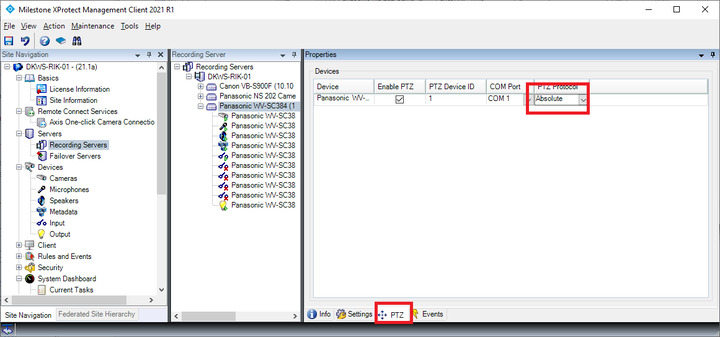
Let me clarify one thing, did you set up PTZ protocol setting to Absolute in Management Client?

Hi - our customer replied that apparently there is no option for Absolute PTZ protocol in their current version of the Management Client : 2018 R3 (we have no direct access to their Milestone services). An update is planned for next month. Nevertheless I consistently get ‘Absolute’: True when I query the camera capabilities through SOAP.

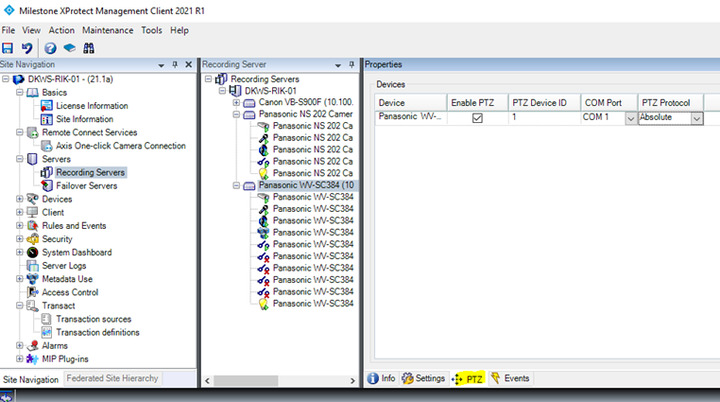
Can you please check if your hardware has PTZ tab when you click the hardware (see below picture)? If not, the camera is not configurable as to using relative or absolute positioning but it might yet be PTZ capable.

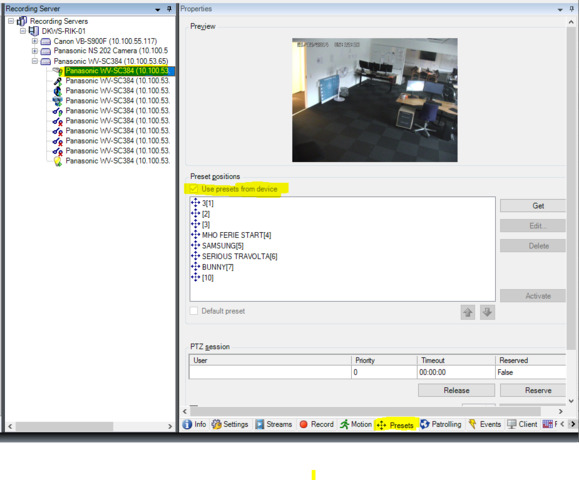
Next step, please check if you can check-on/off the check box texted “Use presets from device” when you click your camera and Presets tab (see below). If the checkbox is grayed out, then it means the camera is the Relative positioning kind. In that case, you cannot ask for and get absolute position. If you believe it is an error that your camera is of relative positioning and should be absolute positioning, please raise a support case or ask again in the support community.

https://supportcommunity.milestonesys.com

I forwarded this to our customer and awaiting their findings.

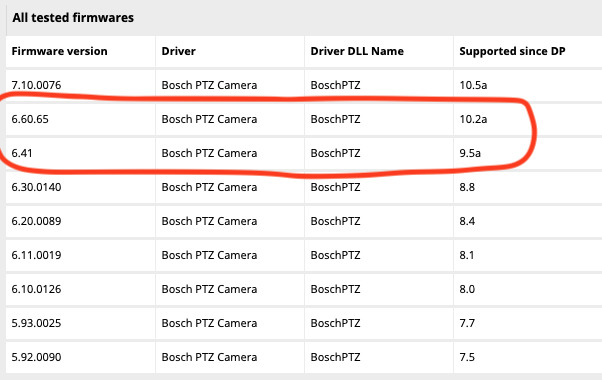
In the meantime, we have verified the firmware and driver versions and we are at version 6.44.00.20 for the camera and 11.3 for the driver pack - which should be ok according to your MIC IP dynamic 7000 HD series documentation (see below).

What also worries me is that, if the camera would indeed be of the Relative positioning type - wouldn’t that mean that I should be able to get a response with a PTZMoveRelative SOAP call? If yes, I don’t understand why I am also not getting a response from the camera when I issue a PTZMoveRelative command with the following ptzArgs:

{
     'movement': {
          'name': 'pan',
          'value': 1.0
     },
     'speed': {
          'name': 'pan',
          'value': 1.0
      },
      'Normalized': False
}

For the token and the deviceId arguments I’m using the same values that give me a successful camera response for a PTZMoveHove command, so unless there is something wrong with my ptzArgs, I don’t understand why that relative move command is also not working.

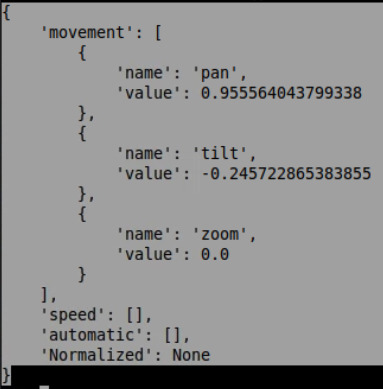
You also mention that if the camera is of the relative ptz kind, you cannot ask for the absolute position, however, I do get a valid response when I issue a PTZGetAbsolutePosition call:

PTZ and Presets sample is not a Protocol sample but a Standalone sample though, can you please try the sample if it is possible? It would be great if you could tell us if it works for you because we are very keen on it.

https://doc.developer.milestonesys.com/html/index.html?base=samples/ptzandpresets_sample.html&tree=tree_2.html