In our c# application I would like to check if the currently logged in user is a member of the administrator role. I can find the current serverId and sidIdentity of the current user. However I cannot get the roleId of the administrators group because I cannot find a simple way to retrieve role information from the server. I looked at the c# examples and they are overly complex for what I need to do. Is there a simple way to retrieve a collection of roles and their Id? Thank You.
You can actually be an administrator without being in the Administrators role.
Can you try to outline what elements it is you want to administrate? Maybe we can come up with a useful example if we know a little more.
Hi Bo and thanks for taking the time to respond to my question.
Basically I am working on a C# MVVM application that deals with milestone alarms. There are settings in the program that a user can change that are completely independent from milestone but we don’t want every user to be able to access them. What we would like to do is hide the settings button if the current user is not in the milestone administrators role. Maybe later we would make it a different role but right now we just specifically want something like this psuedo code.
If (currentUser.IsAdmin)
{
button.visibility = true;
}
else
{
button.visibility = false;
}
Thanks in advance for any suggestions!
When working with alarms please use the flags on the Security Settings for Alarms, this is the recommended way. This will ensure the right handling even in systems where there is administrators that can administrate sub-systems without belonging to the administrators role.
Thanks again for trying to help Bo. Could you elaborate on “please use the flags on the Security Settings for Alarms”? I don’t understand what that means or how it translates to code.
I have been consulting with Developer colleagues, I did not realize how hard it was what I was asking you to do. It actually involved some information that is not documented. Try this snippet of code:
private void testSecurityAccessForAlarms()
{
    Guid _alarmPluginId = new Guid("46BB0392-FD06-465B-8776-B90AC16639B3");

    try
    {
        VideoOS.Platform.Util.SecurityAccess.CheckPermission(_alarmPluginId, "GENERIC_WRITE");
        // Allowed
        MessageBox.Show("Test success");
    }
    catch
    {
        // Not allowed!
        MessageBox.Show("Test failure");
    }
}
What you have achieved with this code is to a valid check even in big Corporate installation with differentiated admin rights. To illustrate let me show you this screen capture from the Management Client..
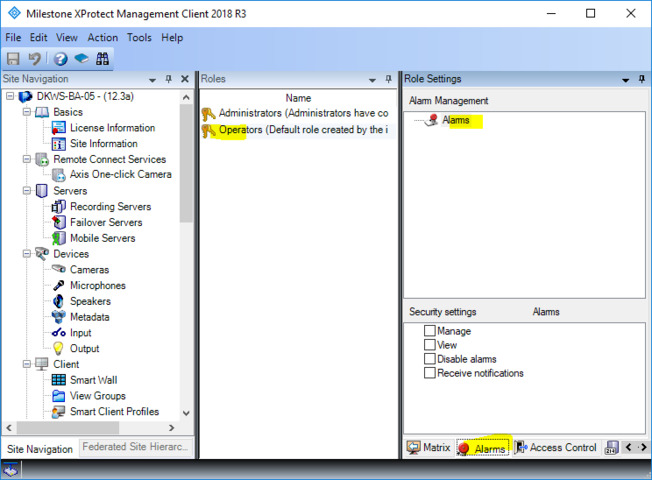
The four options correspond with 4 actions (strings):
Available actions:
GENERIC_DISABLE
GENERIC_NOTIFY
GENERIC_READ
GENERIC_WRITE
I believe this is now the complete and the useful answer. I am sorry because my previous answer might have been correct but not useful.
PS. I will try to put on the wish-list with Development to make better documentation for this
I think this should solve my problem. I do have one more follow up question if it’s not too much trouble. You use a hard coded GUID to identify the AlarmPluginId. Is there a list somewhere of useful GUID strings like this one? Maybe for instance in the future we would want to check for permissions in a similar way but for a different function like managing users or devices and we could just use a different GUID. Thanks again for the expert help!
This is what I mean when I say there was something lacking in the documentation. This is what I mean could be improved in future documentation.
I used a AllPluginDefinitions property in the Smart Client, unfortunately this also returns Ids that are not relevant in this context.
Hi Bo,
Your method works but we would like to check for a different permission. I still don’t know how to get the GUIDs on my own. Maybe you could help. We would like to check for Alarm, Full Control, Allow as seen in the screenshot below. Thanks.
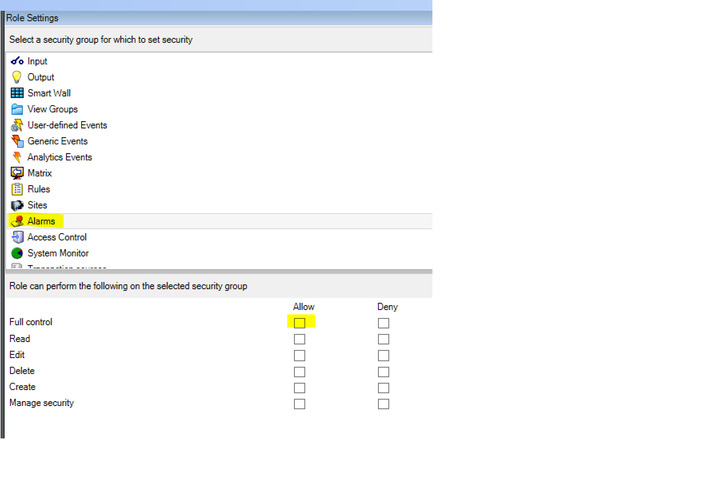
“Full control” is not one permission. “Full control” is a shortcut implemented in the management client which in one go sets the four permissions I mentioned above.
Okay thanks. Unfortunatly the GUID you gave me above won’t fullfil our requirement so I’m trying to chose another one but I don’t know how to get them on my own. Would you be able to help me get the GUID for “Management Server” "Manage security"

Or if you could help me find the GUIDs on my own I wouldn’t need to keep bothering you. Thanks again for all of your help.
Use the Config API Client sample, navigate to the right objects, use a breakpoint in the sample code and get the GUID etc. in that way.
Okay I’m going to make one more attempt at this. I did as you suggested and put a breakpoint at line 41 in MethodInvokeForm.cs within the ComponentSamples example. I naviated to the alarms settings and got the GUID “9807ca8a-1111-2222-3333-6423dae2cd88” and value “ADMIN_SECURITY”. I updated my code to this
private void CheckIfAdmin()
        {
            Guid _alarmPluginId = new Guid("9807ca8a-1111-2222-3333-6423dae2cd88");

            try
            {
                VideoOS.Platform.Util.SecurityAccess.CheckPermission(_alarmPluginId, "ADMIN_SECURITY");
                // Allowed
                _isAdmin = true;
            }
            catch
            {
                // Not allowed!
                _isAdmin = false;
            }
        }
I then made sure to add the permission in my most recent screenshot to the user account. However the check still fails. I don’t understand what I’m doing wrong. My initial question might be easier to answer. Given a username and a groupname how difficult would it be to see if the user is a member of the group.
Thanks.
I have from the Config API Client dialog the GUID
- [0] {VideoOS.ConfigurationAPI.ValueTypeInfo} VideoOS.ConfigurationAPI.ValueTypeInfo
  Name   "Management Server"   string

  TranslationId   "PropertySecurityNamespaceManagementServer"   string

  Value   "e9914e39-a67a-496c-a3c1-5b4aaab28f15"   string
Please try this one instead.
No that did not work either. With the attached code and attached permissions it still fails.
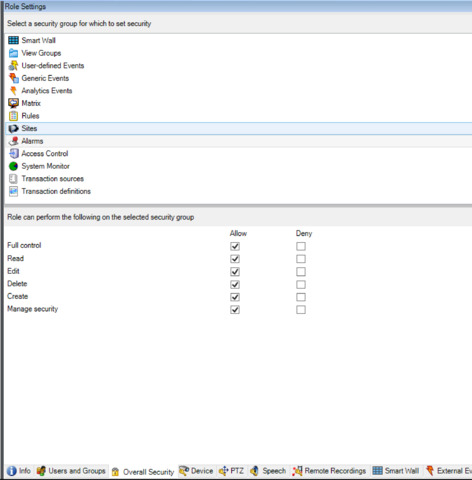
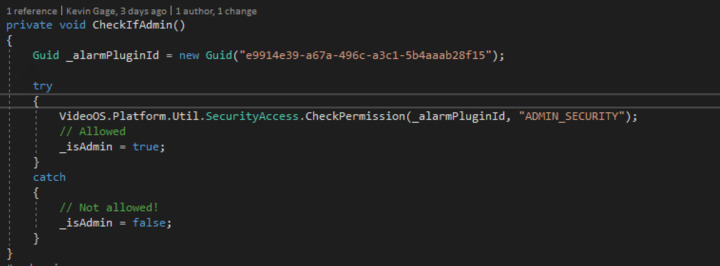
It seems to me there should be an easier way to check for permissions via the API.
The screen capture from the Management Client is pointing to something different than the earlier one. I wonder if we have a mix-up?
Also I do not understand how checking for access to write alarms was not right, can you tell me what you try to accomplish?
Sorry the most recent screenshot was a mistake. I tried Management Server, Manage Security but it’s always returning false.
What we want to accomplish is checking if a given user of our application has a given permission in milestone. All users of our application require Alarms Manage, View, and Receive notifications so we can’t use those values.
My original thought, and still my prefered method, would be to see if the currently logged in milestone user is a member of a particular group name. Then we could create a group, let’s say “TestAdmins”, and only members of that group would have access to a particular part of our application.
Thanks.
Sorry, you wrote..
What we want to accomplish is checking if a given user of our application has a given permission in milestone. All users of our application require Alarms Manage, View, and Receive notifications so we can’t use those values.
Why can’t you? Seems you say those are the required permissions and then (in my mind) it follows that it would be perfect to test those.
I probably have misunderstood, please bare with me and explain..
There will be two types of users for our application. Standard users and power users. We need to differentiate between the two. All users of the program need Alarms Manage, View, and Receive Notifications. We need to check for something that differenciates the power users so we can display some information to only them.