Here I read:
  public override Rectangle[] Rectangles
        {
            get { return new Rectangle[] { new Rectangle(000, 000, 999, 499), new Rectangle(000, 499, 499, 499), new Rectangle(499, 499, 499, 499) }; }
            set { }
        }

        public override Guid Id
        {
            get { return MIPPlugin1Definition.MIPPlugin1ViewLayoutId; }
            set { }
        }

        public override string DisplayName
        {
            get { return "MIPPlugin1"; }
            set { }
        }
If I want other 2 view… how I need to modify this class? 
I want display name “2 + 2”, “3 + 3”, “4+4”.. please help me.. Thanks
You would create multiple classes inheriting the ViewLayout class.
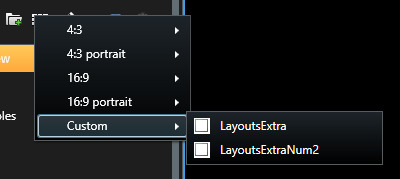
To explain further I am taking a concrete example. I create a new plugin (I call it LayoutsExtra) using the plugin template. This plugin already have a ViewLayout class, I create a copy of the class and now I have LayoutsExtraViewLayout.cs and LayoutsExtraViewLayout2.cs, in the second class I change the DisplayName (can later change rectangles etc.)
So now I have two ViewLayout classes and then I need to change the PluginDefinition.
The two layouts should have different Ids, so I have the code:
internal static Guid LayoutsExtraViewLayoutId = new Guid("f9a689af-1b0c-49ba-9c5f-fd782fa450c3");
internal static Guid LayoutsExtraViewLayoutId2 = new Guid("39396F7A-29C7-48E9-8103-0E4CB3D65F72");
(The first line was made by the template the next by me.)
Now I go back to LayoutsExtraViewLayout2 and make sure it uses the new id:
public override Guid Id
{
   get { return LayoutsExtraDefinition.LayoutsExtraViewLayoutId2; }
   set { }
}
Now the final task is to signal that there are two layouts so I change:
private List<ViewLayout> _viewLayouts = new List<ViewLayout> { new LayoutsExtraViewLayout(), new LayoutsExtraViewLayout2() };
Build and test, I am done.
Note that this shows how to create view layouts available when your plugin is present. Depending on the scenario you might instead want to create layouts that are present for all Smart Clients, even those not using your plugin, this is possible and for this option please explore this sample: https://doc.developer.milestonesys.com/html/index.html?base=samples/componentsamples/addlayout/readme.html&tree=tree_2.html
You are my Number One :)))
Thanks is all ok