High Memory usage when using video playback - using MIPS SDK 2016

Hi,

I am from Gallagher and we have Command Centre product which can show video feeds. For our product we have written a Milestone video integration using Milestone MIPS SDK 2016.

Our integration references dll files from the MIPS 2016 SDK and includes these files with our product installer. For our testing we are using Milestone server XProtect 2018.

Our application mostly works good when playing a Live video, however we have seen gradual increase in memory usage when using video playback, which eventually leads to a application crash.

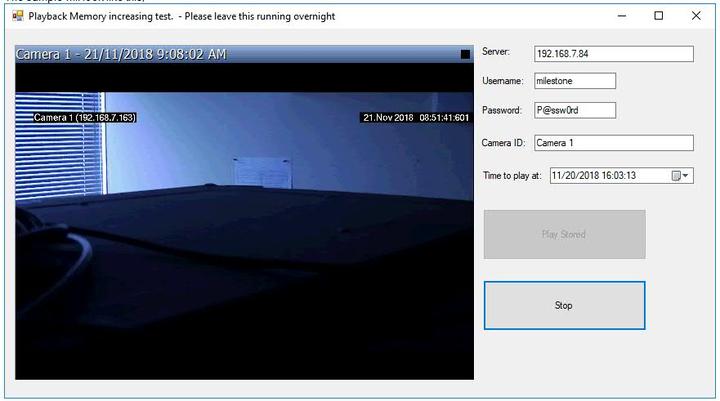
I have written a sample application which could easily re-produce this problem by leaving it running overnight.

If we leave the application running overnight playing video playback then after few hours you would see a sudden increase in memory and it keeps growing.

Milestone SDK kept throwing the same type of exception while the memory usage was increasing.

The Exception is,

SendMessageSendMessage ()Object reference not set to an instance of an object. at VideoOS.Platform.Client.TimeLineUserControl.DisplayLine()

at VideoOS.Platform.Client.TimeLineUserControl.SetShowTimePrivate(DateTime newCenter)

at VideoOS.Platform.Client.TimeLineUserControl.SetShowTime(DateTime newCenter)

at VideoOS.Platform.Client.PlaybackUserControlMini.TimeChangedHandler(Message message, FQID dest, FQID sender)

at VideoOS.Platform.SDK.Platform.SDKEnvironmentManager.ExecuteMessage(Message message, FQID destination, FQID sender, String logMessage)

MIP: Error: SendMessage ():Exception source: VideoOS.Platform

Exception type: System.NullReferenceException

Exception message: Object reference not set to an instance of an object.

Exception target site: DisplayLine

at VideoOS.Platform.Client.TimeLineUserControl.DisplayLine()

at VideoOS.Platform.Client.TimeLineUserControl.SetShowTimePrivate(DateTime newCenter)

at VideoOS.Platform.Client.TimeLineUserControl.SetShowTime(DateTime newCenter)

at VideoOS.Platform.Client.PlaybackUserControlMini.TimeChangedHandler(Message message, FQID dest, FQID sender)

at VideoOS.Platform.SDK.Platform.SDKEnvironmentManager.ExecuteMessage(Message message, FQID destination, FQID sender, String logMessage)

The sample will look like this,
The Memory usage graph captured by us:

I have attached the MilesteonTest.zip - Sample Application which is a Dot Net WinForm application and written using Visual Studio 2017. Its zipped size is 51MB as it includes MIPS 2016.

Please note that we have tried using latest MIPS 2018 SDK - but we ran into more performance issues - hence discarded that idea.

Can you please have a look here and show some light on this playback memory issue?

Please let me know if you need more information.

Thanks

Sandeep Sharma

 c

This area of playback has been the subject of change, bug fixing and otherwise. Please use the newest MIP SDK, currently this is 2018R3.

If you see issues with performance please start a question on this and report these issues.

Hi Bo Andersen, Thanks for the update.

Bit of background - This issue has been reported by a customer (common customer for Gallagher and Milestone) and its in the released Gallagher Command Centre product, which is also used by many other customers. Its not easily possible to simply try new SDK and provide fix. The SDK is bundled with our product. We have tried dynamically loading the SDK but looks like its not possible as advised here: https://developer.milestonesys.com/s/question/0D50O00004QcP3DSAV/how-to-dynamically-load-sdk-from-milestone-bin-folder?t=1527719547366

Also, as I said we have tried 2018 SDK and found other stability and performance issues. Investigating those issues will take even longer. We will try new SDK for our current future version of integration.

Is it possible for you to suggest what we can do to improve performance in 2016 SDK? May be there is something which we can do on our side to improve it or May be needs a fix in Milestone SDK? You may use Sample application to see the issue.

Many thanks.

Sandeep

@Rob Hughes@Pascale Howell

You need to change to the new MIP SDK, rebuild and include the new set of dependent files. If you see an issue you should tell about it.

The key here is that if there is anything that needs fixing here it will be fixed in the new MIP SDK, there will never be fixes for old MIP SDKs.

Hi Bo Andersen, we are back on this job and tried using latest 2019 R1 SDK in our Gallagher integration and seeing the same memory leak issue. We are using XProtect 2019 server to test with.

You may use the previously supplied sample application and update/compile it with latest SDK to reproduce the issue.

Can you please let me know when you get chance to reproduce the issue or if you need any information from my side?

Thanks Sandeep

I have your app running now. I have built it with, and included the dependent files from, MIP SDK 2019R1. Will let it run overnight..

I have it running more than 40 hours, no memory increase.

In your first graph it seemed that it was flat and then something happened. Do you have any indication that it might happen on some incident? Ideas could be communication errors on the camera or some error incident in the server. If you have any idea of a trigger for this issue it would be valuable.

Thanks for trying it out.

We are trying 2019 R1 SDK and issue happens when you do playback. We noticed that this issue happens on our Windows Server 2016 machine, but not on Windows 10 machine (hence could be related to .Net framework version).

From .net profiler it looked like Milesone SDK maintains an internal cache of sequence data when we playback videos and that cache builds up without objects being garbage collected, however this didn’t happen on W10 PC).

There were no visible communication errors.

Let me check again and I will get back to you with more info.

We have easter holiday coming so may take some time to collect more data.

Thanks