I already have Xprotect 2017 R1 and installed MIP SDK 2019 and got an error version from the VideoOS.Platform.DLL, So please I need to download the MIP SDK 2017 R1 or any compatible version from MIP SDK working with Xprotect 2017 R1.
Always use the newest MIP SDK..
Dear Team,
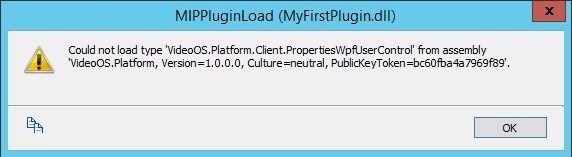
I already Installed the MIP SDK 2019 and got the following error message in Xprotect 2017 R1
[cid:image001.png@01D51486.7FE38CD0]
I checked the Version of the VideoOS.Platform in MIP SDK 2019 it is: 13.1.32.1
[cid:image003.png@01D51487.4A2B7480]
If you have any suggestion to solve this problem please feed me back with it.
Best Regards,
Ayman Eldyasty
Senior Technical Analyst
CÆLUM Middle East LLC
A company of the G2K Group
20 Wezaret Al Zeraa Street
Rageh Tower, Dokki, Giza, Egypt
Tel: +20 22 7370 588
Fax: +20 22 7370 588
Mob: +20 1066108119
Email: ayman.eldyasty@g2k-group.commailto:[ayman.eldyasty@g2k-group.com](mailto:ayman.eldyasty@g2k-group.com)\
Website: www.g2k-group.com<http://www.g2k-group.com/>
I cannot see the error, please try again to document the error or upload the pictures again..
Error Message : Could not load type ‘videoOS.Platform.Client.PropertiesWpfUserControl’ from assembly ‘videoOS.Pltform,Version=1.0.0.0,Culture=neutral,publicKeyToken=bc60fba4a796f89’
This Error message appears when open the XProtect Management Client 2017 R1


You must either have an older VideoOS.Platform.dll in the XProtect Management Client 2017 R1 install folder, or something very unusual in the source code for this plugin. Please start by double-checking that the “[C:\Program](file:C:/Program) Files\Milestone\XProtect Management Client\VideoOS.Platform.dll” is replaced with the newer one from your MIP SDK 2019R1.
PS. I recommend also - https://developer.milestonesys.com/s/article/debugging-techniques-for-Management-Client-plugins