I am attempting to enhance a Milestone Smart Client by embedding an interactive web page within it using the MIP Plugin Template. However, the current implementation utilizes ViewAndLayoutItem.HTMLBuiltinId, which confines me to an outdated browser version, preventing the loading of contemporary web pages. I seek detailed instructions on integrating the WebView2 control into the MIP Plugin Template to replace the existing web viewing mechanism. This integration should allow the Smart Client to display modern, dynamic web content using WebView2 with interoperability between Webview2 and SmartClient
I cannot guide you when it comes to WebView2. I am wondering if there might be inspiration or ideas by having a quick glance at the source code for a browser plugin that uses something else.. If it might be interesting you can find such an example here.. https://developer.milestonesys.com/s/article/alternative-browser-plugins-for-the-XProtect-Smart-Client-howto
If other have used WebView2 for a plugin I hope they will post here and share their experience..
Thank you so much for suggesting this way, seems there is an error executing the script they have provided.
The command “%SystemRoot%\sysnative\WindowsPowerShell\v1.0\powershell.exe -NoProfile -File [D:\ModernBrowserRAR\ModernBrowser-1.0.1\ModernBrowser-1.0.1\ModernBrowser\Scripts\debug.ps1](file:D:/ModernBrowserRAR/ModernBrowser-1.0.1/ModernBrowser-1.0.1/ModernBrowser/Scripts/debug.ps1) “[D:\ModernBrowserRAR\ModernBrowser-1.0.1\ModernBrowser-1.0.1\ModernBrowser\bin\Release\](file:D:/ModernBrowserRAR/ModernBrowser-1.0.1/ModernBrowser-1.0.1/ModernBrowser/bin/Release/)”” exited with code 3. ModernBrowser
do you have any suggestions on how to get this modern browser plugin to run and integrate it with Smart Client, I hope that this should build and get a plugin.def and dll file so that I can paste it on my plugins folder for milestone
I do not recommend using the unmaintained ModernBrowser plugin even if it might still work - it has a VERY old and vulnerable version of Chromium in it. I leave the repository online only as a reference for how you might approach building your own browser plugin, but it has not been kept up to date with either the Milestone SDK or browser/CefSharp package updates.
If I could help you with that particular error I would, but I don’t know where that comes from as I don’t recall doing anything with powershell with that plugin, and I don’t recognize the “Rar” suffix on “ModernBrowserRar”. As I recall, I packaged the plugin into an installer executable/MSI using an application called InnoSetup and it effectively just extracts the DLLs and embedded chrome browser and plugin.def file to [C:\Program](file:C:/Program) Files\Milestone\MIPPlugins\ModernBrowser\
We’re unable to support you with the use of that plugin, but if it inspires MIP SDK related questions in pursuit of building your own plugin we can help answer those.
Thank you so much Josh,
It’s the place where I have downloaded the ModernBrowser source code and the setup.msi
coming back to my main concern here,
I am trying to load a website inside my MIPPlugin1WorkSpacePlugin,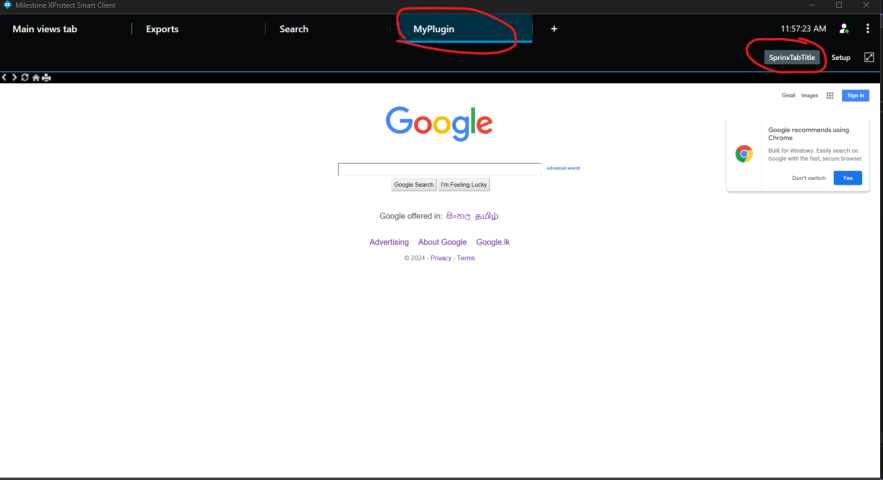
So here, I’m using its built-in methods to display the website as follows
public override void Init()
{
LoadProperties(true);
List rectangles = new List();
rectangles.Add(new Rectangle(000, 000, 1000, 800));
ViewAndLayoutItem.Layout = rectangles.ToArray();
ViewAndLayoutItem.Name = Name;
Dictionary<String, String> properties2 = new Dictionary<string, string>();
properties2.Add(“URL”, “https://google.com”);
properties2.Add(“Addscript”, “true”);
properties2.Add(“HideNavigationBar”, “false”);
ViewAndLayoutItem.InsertBuiltinViewItem(0, ViewAndLayoutItem.HTMLBuiltinId, properties2);
}
What I want to do is define a new “MyWebView.xaml” and “MyWebView.xaml,cs” which contains a webview2, and put it into my workstation plugin so that I can view contents in MyWebView.xaml
so far I tried I couldn’t override the properties to load this new xaml. Can you help me with an approach for this? whether its possible or not with MIP SDK
I might have misunderstood your original post.
If you already have a WebView2 ViewItem and need to populate the view you replace InsertBuiltinItem with InsertViewItemPlugin. Some of the plugin samples uses this.