I have changed camera’s HTTP port to a custom port and changed the schema to HTTPS, I need to send direct request to the camera via HTTP from the plugin.
Could you please provide guidance on how to obtain the HTTP port number and schema from the camera?
I attempted to use the VideoOS.Platform.ConfigurationItems.Hardware.Address
property, but it doesn’t seem to be functioning as expected.
VideoOS.Platform.ConfigurationItems.Hardware.Address should always be the address the Recording Server uses to communicate with the camera hardware. If this is wrong I would expect communication errors and no video or data getting through.
The recommendation from Milestone is very strongly that you never communicate with the device directly.
Most camera drivers / camera devices support that you use VideoOS.Platform.Messaging.MessageId.Control.DriverCommand and VideoOS.Platform.Messaging.MessageId.Control.DriverResponse to communicate with the camera going through the recording server.
Under the “Management Client → Recording Servers → Hardware → Info → Address”, it shows correct.
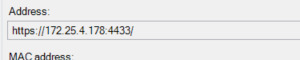
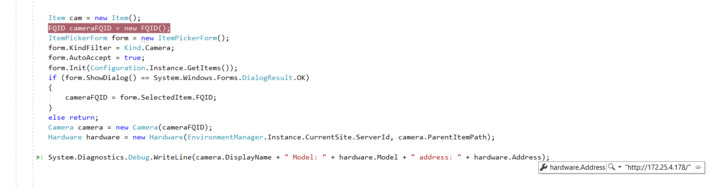
while on “VideoOS.Platform.ConfigurationItems.Hardware.Address”, it is returning “http://172.25.4.178/”
can you please guide me how to get correct value which is “https://172.25.4.178:4433/”
I cannot reproduce. Works fine for me.
Have you restarted the MIP SDK based application after doing the camera configuration?
What product and version is the XProtect VMS? What version of the MIP SDK NuGets are you using when building?
Could you please provide your sample code?
Yes, I have restarted application.
MIP SDK version : 20.3.0 - 2020 R3
XProtect Version : 22.3.67.3 - 2022 R3 Build 67
Please try the newest MIP SDK NuGet..
Updated MIP SDK version to : v23.2.1
but no change in the result.
This was my test method.
private void HardwareProperties()
{
	Item cam = new Item();
	FQID cameraFQID = new FQID();
	ItemPickerForm form = new ItemPickerForm();
	form.KindFilter = Kind.Camera;
	form.AutoAccept = true;
	form.Init(Configuration.Instance.GetItems());
	if (form.ShowDialog() == DialogResult.OK)
	{
		cameraFQID = form.SelectedItem.FQID;
	}
	else return;
	Camera camera = new Camera(cameraFQID);
	Hardware hardware = new Hardware(EnvironmentManager.Instance.CurrentSite.ServerId, camera.ParentItemPath);
	label1.Text = camera.DisplayName + " Model: " + hardware.Model + " address: " + hardware.Address;
	label1.Text += Environment.NewLine;
}
From Code:
From Management Client-> Recording Server → Hardware → Info Recording Server → Hardware → Info" src=“./images/05T3X00002tZyvc.jpg” style=“height: auto; max-width: 100%; max-height: 360px;” data-fileid=“0693X00000sVjSLQA0” title=“Management Client → Recording Server → Hardware → Info”>
The only explanation I can think of is that you actually have two devices on the same IP but different ports, this might be a long shot but please double-check.
Also a long shot, if you use the Config API Client sample instead, do you get the same result? (Uses a different method, we do not expect the result to be different, but please check.)
Is this a one server installation with Management Server and Recording Server in same PC, or is this a larger installation with one or multiple recording servers in separate physical servers? If more than one server please describe the setup and network topology.
What is the camera device (make, model, firmware version)? What driver is used according to the Management Client?
Thank you for the replay,
There is only a single device in network with that IP.
Installation in on a single PC.
Hello, I’m working with Parth. As he said, it doesn’t provide the port number.
Model : Hanwha Techwin PND-A9081RV
Driver : Hanwha Techwin
Frimware version : 2.21.13_20230414_R782
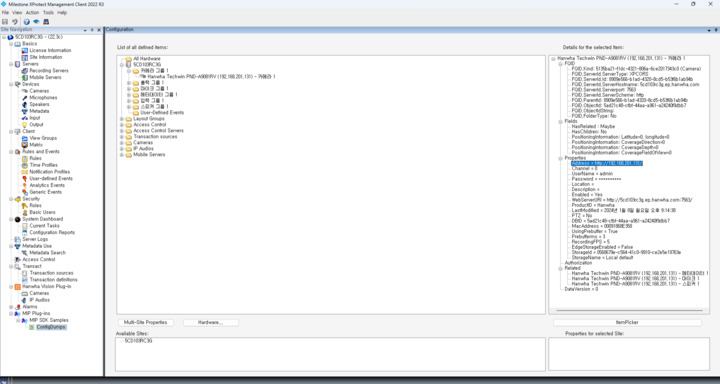
I have checked it using the ConfigDump project. Here is the image providing address without the port.
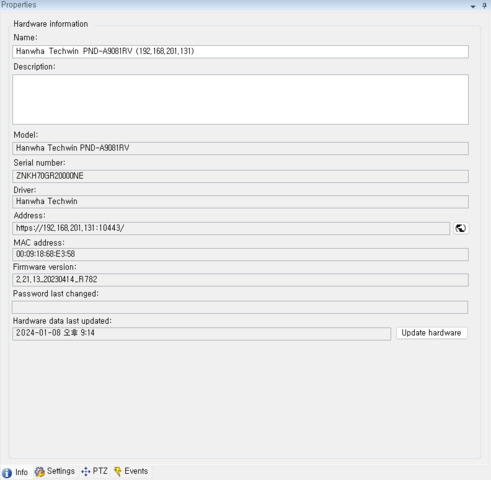
However, Hardware properties tab shows the address with the port number.
The Config API Client sample provides the port number within the “Address”. However, in the case where a camera’s connection scheme is https, it doesn’t provide a proper value in the “Address” as it does with the http scheme.
![when.https]() On the other hand, the Management Client shows the port value with the Address.
On the other hand, the Management Client shows the port value with the Address.
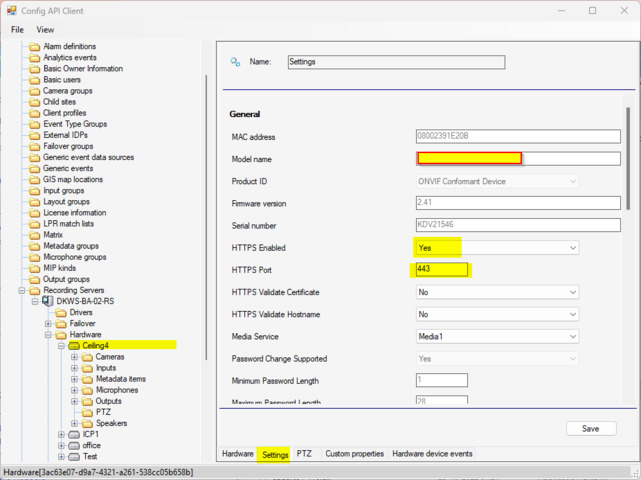
Having looked up the Config API Client sample, I found the httpS port value in the Setting tab. Do I have to handle the “Address” value differently based on its scheme?
I was finally able to figure this one out. (At first I tested with a driver framework based driver and that one is different compared to all the regular drivers from the device pack.)
What you get is the base address of the hardware. If the property HttpSEnabled exists in the general settings of this hardware and has the value Yes, the address should be modified to use HTTPS and the port defined in the property named HttpSPort under general settings. (The Management Client does this behind the scenes.)
New test code.
private void HardwareProperties()
{
	FQID cameraFQID = new FQID();
	ItemPickerForm form = new ItemPickerForm();
	form.KindFilter = Kind.Camera;
	form.AutoAccept = true;
	form.Init(Configuration.Instance.GetItems());
	if (form.ShowDialog() == DialogResult.OK)
	{
		cameraFQID = form.SelectedItem.FQID;
	}
	else return;

	Camera camera = new VideoOS.Platform.ConfigurationItems.Camera(cameraFQID);
	Hardware hardware = new Hardware(cameraFQID.ServerId, camera.ParentItemPath);
	string address = hardware.Address; // might be modified later
	HardwareDriverSettingsChildItem hardwareDriverSettingsChildItem = hardware.HardwareDriverSettingsFolder.HardwareDriverSettings.FirstOrDefault().HardwareDriverSettingsChildItems.FirstOrDefault();
	ICollection<string> propertyKeys = hardwareDriverSettingsChildItem.GetPropertyKeys();
	if (propertyKeys.Contains("HttpSEnabled"))
	{
		string httpSEnabled = hardwareDriverSettingsChildItem.GetProperty("HttpSEnabled");
		string httpSPort = hardwareDriverSettingsChildItem.GetProperty("HttpSPort");
		if (httpSEnabled == "Yes")
		{
			UriBuilder uriBuilder = new UriBuilder(address);
			uriBuilder.Scheme = "https";
			uriBuilder.Port = int.Parse(httpSPort);
			address = uriBuilder.ToString();
		}
	}
	Debug.WriteLine(camera.DisplayName + " address: " + address);
}
 Thank you for supporting