How can to know the camera's status via Protocol Integration

I get the camera list via protocol integration like below

GET /systeminfo.xml?suppress-slave-info=yes HTTP/1.1
Authorization: Basic YWRtaW4dfdfdf4xMjM=
Host: 10.250.46.235:7080

and the response data like below

<cameras>
            <camera cameraid="......... 12">
               <guid>3F449824-2508-4815-879B-92F21AEAD631</guid>
               <mparam>DFC1141537B86D5901F0A3B812EF8241FF9A211C41BF2C84DC66F763E136FB1CDD14F31E423166C508EB1A1E698578CECC99748DD056A18F</mparam>
               <ipix>
                  <enabled>no</enabled>
               </ipix>
               <panoramiclens>
                  <enabled>no</enabled>
               </panoramiclens>
               <ptz>
                  <editpreset>yes</editpreset>
                  <pan>absolute</pan>
                  <tilt>absolute</tilt>
                  <zoom>absolute</zoom>
                  <ptzcenter>yes</ptzcenter>
                  <ptzscalezoom>yes</ptzscalezoom>
                  <ptzrectangle>yes</ptzrectangle>
                  <ptzjoystick>yes</ptzjoystick>
               </ptz>
               <browsable>
                  <streamable>no</streamable>
               </browsable>
               <presets />
               <outputs />
               <events />
               <shortcut />
               <userrights>
                  <aviexport>yes</aviexport>
                  <jpegexport>yes</jpegexport>
                  <databaseexport>yes</databaseexport>
                  <live>yes</live>
                  <browse>yes</browse>
                  <ptz>yes</ptz>
                  <managepresets>yes</managepresets>
                  <outputs>yes</outputs>
                  <presets>yes</presets>
                  <events>yes</events>
                  <smartsearch>yes</smartsearch>
                  <sequences>yes</sequences>
                  <startrecording>yes</startrecording>
               </userrights>
               <hostname>10.250.46.235</hostname>
               <port>7080</port>
               <connectparam />
               <DeviceState>1</DeviceState>
            </camera>
            <camera

I think maybe the DeviceState is the camera’s status.

so.. I plug-out the network cable from that camera → and try again

But.. the response is same

How to know the camera’s status using the protocol integration?

p.s

If I already connect the event server then I can know the change of camera’s status using GetSessionAlarmLines
The systeminfo.xml is, as you discovered, static configuration information.

In the underlying protocols there is two differenct protocols in use when it comes to status.

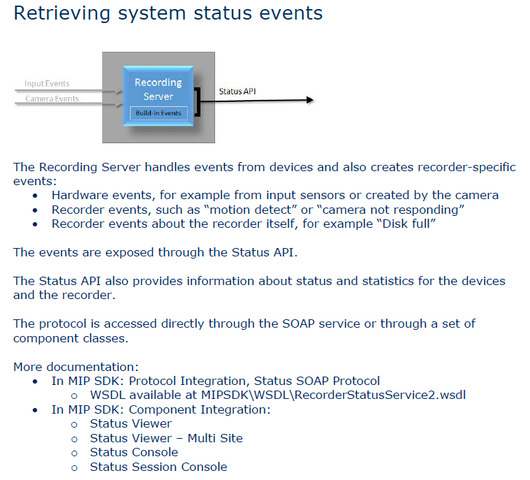
In XProtect Corporate and Expert it is the Status SOAP Protocol. Samples:

  • Status Console
  • Status Session Console
  • System Status Client Console

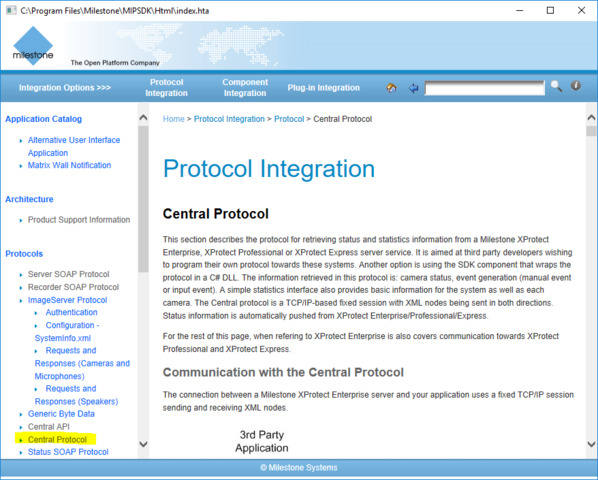
In XProtect Enterprise, Professional and Express it is the Central API. Sample:

  • Central Sample

OK…

But, I need more information.

Case like below

Registed Camera: A, B
A Camera's Connectivity: Connected
B Camera's Connectivity: Disconnected
 
and the B Camera maybe does not connect forever

In this case,

If I using the GetSessionAlarmLines… But the B Camera’s status does not change… So I cannot know the B camara status was disconnected

Maybe after B cameras connect status is change then I can know.

So.

First Access to the VMS Server → and How to know the currently camera’s status before change the status

But, I do the protocol interface using java.

Assuming you have XProtect Enterprise, Professional, Express. When I run the Central Sample I get initial status.

As you metioned.. the Central Sample is ComponentSamples.

and the program using the 22333 port.

But, I want know the guide using protocol integration (HTTP SOAP base)

How to know the currently camera’s status before change the status via protocol integration?

Is it possible using protocol integration?

If it possible then please give the protocol sample

The Central Sample is using a generated proxy but it could have used the Central API/Protocol directly. The Central Protocol is documented in the MIP Documentation.

I already find the MIP Document.

and Search about the “cental protocol”

But, I cannot find the central protocol’s SOAP message format anywhere.

Why does not announe the SOAP message format?

Can you share the SOAP message format?

It’s hard to integrated via protocol integration.

Because I’m using the linux machine

and already integrated with ohter VMS systems

and using the Java Program

and send the SOAP message using java HttpClient class

So, I cannot using the VideoOS.Platform.SDK.Proxy.Central.xxxxxxx

Please share to me the SOAP message format

Central is an XML based protocol but is not SOAP.

I was wrong when I said “generated” proxy, the sample uses th XML..

See this documentation

So.. If I want to know the camera’s status → using the central protocol

1. connect to the recording server

2. send to the XML data for XMLSignIn

3. send to the XML data for Request Statistics ?

4. parsing ths Server Service Responds with Statistics

-> Then I will find the current camera's status

Is it right?

Is there no other way?

using the Image Server, Event Server.. no way?

I try to using the CentralDemo project

using the VS 2015 → and compile is done → excute

Then… the program terminated by error

처리되지 않은 'System.BadImageFormatException' 형식의 예외가 알 수 없는 모듈에서 발생했습니다.
 
추가 정보: 파일이나 어셈블리 'VideoOS.Platform.SDK.UI, Version=4.0.0.0, Culture=neutral, PublicKeyToken=bc60fba4a7969f89' 또는 여기에 종속되어 있는 파일이나 어셈블리 중 하나를 로드할 수 없습니다. 프로그램을 잘못된 형식으로 로드하려고 했습니다.

What’s wrong?

I try to socket communication with recording server

but, after the send the message like below

<?xml version="1.0" encoding="UTF-8"?>
<milestoneSurveillance protocolVersion="2.0">
   <command token="1">
      <base>XMLSignIn</base>
      <action>
         <commandName>Sign In</commandName>
         <destinations>
            <object>
               <classification>UserLoginManager</classification>
               <id>701</id>
            </object>
         </destinations>
      </action>
      <parameter>
         <login>
            <user>administrator</user>
            <pass>1234</pass>
         </login>
      </parameter>
   </command>
</milestoneSurveillance>

the server close the connection.

What’s wrong?

===========================

and I found the another document (MilestoneMIPSDK_IntegrationDecisionGuide_EventsAndAnalytics_en-US.pdf)

Then.. the document say about the “Status SOAP Protocol”

So..

1. Why the recording server close connection?

How to integrate?

2. What’s the Recording server’s Status SOAP Protocol?

How to use it?

In XProtect Enterprise, Professional and Express you have a Central protocol. In XProtect Corporate and Expert you do not have this protocol, you have instead another protocol with an equivalent role; the Status SOAP Protocol.

I wonder if I mistakenly have concluded wrong about what system you use..(?)

What is your XProtect VMS?

I download the xprotect essential
https://www.milestonesys.com/solutions/platform/try-our-software/xprotect-free-download/

and using the 1 year license file.

in the future i will buy commercial version.
and our customer will buy any type of version

XProtect Essential is the same family as XProtect Enterprise, Professional and Express but has no support for integration via MIP SDK.

For more information on the versions - https://www.milestonesys.com/globalassets/materials/documents/product_updates/Milestone_XProtect_Full_VMS_Comparison_Chart_EN_Feb_2017.pdf

Hum…

I develope the total security monitoring application.

and I don’t know the version of our customer’s Milestone VMS.

So, I will prepare to integration any type of Milestone VMS.

and only running on Linux.

I can have conclued with your help

First, If the VMS version is Enterprise, Professional and Express then

-> our application cannot service the initial status of camera

-> SOAP Protocol does not supported

-> So, I do Suppose all of them are alive.

-> after running the application can get the alarm from Event Server

(StartAlarmLineSession, GetAlarmLineSession, StopAlarmLineSession SOAP)

-> That’s right?

Seconds, If the VMS version is Corporate and Expert then

-> our application can service the initial status of camera

-> via SOAP Protocol with Recording Server

(But, where is the SOAP Protocol Sample?)

-> That’s right?

If above all is right…

Is there any idea to display the initial status of camera on Essential version?

Do I have to give up?

The Central Protocol is not SOAP but it is documented in the MIP Documentation.

The Status Protocol is seen in the Status Console sample ao., in this sample is a proxy based on the service wsdl.

Try

http://recServer:7563/recorderstatusservice/recorderstatusservice2.asmx?WSDL

(replace recServer with a recording server in your system, note there can be many recording servers in your system.)

PS.

XProtect Enterprise, Professional and Express has Central Protocol. XProtect Corporate and Expert has Status Protocol.

The Event Server is shared among the mentioned XProtect versions.

Make sure you exchange Essential with somehting else, it is not supported for integrations.