How do we view cameras from a remote connection using the PlaybackWpfUser component sample with Xprotect Pro+ 2019 R2?

System.Net.WebException: The request failed with HTTP status 404: Not Found.

at System.Web.Services.Protocols.SoapHttpClientProtocol.ReadResponse(SoapClientMessage message, WebResponse response, Stream responseStream, Boolean asyncCall)

at System.Web.Services.Protocols.SoapHttpClientProtocol.Invoke(String methodName, Object[] parameters)

at VideoOS.Platform.SDK.Proxy.RecorderServices.RecorderCommandService.SequencesGetTypes(String token, Guid deviceId)

at VideoOS.Platform.SDK.Config.Recorder.GetSequenceTypes(Guid deviceGuid)

VideoOS.Platform.CommunicationMIPException: Server unreachable. Reason: ProtocolError -

at VideoOS.Platform.SDK.Config.Recorder.GetSequences(Guid deviceId, DateTime time, TimeDuration timeBefore, Int32 maxCountBefore, TimeDuration minutesAfter, Int32 maxCountAfter, Guid seqType, CancellationToken cancellationToken)

at VideoOS.Platform.SDK.Config.Recorder.GetSequenceAtTimeMinutes(Guid deviceGuid, DateTime time, TimeSpan minutesBefore, Int32 maxCountBefore, TimeSpan minutesAfter, Int32 maxCountAfter, Guid seqType)

Receiving “Connection to camera failed. Retrying…” error when viewing cameras using PlaybackWpfUser component sample with remote connection to server.

Issue began after replacing Xprotect Pro 2019 R2 with Xprotect Pro+ 2019 R2 (plus version).

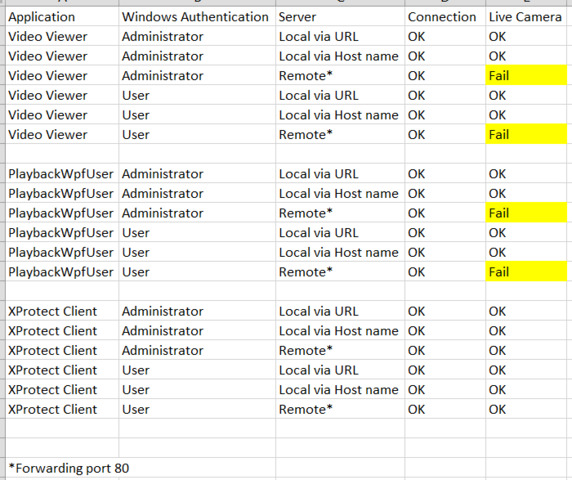
Viewing cameras with Xprotect Client works fine with both local and remote connections.

Viewing cameras with component sample works fine with local connection.

Component sample completes the remote connection but fails to allow camera viewing.

XProtect systems has supported encrypted secure communication from the recording server to all clients since the introduction of 2019R1.

I recommend you see the announcement here -

https://doc.developer.milestonesys.com/html/index.html?base=gettingstarted/mip2019r1_intro.html&tree=tree_home.html

If your MIP SDK is older than 2019R1 it will not support the recording server encryption. Download and use the newest MIP SDK.

Rie, Thanks for the quick response. We are using the current versions of everything (2019 R2). Also, we installed the VMS without any encryption enabled - how would we verify this? Perhaps you can recreate the issue on your end.

Please verify, when you test with the same user in the Smart Client on the same remote PC you get the images from the same camera and no error message?

My first idea would be the network communication, that networking does not work correctly, a firewall is blocking or something similar. I would however expect this kind of issue to be the same for the Smart Client as for the PlaybackWpfUser component sample. Can you test with firewall turned off?

Yes, same server, same remote PC, same user.

In every case we are able to connect to the VMS.

Firewall is turned off on both computers.

Both computers are running Win 10 with latest updates.

Router is forwarding port 80.

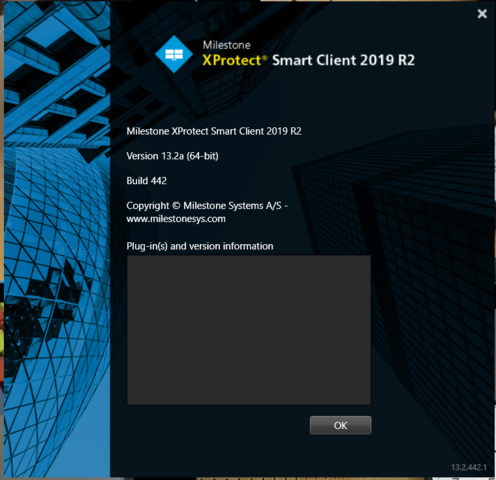
Running 2019 R2 versions of XProtect Pro+ VMS, Client, and SDK

All encryption disabled.

No issues with XProtect Pro, only Pro+.

No issues with XProtect Client, only SDK.

Can you please test with Smart Client? Your attached image seems like Web Client, so please test it with using Smart Client. Click Windows icon → select XProtect Smart Client.

The test was with the Smart Client. The attached image was an Excel spreadsheet we used for testing. We attached it for extra clarification.

We have never seen this issue before that SC can login and MIP SK based app cannot when using the same user on the same PC. To troubleshoot: Could you please add a new user in administrator role and test it again with that user?

If you run the MIP SDK based app in the server directly, does it work there?

We tried several different users with various permissions with no change in the results. Connecting directly on the server via local host and IP address work as expected. How would we test a remote connection from the server to itself? How does this help diagnose why the SDK has issues and the Smart Client does not?

This is a big mystery. To investigate further please prepare a network communication trace (Wireshark or similar) (see - https://developer.milestonesys.com/s/article/Using-Wireshark).

Prepare a Smart Client view with one camera, let us know the camera for the test (make, model and firmware version), let us know the setting of the camera (settings and streams tab).

First make a trace where you open the Smart Client on the camera view (setup above) and goes into playback mode. As soon as you are in playback mode and see the view has images please stop tracing and save the trace for us.

Second make a trace where you open the PlaybackWpfUser on the camera. When you see the “connecting” message let the trace run another 5 seconds or so and then stop the trace and save the trace for us.

It is important that the two traces are tracing the use the same remote PC, using the same user, using the same camera.
We decided to restore the working version rather than troubleshoot further. Thanks anyway.