In MIP SDK Plugin, I want to add a custom image on a simple map view. Like we can add cameras on a map, or add a door (access) on the map, I want a custom image (like a camera or door, anything) on a camera. Please tell what classes I can use. How to do it. I am very new to MIP SDK. Thank you
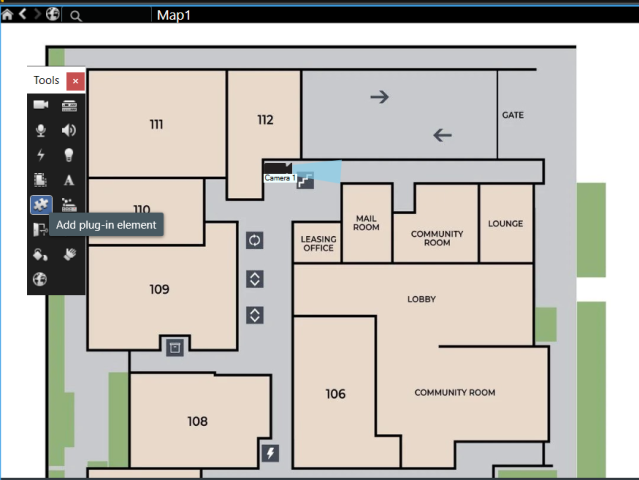
There is a sample, and I very much recommend that you explore it, that creates some elements in this case controller and sensor. The sample is the Sensor Monitor plugin sample.
I explored it, I build it and the thing is the MIP plugin was being shown as an icon in the management client, but not in the smart client. Even though it claims to have it in the smart client but I have tried everything, it is not showing in the smart client setup map. Any guidance. Thank you
The plugin needs to be deployed in both the server hosting the Event Server service and the client PC where you run the Management Client (MC) (if not all in the same machine).
After deploying the plugin it is important to restart the Event Server where the items and the maps “live”.
If deployed correctly then I have these questions:
Did you create items in the MC? Are these items persisted if you refresh or restart the MC?
Thank you very much.. After restarting the event server it is working… but now the sample code contains a lot of things I don’t need. I just want a simple icon that can be shown in the map, with no sensor, background plugin, I just want the icon that can be added in the map. I have tried to use same analogy of the code and read a Item, ItemManager, ItemNode, PluginDefinition classes in the Docs. I have written this code. My .ico file contains all six resolutions as mentioned in the Docs. The sample code that you provided is working after event server restart, but my code is not working (plugin icon is being shown in the management client but not in the smart client). Please if you can see this code and guide me where I am going wrong. Thank you very much for the help. Very grateful.
SimpleMapIconDefinition.cs:
using System;
using System.Collections.Generic;
using System.Drawing;
using VideoOS.Platform;
using VideoOS.Platform.Admin;

namespace SimpleMapIcon
{
    public class SimpleMapIconDefinition : PluginDefinition
    {
        internal static Guid MapIconKind = new Guid("D1111111-1111-1111-1111-111111111111");

        // ✅ Static plugin ID for ItemManager reference
        internal static Guid SimpleMapIconPluginId = new Guid("AAAAAAAA-BBBB-CCCC-DDDD-EEEEEEEEEEEE");

        // Load icon from resources (must be .ico with 6 sizes!)
        internal static Icon MapIcon = Properties.Resources.MyIcon;

        private List<ItemNode> _itemNodes;

        public override void Init()
        {
            _itemNodes = new List<ItemNode>
            {
                new ItemNode(
                    MapIconKind,
                    Guid.Empty,                           // parent
                    "My Map Icon",                        // display name
                    MapIcon.ToBitmap(),                   // large icon (tree/list)
                    "Map Icons",                          // category
                    MapIcon.ToBitmap(),                   // small icon (tree/list)
                    Category.Text,                        // category type
                    true,                                 // selectable
                    ItemsAllowed.Many,                    // many allowed
                    new SimpleMapIconItemManager(MapIconKind), // item manager
                    null                                  // no custom user controls
                )
                {
                    // 🔹 This is the important part for Smart Client Map
                    MapIcon = MapIcon
                }
            };
        }

        // Plugin definition properties
        public override Guid Id => SimpleMapIconPluginId;  // ✅ return static Guid
        public override string Name => "Simple Map Icon Plugin";

        // 🔹 Icon shown in Admin/Client plugin list
        public override Image Icon => MapIcon.ToBitmap();

        public override List<ItemNode> ItemNodes => _itemNodes;
    }
}
Admin/SimpleMapIconItem.cs:
using System;
using System.Collections.Generic;
using System.Collections.ObjectModel;
using VideoOS.Platform;
using VideoOS.Platform.Admin;

namespace SimpleMapIcon
{
    public class SimpleMapIconItem : Item
    {
        private Item _parentItem;

        // Constructor for manually created item
        public SimpleMapIconItem(FQID fqid, string name, Item parentItem = null)
            : base(fqid, name)
        {
            _parentItem = parentItem;
        }

        // Constructor for persisted configuration item
        public SimpleMapIconItem(Item item)
            : base(item.FQID, item.Name)
        {
            _parentItem = item.GetParent();
            foreach (var property in item.Properties)
            {
                Properties.Add(property.Key, property.Value);
            }
        }

        public override Item GetParent()
        {
            return _parentItem;
        }

        // No context menu for now
        public override Collection<MapAlarmContextMenu> ContextMenu
        {
            get { return new Collection<MapAlarmContextMenu>(); }
            set { }
        }

        // Smart Client map icon key
        public override Guid MapIconKey
        {
            get { return SimpleMapIconDefinition.MapIconKind; }
            set { } // do nothing
        }
    }
}
Admin/SimpleMapIconItemManager.cs:
using System;
using System.Collections.Generic;
using System.Linq;
using VideoOS.Platform;
using VideoOS.Platform.Admin;

namespace SimpleMapIcon
{
    public class SimpleMapIconItemManager : ItemManager
    {
        private readonly Guid _kind;

        public SimpleMapIconItemManager(Guid kind)
        {
            _kind = kind;
        }

        public override List<Item> GetItems()
        {
            // Fetch all items of this kind from persisted VMS configuration
            var items = Configuration.Instance
                .GetItemConfigurations(SimpleMapIconDefinition.SimpleMapIconPluginId, null, _kind)
                .Select(i => (Item)new SimpleMapIconItem(i))
                .ToList();

            return items;
        }

        public override List<Item> GetItems(Item parentItem)
        {
            // Fetch items under a parent item, if any
            var items = Configuration.Instance
                .GetItemConfigurations(SimpleMapIconDefinition.SimpleMapIconPluginId, parentItem, _kind)
                .Select(i => (Item)new SimpleMapIconItem(i))
                .ToList();

            return items;
        }

        public override Item GetItem(FQID fqid)
        {
            // Fetch a single item by FQID from configuration
            var itemConfig = Configuration.Instance.GetItemConfiguration(SimpleMapIconDefinition.SimpleMapIconPluginId, _kind, fqid.ObjectId);
            if (itemConfig != null)
            {
                return new SimpleMapIconItem(itemConfig);
            }
            return null;
        }

        public override Item CreateItem(Item parentItem, FQID suggestedFQID)
        {
            // Optional: allow creating a new item
            return new SimpleMapIconItem(suggestedFQID, "My Map Icon", parentItem);
        }

        public override void DeleteItem(Item item) { }

        public override bool ValidateAndSaveUserControl() => true;

        public override string GetItemName() => "My Map Icon";

        public override void SetItemName(string name) { }
    }
}
File Structure:
Image is not available
Hi @Mujtaba Nadeem @Bo Ellegård Andersen (Milestone Systems) ,
I’m exploring something similar, but is the custom SimpleMapIconItem.cs needed to give an Item an icon for maps?
Or can I just use existing Items created from the default Item class?
When I add my own custom icon to MapIcon, the Icon does not appear on the map.
MapIcon = Properties.Resources.Alarm_Icon1
But when I use the controller Icon from the example, it shows up. Why would that be?
MapIcon = Properties.Resources.SensorController
I’ve noticed the following in the Logs
2025-10-09 15:54:07.015+02:00 [     1] DEBUG      - Telemetry Track Event: eventName:Active interaction state property changed, properties:{[From state, IsAddNewMipItemState],[To state, IsNormalState],[environmentID, SC]}, metrics:{}
2025-10-09 15:54:07.034+02:00 [     1] ERROR      - GisMap: Convert icon for mip item kind Device Groups failure. This was the error message: Could not load file or assembly 'VideoOS.RemoteClient.Plugin.GisMapData, Culture=neutral' or one of its dependencies. The system cannot find the file specified.
2025-10-09 15:55:01.460+02:00 [     1] DEBUG      - Telemetry Track Event: eventName:Active interaction state property changed, properties:{[From state, IsNormalState],[To state, IsAddNewMipItemState],[environmentID, SC]}, metrics:{}
2025-10-09 15:55:04.956+02:00 [     1] DEBUG      - Telemetry Track Event: eventName:Active interaction state property changed, properties:{[From state, IsAddNewMipItemState],[To state, IsNormalState],[environmentID, SC]}, metrics:{}
2025-10-09 15:55:04.965+02:00 [     1] ERROR      - GisMap: Convert icon for mip item kind Device Groups failure. This was the error message: Could not load file or assembly 'VideoOS.RemoteClient.Plugin.GisMapData, Culture=neutral' or one of its dependencies. The system cannot find the file specified.
Please see the documentation for ItemNode.MapIcon, it might be helpful.