How to aqcuire camera name of SmartWall.

I would like to acquire the camera name of SmartWall by using an independent application with MIPSDK in XProtect. However, I couldn’t acquire the camera name using API.

■ Question

(1) Could you teach me how to acquire camera information assigned to each monitor in SmartWall. I would like to use an independent application implemented by MIPSDK.

* Either Component Integration or Protocol Integration is acceptable.

■ What I did

(1) Created the independent application with MIPSDK.

After successful login, I couldn’t acquire the camera information.

I called the following method in the application:

“VideoOS.Platform.ClientControl.Instance.GetSmartWallItems()”

(2) Created the SmartClient Plugin.

In this case, I could acquire the camera information.

I called the following method:

“VideoOS.Platform.ClientControl.Instance.GetSmartWallItems()”

If I called this method in the plugin, I acquired the monitor information as SCViewAndLayoutItem. In addition, the camera information is also acquired as child information.

Thank you for your help.

Video Wall Controller sample might be helpful for you, please explore it -

https://doc.developer.milestonesys.com/html/index.html?base=samples/componentsamples/videowallcontroller/readme.html&tree=tree_2.html

Dear Kito-san,

I had already checked this sample, but I could not get the camera name of SmartWall by using the independent application.

Thank you for your response.

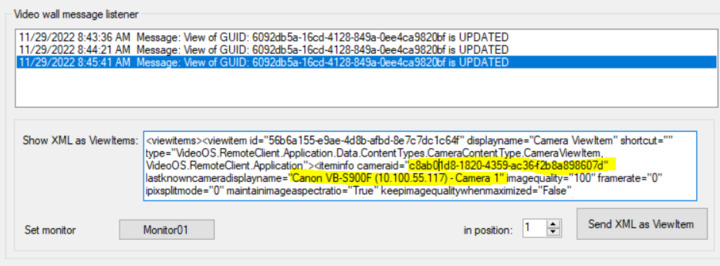
I just ran the sample and did Set preset in the sample. Then selected a message (from Set preset) in the top list and checked if there was a camera name and ID in the XML. As you can see below, there is the camera name and ID that I am supposed to see. I thought this would be the one that you wanted to see but it is not? If not, please explain a bit more detail.
Dear Kito-san,

Thank you for your corporation.​

The sample you provided couldn’t acquire the camera name displayed in the View on the monitor connected to the Wall.

Is there a way to use MIPSDK’s Protocol Integration or Component Integration to acquire the camera name at any time or in real time?

Or is it possible to raise a Wall change event?

You will need to listen the Smart wall. If something happens on the Smart Wall then you will get the camera’s information.

It means, you cannot anything when you open the sample while the Smart Wall is running. Please see following instructions.

Open the sample,

Start Smart Wall,

Update or subscribe something on the Smart Wall,

And then you will get the camera information.