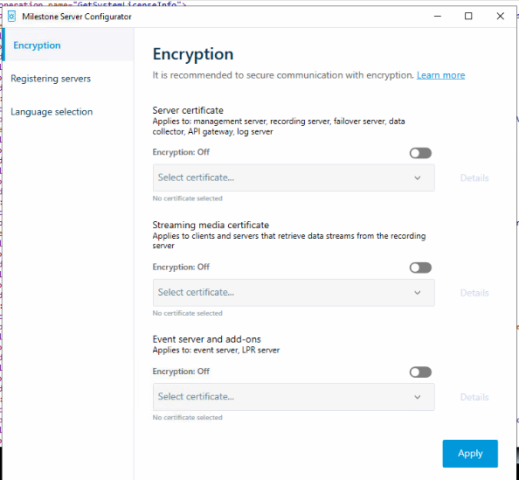
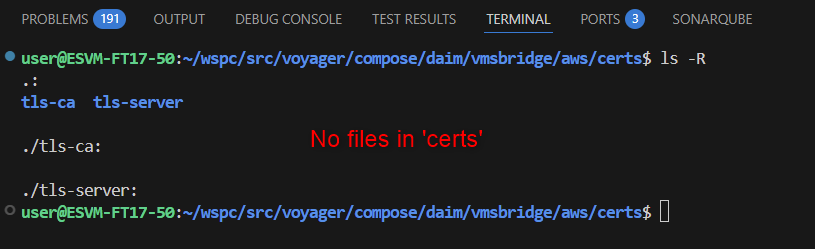
I’m working on an integration with Milestone XProtect VMS using AI Bridge, and for development and testing purposes, I would like to avoid the need for TLS/HTTPS and the associated certificate setup, because
Whenever I am touching .env file, to disable https or tls, i get the following error, and the aibridge is not even getting connected to the VMS.
 2025/09/08 04:37:04 unauthorized attempt to subscribe for 'metadata'. Error: 'token issuer not recognized'
 2025-09-08T04:37:06Z Applying registration using input from '/root/bin/config/register.graphql' ...
 2025/09/08 04:37:06 Error adding endpoint: Post "https://milestone4:80/ManagementServer/ServerCommandService.svc": http: server gave HTTP response to HTTPS client
 Error: Error adding endpoint: Post "https://milestone4:80/ManagementServer/ServerCommandService.svc": http: server gave HTTP response to HTTPS client
     at Runner.eachMessage (/root/bin/app.js:185:32)
     at Runner.processEachMessage (/root/bin/node_modules/kafkajs/src/consumer/runner.js:231:20)
     at onBatch (/root/bin/node_modules/kafkajs/src/consumer/runner.js:447:20)
     at Runner.handleBatch (/root/bin/node_modules/kafkajs/src/consumer/runner.js:461:11)
     at handler (/root/bin/node_modules/kafkajs/src/consumer/runner.js:58:30)
     at /root/bin/node_modules/kafkajs/src/consumer/worker.js:29:15
     at process.processTicksAndRejections (node:internal/process/task_queues:95:5) {
   path: [ 'register' ],
   locations: [ { line: 1, column: 12 } ],
   extensions: [Object: null prototype] {}
 }
Currently, every time I deploy on a new (developer) machine, I have to generate and configure certificates, which is time-consuming for quick iterations and testing.
I would like to know:
Is it possible to configure Milestone VMS and AI Bridge to use plain HTTP (without TLS)?
If yes, what are the steps or configurations required on:
Milestone Management Client (or config files)
AI Bridge (
register.graphql
or other config files)
My goal is to run a simple HTTP-based development environment, understanding that this would only be for internal/local testing and not for production.
This somehow seems related to: Kubernetes Deployment not working (at least in regards on why you still see the https) even though through server configurator you have set ‘http’.
Could it be that you have VPS hardware that was created (you’ve subscribed to a metadata/video topic) when your AI Bridge was running secured ?
If that’s the case you should go to that VPS hardware and edit its URL:
lisber
(Lisber Gouveia de Pontes (Milestone Systems))
5
That’s odd.
Could you unsubscribe and re-subscribe to the topic again (just to double-check if something got cached). It should have worked (adjusting the url on MC, I’ve done this in the past).
Mind also using latest version of the PS Admin Plugin (from milestone download page).
lisber
(Lisber Gouveia de Pontes (Milestone Systems))
7
That’s precisely what my colleague Fernando mentioned here (that the https call will happen, but that doesn’t affect the AI Bridge connecting to a non-secured VMS)
2025-09-10T02:17:32Z Initialization started ...
2025-09-10T02:17:32Z Creating kafka topics 'voyager.topics.daim.gateway.config_requests:2:1,voyager.topics.daim.gateway.config_responses:2:1,voyager.topics.daim.gateway.stream_requests:2:1,voyager.topics.daim.gateway.stream_responses:2:1,voyager.topics.daim.gateway.endpoint_status:2:1,voyager.topics.daim.vmsbridge.stream_subscriptions:2:1' ...
2025-09-10T02:17:32Z Publishing ontology './lmap.ttl' ...
2025-09-10T02:17:32Z Updating gateway graph to version 1.0.0 ...
2025-09-10T02:17:32Z Updating gateway graph to version 1.0.0 failed (will retry in 5 seconds) : Post "http://aibridge-fuseki:3030/repositories/voyager/query": dial tcp 172.18.0.2:3030: connect: connection refused
2025-09-10T02:17:32Z Publishing ontology './lmap.ttl' failed (will retry in 5 seconds) : Post "http://aibridge-fuseki:3030/repositories/voyager/update": dial tcp 172.18.0.2:3030: connect: connection refused
2025-09-10T02:17:34Z Creating kafka topics 'voyager.topics.daim.gateway.config_requests:2:1,voyager.topics.daim.gateway.config_responses:2:1,voyager.topics.daim.gateway.stream_requests:2:1,voyager.topics.daim.gateway.stream_responses:2:1,voyager.topics.daim.gateway.endpoint_status:2:1,voyager.topics.daim.vmsbridge.stream_subscriptions:2:1' failed (will retry in 5 seconds) : kafka: client has run out of available brokers to talk to: dial tcp 172.18.0.5:29092: connect: connection refused
2025-09-10T02:17:37Z Publishing ontology './lmap.ttl' ...
2025-09-10T02:17:37Z Updating gateway graph to version 1.0.0 ...
2025-09-10T02:17:37Z Publishing ontology './lmap.ttl' succeeded
2025-09-10T02:17:37Z Publishing ontology './iot.ttl' ...
2025-09-10T02:17:37Z Publishing ontology './iot.ttl' succeeded
2025-09-10T02:17:37Z Publishing ontology './core.ttl' ...
2025-09-10T02:17:37Z Updating gateway graph to version 1.0.0 succeeded
2025-09-10T02:17:37Z Publishing ontology './core.ttl' succeeded
2025-09-10T02:17:37Z Publishing ontology './gateway.ttl' ...
2025-09-10T02:17:37Z Publishing ontology './gateway.ttl' succeeded
2025-09-10T02:17:37Z Publishing ontology './vmsbridge.ttl' ...
2025-09-10T02:17:37Z Publishing ontology './vmsbridge.ttl' succeeded
2025-09-10T02:17:39Z Creating kafka topics 'voyager.topics.daim.gateway.config_requests:2:1,voyager.topics.daim.gateway.config_responses:2:1,voyager.topics.daim.gateway.stream_requests:2:1,voyager.topics.daim.gateway.stream_responses:2:1,voyager.topics.daim.gateway.endpoint_status:2:1,voyager.topics.daim.vmsbridge.stream_subscriptions:2:1' ...
2025-09-10T02:17:39Z Creating kafka topics 'voyager.topics.daim.gateway.config_requests:2:1,voyager.topics.daim.gateway.config_responses:2:1,voyager.topics.daim.gateway.stream_requests:2:1,voyager.topics.daim.gateway.stream_responses:2:1,voyager.topics.daim.gateway.endpoint_status:2:1,voyager.topics.daim.vmsbridge.stream_subscriptions:2:1' succeeded
2025-09-10T02:17:39Z Applying registration using input from '/root/bin/config/register.graphql' ...
2025-09-10T02:17:39Z Applying registration using input from '/root/bin/config/register.graphql' failed (will retry in 5 seconds) : Post "http://aibridge-webservice:4000/api/bridge/graphql": dial tcp 172.18.0.10:4000: connect: connection refused
2025-09-10T02:17:44Z Applying registration using input from '/root/bin/config/register.graphql' ...
2025-09-10T02:17:47Z Applying registration using input from '/root/bin/config/register.graphql' failed (will retry in 5 seconds) : Unexpected error.
connecter.log
-log-file-enabled true
-log-max-age 15
-log-max-backups 15
-log-max-size 100
-network-config-file
-sparql-query-endpoint http://aibridge-fuseki:3030/repositories/voyager/query
-sparql-timeout-in-seconds 30
-sparql-update-endpoint http://aibridge-fuseki:3030/repositories/voyager/update
-stream-requests-topic voyager.topics.daim.gateway.stream_requests
-stream-responses-topic voyager.topics.daim.gateway.stream_responses

2025-09-10T02:17:12Z Server starting ...
2025-09-10T02:17:12Z Creating new kafka client ...
2025-09-10T02:17:13Z Creating new kafka client failed (will retry in 5 seconds): kafka: client has run out of available brokers to talk to: dial tcp 172.18.0.5:29092: connect: connection refused
2025/09/10 02:17:33 Logging initialized
Component: Connector
Built: Thu Jun  5 07:49:07 UTC 2025
GoVersion: go1.22.5
-bridge-id 12355b21-5a25-4a1d-b6d2-f6e02c9b95b5
-brokers aibridge-kafka-broker:29092
-config-requests-topic voyager.topics.daim.gateway.config_requests
-config-responses-topic voyager.topics.daim.gateway.config_responses
-endpoint-status-resend-seconds 300
-endpoint-status-topic voyager.topics.daim.gateway.endpoint_status
-gateway-id 1b80eaa0-203d-4dc0-ae3b-9bf4b85ec992
-gateway-version 1.0.0
-log-file-enabled true
-log-max-age 15
-log-max-backups 15
-log-max-size 100
-network-config-file
-sparql-query-endpoint http://aibridge-fuseki:3030/repositories/voyager/query
-sparql-timeout-in-seconds 30
-sparql-update-endpoint http://aibridge-fuseki:3030/repositories/voyager/update
-stream-requests-topic voyager.topics.daim.gateway.stream_requests
-stream-responses-topic voyager.topics.daim.gateway.stream_responses

2025-09-10T02:17:33Z Server starting ...
2025-09-10T02:17:33Z Creating new kafka client ...
2025-09-10T02:17:34Z Creating new kafka client failed (will retry in 5 seconds): kafka: client has run out of available brokers to talk to: dial tcp 172.18.0.5:29092: connect: connection refused
2025-09-10T02:17:39Z Creating new kafka client succeeded
2025-09-10T02:17:39Z Creating new kafka consumer for group 'daim.gateway.connector' ...
2025-09-10T02:17:39Z Creating new kafka consumer succeeded
2025-09-10T02:17:39Z Creating new kafka producer ...
2025-09-10T02:17:39Z Creating new kafka producer succeeded
2025-09-10T02:17:39Z Verifying existence of topics in kafka cluster ...
2025-09-10T02:17:39Z Topics [voyager.topics.daim.gateway.config_requests, voyager.topics.daim.gateway.config_responses, voyager.topics.daim.gateway.stream_requests, voyager.topics.daim.gateway.stream_responses, voyager.topics.daim.gateway.endpoint_status] do not yet exist; will wait 5 seconds and check again
2025-09-10T02:17:44Z Verifying existence of topics in kafka cluster succeeded
2025-09-10T02:17:44Z Verifying gateway graph ...
2025-09-10T02:17:44Z Verifying gateway graph succeeded
2025-09-10T02:17:44Z Server started
2025/09/10 02:17:47 EndpointRepository.GetAllEndpoints: 'endpoint_id' and 'driver_id' could not be found
2025/09/10 02:17:47 Error adding endpoint: Post "https://Milestone4:80/ManagementServer/ServerCommandService.svc": http: server gave HTTP response to HTTPS client
2025/09/10 02:17:52 Error adding endpoint: Post
webservice.log
GraphQL request:1:12
1 | mutation { register(input: {
  |            ^
2 |   url: "http://Milestone4:80"
2025-09-10T02:22:07.685Z error: Error adding endpoint: Post "https://Milestone4:80/ManagementServer/ServerCommandService.svc": http: server gave HTTP response to HTTPS client
lisber
(Lisber Gouveia de Pontes (Milestone Systems))
9
1 - You are using IP and port, could you please use hostname (without a port) ? . There are some responses from the VMS that even though you’ve setup an IP address in the server configurator they’re coming back with the hostname or FQDN, that’s why I would stick to using hostnames in the VMS_URL var.
2 - Would you mind zipping and adding your compose folder here so I can take a look ?