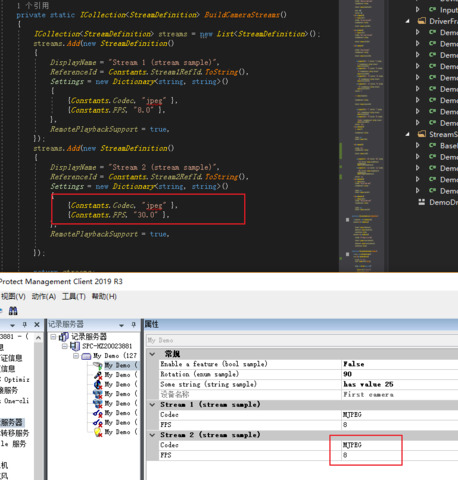
Hello, I am develop a driver by mip driver framework. But when I create our camere parameter configuration. I change the value to our camere,but the value is show in manage client that I defined this field in BuildFields function. And I test this phenomenon in demo driver. The value in StreamDefinition isn’t changed,and the value in CameraDeviceDefinition is changed.
Did you remove your old camera? If not, please remove the old camera first, and then add new camera when you have changed the driver.
You might already know how to deploy but let me introduce it.
Deploy your driver here - [C:\Program](file:C:/Program) Files\Milestone\MIPDrivers
Restart the Recording Server Service to make your driver available.
In the Management Client, use the Add Hardware… wizard for adding the device.
I remove all camera,and add new camera and the phenomenon is the same. I only change the demo driver on what I screenshot. Can you test on your side?
Let me ask you one more thing. Did you delete the old driver from [C:\Program](file:C:/Program) Files\Milestone\MIPDrivers before deploying the (new) driver?
Delete the old driver in Management Client → Delete files from [C:\Program](file:C:/Program) Files\Milestone\MIPDrivers, and then deploy the new one.
Restart the Recording Server Service and Add the new driver in Management Client.
I follow the steps what you described, and the result is the same, the field setting in streamdefinition is no changed. And when I change the field in cameradevicedefinition, It is changed in UI.
I was able to reproduce the behavior that setting StreamDefinition.Settings.FPS in the DemoDriver had no effect. I will do a deeper investigation in cooperation with Milestone Development.
Thank you very much for your reply. If you have any further information, please reply to me in time.
We have been attempting to set the defaults in the wrong place. In order to change the defaults you should instead modify the BuildFields() method.
In the Demo Driver sample I find:
f.Add(new DoubleSetupField()
{
	Key = Constants.FPS,
	DisplayName = "FPS",
	DisplayNameReferenceId = Guid.Empty,
	MinValue = 0.00028,
	MaxValue = 30.0,
	IsReadOnly = false,
	ReferenceId = Constants.FPSRefId,
	Resolution = 0.0,
	DefaultValue = 8.0,
});
Correction:
Your code for changing the defaults was correct, that it did not have the indented effect was caused by a bug in the recording server implementation of the driver framework. The bug will be fixed in 2020R3.
Perfectly…Thank you very much.
Hi Yuri Li,
Have you had any luck retreiving the values to do something usefull with them?
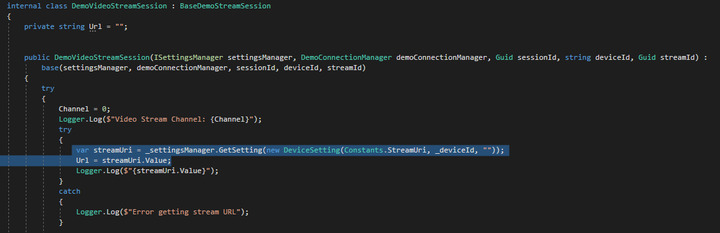
I have a device setting called “StreamUri” which shows up fine in the Management Client UI.
When I try to get the Device Settings in a way similar to how the axample shows how to get metadata device settings, which works fine, the function returns null most of the time but I have seen it return the value once: