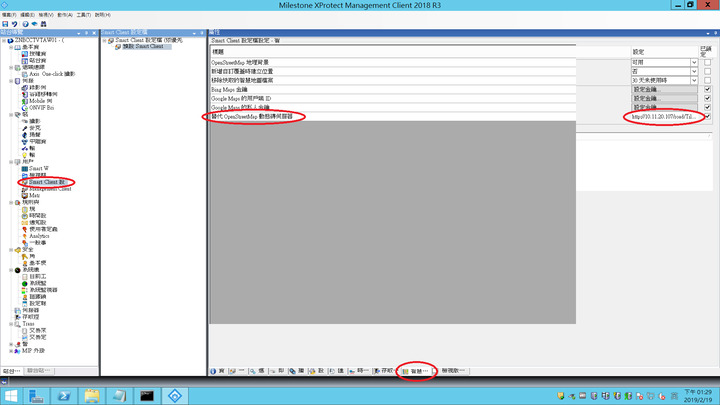
Like replace OpenStreetMap Dynamic brick server.
Now I already using leaflet to build GIS server,
local website is http://10.11.20.107/road/Tiles/{z}/{x}/{y}.png.

Why do I change from empty to type in http://10.11.20.107/road/Tiles/{z}/{x}/{y}.png.
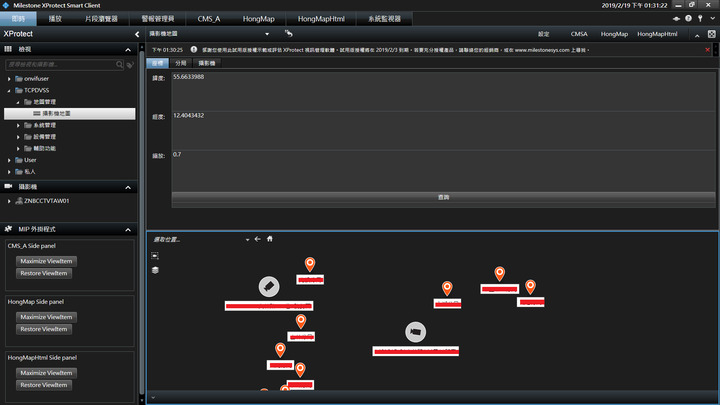
In Smart Client operating, the Smart Map is dark, nothing map image.
I’ll try to these below open web WMTS, the same nothing results.
http://maps.nlsc.gov.tw/S_Maps/wmts?SERVICE=WMTS&REQUEST=GetTile&VERSIO
N=1.0.0&LAYER={Layer_ID}&STYLE=_null&TILEMATRIXSET=EPSG:3857&TILEMATRIX=
EPSG:3857:{z}&TILEROW={y}&TILECOL={x}&FORMAT=image/png
http://uptile.gov.taipei/WMTSGene/Projmap/P105002
http://uptile.gov.taipei/WMTSGene/Projyear/96
If somebody don’t know my Question, you can see figure.