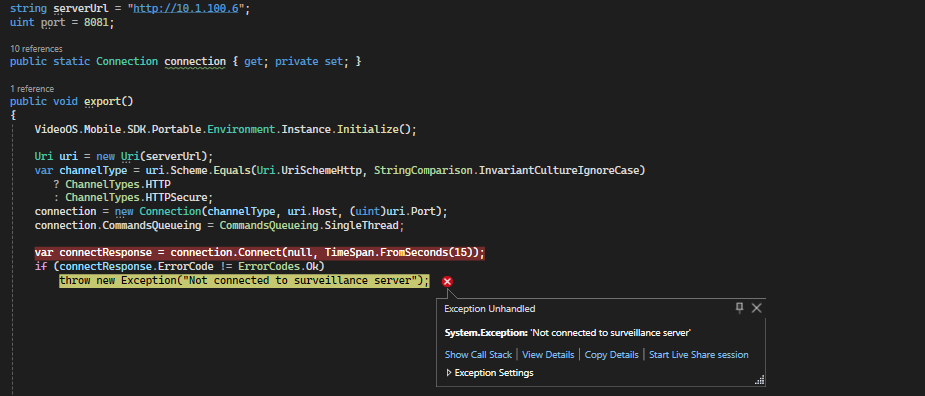
I need to integrate video export using VideoOS.Mobile.SDK.Portable.dll into a WPF NET 7 application but I don’t have any sample how to do it. Can someone help me confirm whether I can export video via dll? Thank you.
There is no sample for this, unfortunately.
Here are the steps you need to do, to create an export (no matter of the frontend technology used, in your case - WPF):
- Create connection and login - like in any other sample
- CreateInvestigation
- GetInvestigation multiple times (e.g. every second) - until returned Status is “Saved”
- StartInvestigationExport
- GetExport multiple times (e.g. every second) - until State is “101” (meaning ready for download)
- CreateExportDownloadLink and use returned ExportLink to download
Br,
Nikolay
Hi Nikolay,
Thank you for your answer.
I’m having a problem where CreateInvestigation always returns ErrorCode.UnknownCameraID. The CameraID that I assign to the InvestigationId of InvestigationParams is taken from ViewGroupTree.CameraId.
So I’m not sure why the CameraID is wrong. Can you help me with this, thank you.
Best regards,
Khoa
Hi Khoa,
Obtained camera ID should be passed to SetCameras, not to InvestigationId. Example:
var options = new InvestigationParams
{
    Name = <name>,
    StartTime = <start_time>,
    EndTime = <end_time>,
    State = InvestigationState.InProgress,
};
options.SetCameras(new[] { <obtained_camera_id> });
response = <your_connection_object>.Investigations.CreateInvestigation(options, TimeSpan.FromSeconds(30));
Br,
Nikolay
Hi Nikolay,
Thank you for your answer. I have a few more questions.
When doing step 3, at first I only received Status as Saving/Saved, but after that I only received Status as Initial even though I tried GetInvestigation again every second many times. And I tried doing the CreateInvestigation part again but it still the same.
Can you show me what the cause is?
And by the way, can you show me some sample code on how to initialize and pass parameters to the items StartInvestigationExport, GetExport, CreateExportDownloadLink?
Thank you.
Best regards,
Khoa
Hi Khoa,
Below you can find the code sample I just wrote for you. It assumes a pre-initialized connection object called connection. After executing it, a new zip file will be created on your local drive, with two MKV files in it - one per camera.
using VideoOS.Mobile.Portable.MetaChannel;
using VideoOS.Mobile.Portable.MetaChannel.CommEntries;
using VideoOS.Mobile.Portable.Utilities;
using VideoOS.Mobile.Portable.VideoChannel.Params;
using VideoOS.Mobile.Portable.ViewGroupItem;
using VideoOS.Mobile.SDK.Portable.Server.ViewGroups;


var cameraNames = new[] { "Camera 1", "Camera 2"};
var commandTimeout = TimeSpan.FromSeconds(30);
var cameraIds = ViewGroupsHelper.GetAllCamerasView(connection.Views, new ViewParams(), commandTimeout)
    .Descendants(ViewItemType.Camera)
    .Where(cam => cameraNames.Contains(cam.ItemName))
    .Select(cam => cam.ItemId);

var options = new InvestigationParams
{
    Name = "a short 2-cam investigation",
    StartTime = DateTime.UtcNow.Subtract(TimeSpan.FromSeconds(20)),
    EndTime = DateTime.UtcNow,
    State = InvestigationState.InProgress,
};
options.SetCameras(cameraIds);
var createInvestigationResponse = connection.Investigations.CreateInvestigation(options, commandTimeout);

// always check any request's return code. If it's not OK, add a proper handling. For brevity, I'll only show this once
if (createInvestigationResponse.ErrorCode != ErrorCodes.Ok)
{
    throw new Exception(createInvestigationResponse.ErrorMessage);
}

var investigationId = createInvestigationResponse.InvestigationId;
var sw = Stopwatch.StartNew();
while (sw.Elapsed < TimeSpan.FromMinutes(1) // longer investigations may take quite a lot of time to prepare
    && connection.Investigations.GetInvestigation(investigationId, commandTimeout).Investigations.Single().Status != InvestigationSatus.Saved)
{
    Thread.Sleep(1000);
}

var exportParams = new ExportParams
{
    InvestigationId = investigationId,
    Type = VideoOS.Mobile.Portable.VideoChannel.Params.ExportType.Mkv,
};
var a = connection.InvestigationExports.StartInvestigationExport(exportParams, commandTimeout);
var exportId = a.ExportId;

sw.Restart();
while (sw.Elapsed < TimeSpan.FromMinutes(1) // longer exports may take quite a lot of time to prepare
    && connection.Exports.GetExport(exportId, commandTimeout).Exports.Single().State != (int)ExportState.Ready)
{
    Thread.Sleep(1000);
}

exportParams.ExportId = exportId;
var downloadLink = "https://mobileserver.domain:8082/" + connection.Exports.CreateExportDownloadLink(exportParams, commandTimeout).ExportLink;


const string ArchiveName = @"D:\Temp\Export.zip"; // containing folder should already exist
var request = (HttpWebRequest)WebRequest.Create(downloadLink);
using (var response = (HttpWebResponse)request.GetResponse())
using (var responseStream = response.GetResponseStream())
using (var fileStream = File.Create(ArchiveName))
{
    responseStream.CopyTo(fileStream);
}
Disclaimer: this not a production-ready code, it’s just for demo purposes. I hope that you still find it useful.
Br,
Nikolay
Hi Nikolay,
Thank you for your answer. I still have one problem that I mentioned above.
When doing step 3, at first I only received Status as Saving/Saved, but after that I only received Status as Initial even though I tried GetInvestigation again every second many times. And I tried doing the CreateInvestigation part again but it still the same.
Can you show me what the cause is?
Thank you.
Best regards,
Khoa
Hi Khoa,
I don’t really know how is that possible. Here are several generic advices how to investigate further:
- make sure to use the latest Mobile SDK version and the latest Mobile Server
- take a look at Mobile Server logs - is there any error?
- open Web Client and see what is the status of the investigation created in step 3.
- try to create similar investigation (with same camera and duration) via Web Client and see if problem also exists there
- reduce investigation duration to just 15-20 seconds and see if it makes any difference
- don’t wait any longer (break loop) immediately after you get state Saved once
Br,
Nikolay
Hi Nikolay,
Thank you for your answer. I have successfully exported the video based on your instructions.
Thank you very much. Wish you have a good day.
Best regards,
Khoa
Do you still have the code? Please refer to the integration project to export videos from milestone server. Thank you
Hi @Tăng Bá Thiện
There is no sample for this, unfortunately.
The only code for this is available in my comment above (from October 26, 2023 at 2:44 PM).
Please give it a try - it should work fine.
where did you get the connection, help me do that, thank you very much
Do you have an example to connect? I consult with
Can the above example retrieve records in .net 7 from XProtect smart Client 2023 R3 and save them to minIO?
For establishing a connection you can do the same as in LiveSample:
https://github.com/milestonesys/mipsdkmobile-samples-dotnet/tree/main/.NET%20Framework/LiveSample
Mobile SDK is built as a .NET Standard project. You should be able to use it from any .NET version.
MinIO should not be a problem either.
If you have further questions, please create a separate forum thread. This has nothing to do with the original topic.
Thanks, Can I log in with my XProtect Smart Client 2023 R3 account to get records using Mobile.SDK?
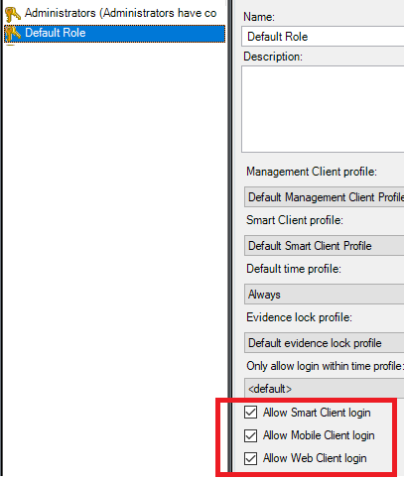
It depends. You user should have Web/Mobile access to use the Mobile SDK.
Users are managed in XProtect Management client:
Please create another forum thread if you have more questions.