Hi there,
I read through the MIP SDK document.
At component integration, Image Viewer Active-X Documentation it said that it’s able to export recordings in AVI or JPEG formats.
But I cannot found any example to export the JPEG/AVI from the ImageViewerControl.
Please advice.
The example for ImageViewer activeX including exporting using it is the “ImageViewer ActiveX Jscript” sample (ImageViewerDemoActiveX.htm)
I would like to recommend that you do not use the activeX but instead maybe you can use the AVI export as shown in the Export sample.
I would like to explain that the ImageViewerControl today uses other methods (no longer an activeX), more modern methods which includes “hardware acceleration”. The ImageViewerControl never did implement the export functionality of the activeX, but other methods that can be explored in the Export sample was the included in the MIP SDK. Note that the Export includes AVI export while use of JPEG is not considered export as such but easy methods for handling JPEGS is also part of the MIP SDK. On that subject please see - https://developer.milestonesys.com/s/question/0D50O00003Rsz0QSAR/is-mjpeg-supported-as-a-video-export-format-if-so-does-it-require-a-third-party-installation-
My recommendation is to forget or ignore the activeX but explore the Export sample and the JPEG usage as mentioned above.
Hi there,
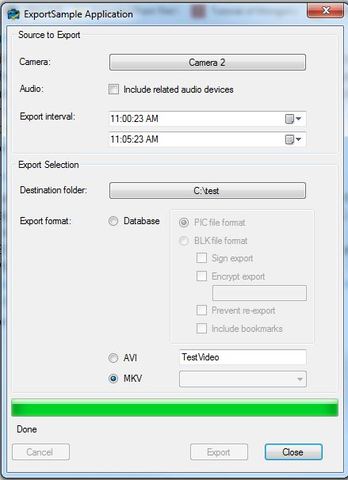
I use Export sample to export AVI/MKV video clip but it’s failed.
I did double check that there are a recorded video within the time frame.
However, after complete the exporting from the application, I cannot find the file within the folder. It’s show “done” in the progress bar.
Please advice.
I know there is a limitation that MKV export cannot be performed if the camera is setup with a privacy mask. Other than that; it should work.
A first experiment would be if you can do the exact same export using the Smart Client (use same PC, same user, same camera etc.)
Another experiment in troubleshooting would be if another camera is better exported or the same camera works better if it is setup with different video settings
If still you have no success, please share the details. Version of MIP SDK? XProtect product? XProtect version? Describe the setup.. What do you observe? What is the outcome of the experiments I mention?
Hi I already find the issues.
The Exporter sample did export the video successfully.
I cannot find the exported video clip because the export destination was added an external path “Exported Images” inside the codes.
Thank you.