Trying to filter cameras by manufacturer. Code from “AdminTabCameraPlugin” MIP example that filters Axis cameras in the Admin Client.
associatedItem.Properties.ContainsKey(ItemProperties.ProductID) &&
associatedItem.Properties[ItemProperties.ProductID].ToUpper().Contains(“AXIS”);
The above works in the Admin Client, but the Smart Client does not have the same properties. Admin Client Properties count = 19 and Smart Client Count = 9. I’m trying to filter on a button like the SCToolbarPlugin MIP Example. There is no “ProductID” Property on the Item in the “ViewIItem”. Is there a way to get this information in the Smart Client?
Thanks
Matt
The available Item properties are not the same in the Management Client (admin environment) as in the Smart Client. ProductID is one example of a property present in the Management Client but not in the Smart Client.
Thinking about a workaround you might be able to use Configuration API. This will work in a Smart Client plugin but only on c-code XProtect systems.
I did an experiment, please try this:
using VideoOS.Platform.ConfigurationItems;
..

Camera camera = new Camera(cameraFQID);
Hardware hardware = new Hardware(cameraFQID.ServerId, camera.ParentItemPath);
MessageBox.Show(hardware.Model);
(c-code supports the Configuration API)
I threw the code into the MIP example SCToolbarPlugin and it produced an exception on new Camera().
class ShowCameraNameViewItemToolbarPluginInstance : ViewItemToolbarPluginInstance
{
private Item \_viewItemInstance;

private Item \_window;

public override void Init(Item viewItemInstance, Item window)

{

  \_viewItemInstance = viewItemInstance;

  \_window = window;

  Title = "Show camera name";

  Tooltip = "Click to show current camera name.";

  Camera camera = new Camera(viewItemInstance.FQID);

  Hardware hardware = new Hardware(viewItemInstance.FQID.ServerId, camera.ParentItemPath);

  MessageBox.Show(hardware.Model);
}
You will have to use the FQID of the camera, not the FQID of the View Instance.
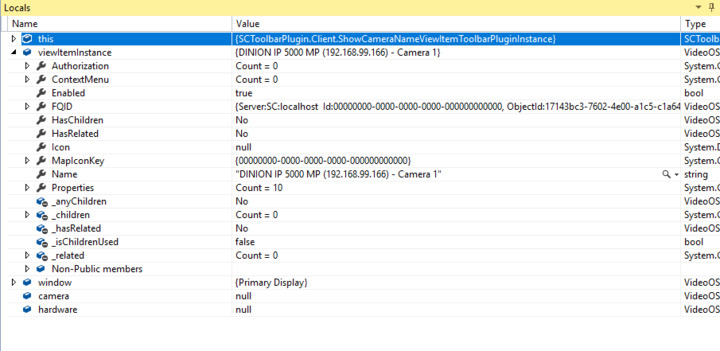
the viewItemInstance isn’t a camera? See the image of the image of the Locals when I hit that line.
No it is not, in this case it is confusing that the ViewItemInstance inherits the name of the camera.
I was inspired to try it myself:
public override void Init(Item viewItemInstance, Item window)
{
    _viewItemInstance = viewItemInstance;
    _window = window;

    Title = "Show camera name";
    Tooltip = "Click to show current camera name.";
    string cameraObjectIdString;
    if (_viewItemInstance.Properties.TryGetValue("CurrentCameraId", out cameraObjectIdString))
    {
        Item cameraItem = Configuration.Instance.GetItem(new Guid(cameraObjectIdString), Kind.Camera);
        if (cameraItem != null)
        {
            Camera camera = new Camera(cameraItem.FQID);
            Hardware hardware = new Hardware(viewItemInstance.FQID.ServerId, camera.ParentItemPath);
            MessageBox.Show(hardware.Model);
        }
    }
}
I tried the code above, but there was an exception on new Hardware(). I was able to get it to working by changing the ServerID param to:
Hardware hardware = new Hardware(camera.ServerId, camera.ParentItemPath);
The “hardware” variable produced still does not have manufacturer info. I might put a tab on the cameras in the admin client filtered by manufacturer. Then the tab could have a checkbox to add a property that will display the button on the client. This might be a workaround for filtering by manufacturer?
Thanks,
Matt
I had hoped Hardware.Model was the answer as it worked for my test camera. The way I understand your workaround suggestion it will work.