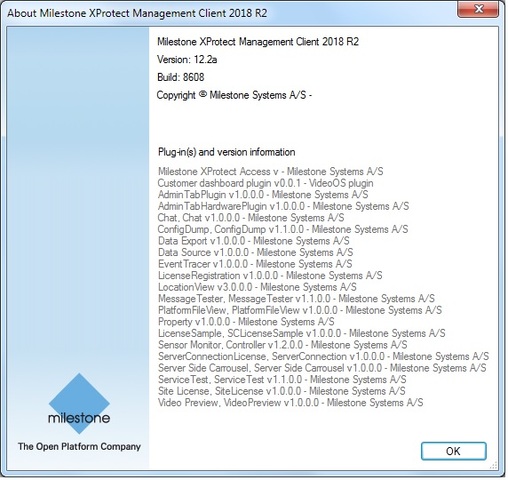
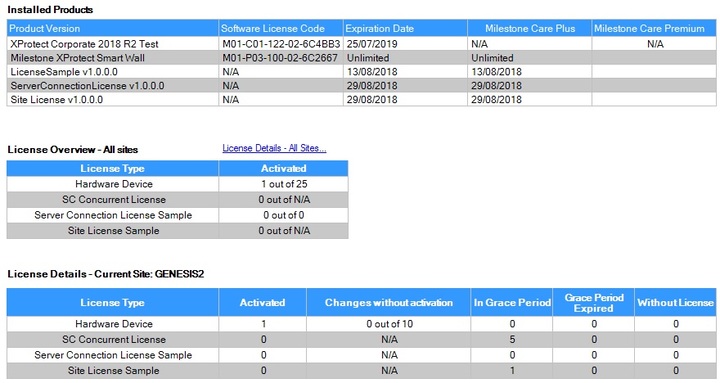
Installed XProtect Corporate 2018 R2 Test on Windows 7, custom, single computer with SQL Express 2014.
The event server log indicates that access control feature is started and the demo access control plugin is loaded:
2018-07-26 17:09:47 UTC+02:00 Info Log -------------------------- Version: 12.2.5658.1
2018-07-26 17:09:47 UTC+02:00 Info Log Available MAC address:40:61:86:2D:4E:AA
2018-07-26 17:09:47 UTC+02:00 Info Log Available MAC address:0A:00:27:00:00:0D
2018-07-26 17:09:47 UTC+02:00 Info Log Local time is now: 17:09:47
2018-07-26 17:09:47 UTC+02:00 Info Log UTC time is now: 15:09:47
2018-07-26 17:09:42 UTC+02:00 Info Server Event Server is starting.
2018-07-26 17:09:43 UTC+02:00 Info Server Server machine name: GENESIS2, Server domain name: GENESIS2.bxl.ncs.com
2018-07-26 17:09:46 UTC+02:00 Info Server Event Server feature manager started.
2018-07-26 17:11:31 UTC+02:00 Info FeatureManager Error opening VMO connection to: GENESIS2.bxl.ncs.com:80 with message: Client is unable to finish the security negotiation within the configured timeout (00:00:59.7035996). The current negotiation leg is 1 (00:00:58.9703983).
2018-07-26 17:12:12 UTC+02:00 Info FeatureManager XProtect Corporate (or similar) detected, Alarm, Map and Access Control feature started
2018-07-26 17:12:12 UTC+02:00 Info ServerRegistration Server registration has started.
2018-07-26 17:12:17 UTC+02:00 Info ServerRegistration Got registered services, found 5 services allready registered.
2018-07-26 17:12:17 UTC+02:00 Info ServerRegistration Found existing Event Server registration with same service instance. Skipping further registration.
2018-07-26 17:12:17 UTC+02:00 Info ServerRegistration Attempting to write custom data to service with instance b593b051-4ecb-4d48-97bc-d44bb82bfe33
2018-07-26 17:12:17 UTC+02:00 Info ServerRegistration Server registration completed successfully.
2018-07-26 17:12:17 UTC+02:00 Info ServerConfigManager Server ‘GENESIS2[genesis2.bxl.ncs.com]’ created.
2018-07-26 17:12:20 UTC+02:00 Info SQLManager Database connection established.
2018-07-26 17:12:20 UTC+02:00 Info MapPlugInManager Initializing MIP environment.
2018-07-26 17:12:23 UTC+02:00 Info ESEnvironmentManager Access Control plugin loaded: Demo Access Control Plug-in v2.0 - Milestone Systems A/S
2018-07-26 17:12:24 UTC+02:00 Info MapPlugInManager Plugin loaded: Analytics Events v12.2a - Milestone Systems A/S
2018-07-26 17:12:24 UTC+02:00 Info MapPlugInManager Plugin loaded: Customer dashboard plugin v0.0.1 - VideoOS plugin
2018-07-26 17:12:24 UTC+02:00 Info MapPlugInManager Plugin loaded: Generic Events v12.2a - Milestone Systems A/S
2018-07-26 17:12:24 UTC+02:00 Info MapPlugInManager Plugin loaded: LicenseService v1.0.0.0 - Internal MIP Component
2018-07-26 17:12:24 UTC+02:00 Info MapPlugInManager Plugin loaded: BatAction v1.0.0.0 - Milestone Systems A/S
2018-07-26 17:12:24 UTC+02:00 Info MapPlugInManager Plugin loaded: ConfigDump v1.1.0.0 - Milestone Systems A/S
2018-07-26 17:12:24 UTC+02:00 Info MapPlugInManager Plugin loaded: EventTracer v1.0.0.0 - Milestone Systems A/S
2018-07-26 17:12:24 UTC+02:00 Info MapPlugInManager Plugin loaded: Property v1.0.0.0 - Milestone Systems A/S
2018-07-26 17:12:24 UTC+02:00 Info MapPlugInManager Plugin loaded: Sensor Monitor v1.2.0.0 - Milestone Systems A/S
2018-07-26 17:12:24 UTC+02:00 Info MapPlugInManager Plugin loaded: Site License v1.0.0.0 - Milestone Systems A/S
2018-07-26 17:12:24 UTC+02:00 Info MapPlugInManager Plugin loaded: ServiceHelper v1.0.0.0 - Internal MIP Component
2018-07-26 17:12:24 UTC+02:00 Info MapPlugInManager Plugin loaded: Event Server internal AC plugin v12.2.5658.1 - Milestone Systems A/S
2018-07-26 17:12:24 UTC+02:00 Info MapPlugInManager Plugin loaded: Milestone XProtect Transact v12.2a - Milestone Systems A/S
2018-07-26 17:12:24 UTC+02:00 Info Server Database Version: 12.2.5
2018-07-26 17:12:24 UTC+02:00 Info Config Configuration has been loaded from the database.
2018-07-26 17:12:25 UTC+02:00 Info DbMigrationExecuter Starting database migration
2018-07-26 17:12:25 UTC+02:00 Info EventOptimizationMigration Starting event migration
2018-07-26 17:12:25 UTC+02:00 Info EventOptimizationMigration Event migration finished with success
2018-07-26 17:12:25 UTC+02:00 Info DbMigrationExecuter Database migration done with success
2018-07-26 17:12:28 UTC+02:00 Info ServerConfigManager Server ‘GENESIS2[genesis2.bxl.ncs.com:7563]’ created.
2018-07-26 17:12:28 UTC+02:00 Info StatusSessionServer Finished loading updated VMS configuration
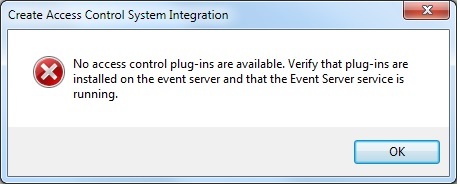
When I try to create an access control item in Management Client, I get this message:
and in the Smart Client, there is no ‘Access Control’ tab.
What is going wrong here?