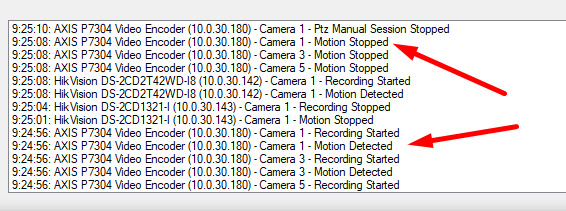
Problem description:
When I start a Ptz manual control session, the above events are present and successfully received.
But when the camera is moving using Ptz patrolling, these events are not present.
I get the events using a template Status Viewer.
Expected result:
When the camera is moving using Ptz patrolling, I need an event - Motion stopped (or something like that), at each preset position of the running patrolling profile.
Patrolling works this way. While moving the camera motion detection will be disabled, it will be disabled for the amount of time that is configured, this is the “Transition. Expected time (sec)” value. So after the period being disabled the motion detection is enabled, it will stay enabled until the next move of the camera is initiated in the patrolling scheme. This cycle of moving a camera while disabling the motion detection will repeat over and over, doing a patrolling.
If you have a camera that is pointing at scenes where there is always motion, you will have a constant flow of events, motion started when motion detection is enabled and motion stopped when motion detection is disabled.
If you have a camera that is pointing at scenes where there is never motion, you will never get motion detection events.
The way I see it you are trying to use the events to signal that the camera is not moving, that a transition move in the patrolling is completed. You can only use motion detection for this purpose if there truly is motion to detect. Unfortunately there is no event you can pick that tells you when a camera is being moved by a patrolling, when a camera is being moved by a patrolling and the transition period is over, or when the motion detection is disabled or enabled because of the patrolling.
I currently do not see a workaround for detecting the progress on the patrolling.