Hi Dario,
In general you get the related devices (Mic, Speaker) as children for every camera when you receive information for views (both with GetViews and GetAllViewsAndCameras commands).
If you need more “code” like response we will need information about your target platform. Looking at the name “LiveVideoSample” I would assume you are using MIP SDK Mobile for Android, but I cannot be sure.
Hi Petar,
I’m using MIP SDK Mobile for Android with example “LiveVideoSample”.
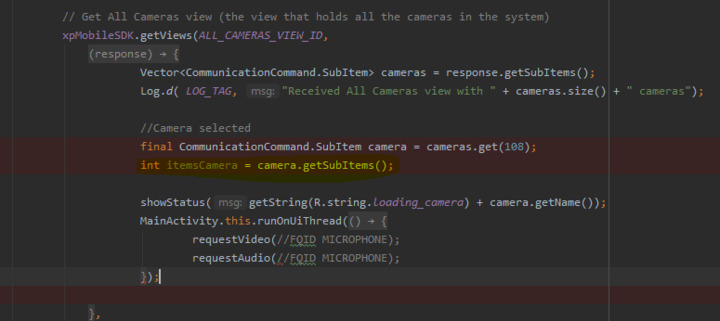
This is my code where I use the getViews method to get all the cameras, but when selecting one in particular I would like to get FQID from the microphone and I don’t know the code for this.
The camera.getSubItems () method returns an integer in response.
Thanks for the help,
Dario
Hello,
I hope I’m not too late with my answer.
GetSubitems will just return the number of subitems; to get the actual items you can make another call to GetViews using the camera Id:
if( camera.getSubItems() > 0 ) {

    xpMobileSDK.getViews(camera.getId(), new SuccessCallback() {

        @Override

        public void onSuccess(CommunicationCommand resp) {

            Log.d("getViews", "Received subitems of " + camera.getId());

            Vector<CommunicationCommand.SubItem> subitems = resp.getSubItems();

            //....

        }

    }, new ErrorCallback() {

        @Override

        public void onErrorOccurred(CommunicationCommand cmd) {

            //....

        }

    });

}
Of course, this is not very efficient as it makes a network call - but it’ll do the job
Another apporach would be to get the list of all cameras and views, using xpMobileSDK.getAllViewsAndCameras(…) and parse the result recursively, which is more efficient but requires more work.
Hope this helps,
Plamen Parvanov
Hi Plamen,
Thanks for the help, it worked perfectly,
Dario