Hi, I can’t get Management client to show my device as not connected when the connection is lost. Device is integrated in XProtect using MIP Driver Framework. It is an input/output device, with no video or audio streams.
Even if connection is lost, device still looks the same way as if it is online. I throw ConnectionLostException but nothing changed, also tried CommunicationError/CommunicationStopped events but still no success.
Even communication drops, device looks this way:
What exception or event I need to use?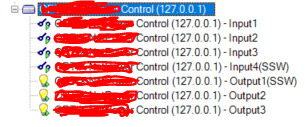
Using XProtect 2022R2
DriverFramework: 22.3.0
Regards,
Nikolay