I can use this:
Configuration.Instance.GetItemsByKind(Kind.Server, ItemHierarchy.SystemDefined);
but it returns only management server. There is not mobile server.
Then i can use this:
Configuration.Instance.GetRegisteredServiceUriInfo(servers[0].FQID.ServerId);
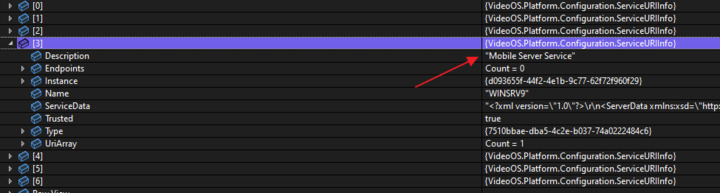
It returns all registered services with Mobile server but how can get mobile server item from returned sevices? Example of my services:
I need to know what is an unique indentifier of Mobile server KIND/TYPE. I see the type property but I do not see any constant in SDK with that type (like Kind.Server, Kind.Camera). I need Kind.MobileServer.
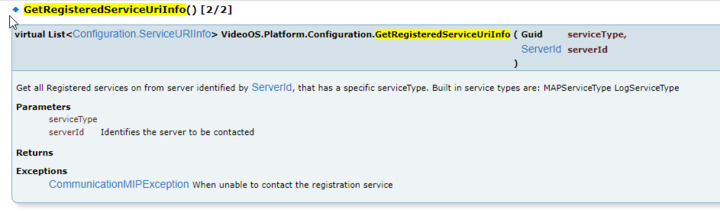
I could use this:
but what serviceType should I use to get mobile server?
and one more issue:
When I change mobile server addresses I do not receive SystemConfigurationChangedIndication. Why is that? How do I know something was changed?
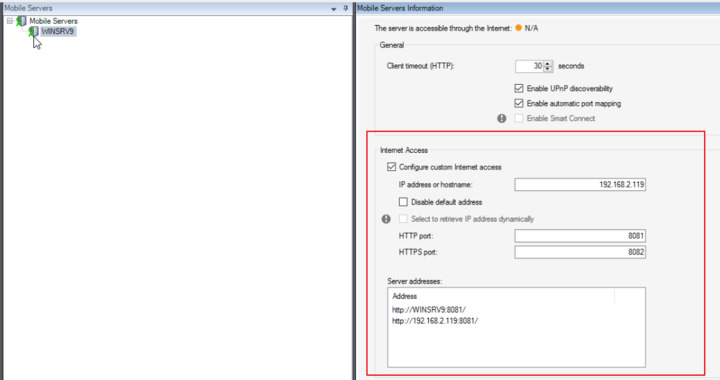
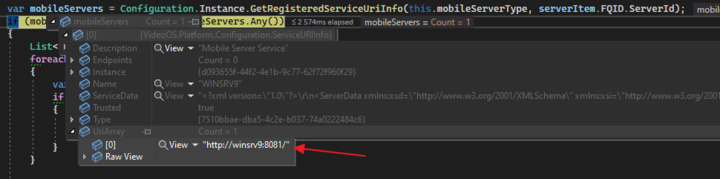
Edit: I’m getting MessageId.Server.ConfigurationChangedIndication but when I’m calling Configuration.Instance.GetRegisteredServiceUriInfo, the UriArray property does no contain all URLs defined in management (red area on image above). How do I get all URLs?
If I disable default address the UriArray still contains the default adress and does not cotain my new custom address.
GetItems(x) will give you the built-in system items, technically speaking the Mobile Server is instead a MIP Item. (Milestone used the MIP SDK to develop Mobile Server.) This means that to get the Mobile Servers you should use GetItemConfigurations(x) instead.
This works for me:
var result = Configuration.Instance.GetItemConfigurations(Guid.Empty, null, new Guid(“9947f340-397c-483b-9e03-f27253f7f403”));
This answers also the question of what kind a Mobile Server is: Guid(“9947f340-397c-483b-9e03-f27253f7f403”) This has never been documented but I found it, the documented kinds are all the built-in kinds.
In the same way you found that System.SystemConfigurationChangedIndication does not work, the issue is the same that this message works for built-in items. Instead you will have to use Server.ConfigurationChangedIndication.
(Ref. https://doc.developer.milestonesys.com/html/index.html?base=miphelp/class_video_o_s_1_1_platform_1_1_messaging_1_1_message_id_1_1_server.html&tree=tree_search.html?search=systemconf
--
const String VideoOS.Platform.Messaging.MessageId.Server.ConfigurationChangedIndication = “Server.ConfigurationChangedIndication”
-
This message is being sent by the Environment to indicate that some part of a plug-in configuration has changed.
The Message.RelatedFQID defines the top most Item that has changed. If the specific Item is not known only the Kind is filled with relevant content.
You may use this information to reload from this Item and all it’s children.
The EventServer will use this information to reload a plug-ins Items and refresh relevant Maps.
Please note that video management server configuration changes are being notified by the similar message under the System namespace (System.SystemConfigurationChangedIndication).
This feature requires the EnvironmentManager.Instance.EnableConfigurationChangedService = true;
--)
Thanks now I can use GetItemConfigurations but I do not see mobile server URLs array (the red area “Internet access” on image above) in properties. How many addresse can be in that array? Is it just default address and 1 custom address?
I see property called Properties and it’s key-value pairs. Are there properties for mobile server URLs? What I need as a result is array [http://winsrv9:8081/, http://192.168.2.119:8081].
Hi,
About mobile server kind id, it can be found in :
VideoOS.Mobile.SDK.Portable.Server.Base.Constants.MobileServiceType
About subscribing for configuration change notification:
We use
EnvironmentManager.Instance.RegisterReceiver(handler, new MessageIdFilter(MessageId.Server.ConfigurationChangedIndication)
About getting all Mobile Server Urls as shown in Management Client:
You can communicate with Mobile Server
1. By using the MIPSDKMobile
You should send GetServerStatus command with parameter “ServerAccessibility” set to “Yes”
2. Getting it from this URL : [MoSaddress]/XProtectMobile/Configuration/DeviceConfiguration
For Mobile Server address you can use the one you get from registered services
/Svetlana