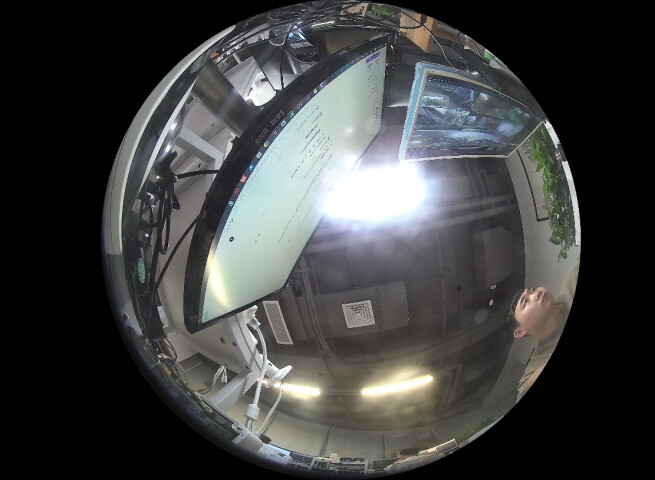
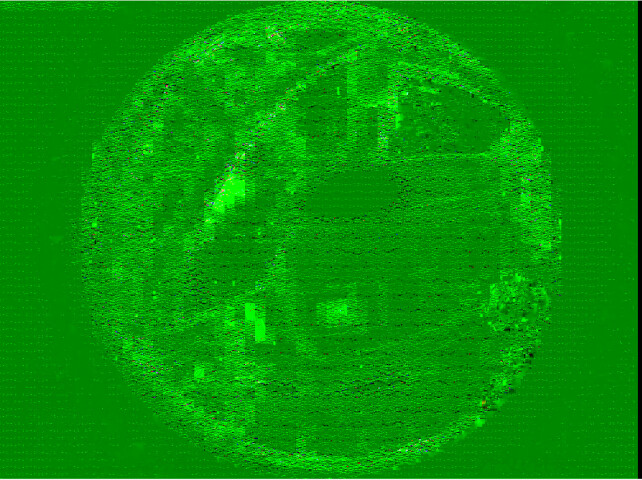
Here’s my code to fetch the frame data from BitmapLiveSouce.
private void OpenLiveSession()
{
    if (_viewItemManager.Config.DeviceId != null)
    {
        _selectedItem = Configuration.Instance.GetItem(_viewItemManager.Config.DeviceId, Kind.Camera);
        if (_selectedItem != null)
        {
            _bitmapLiveSource = new BitmapLiveSource(_selectedItem, BitmapFormat.YCbCr420_Planar);
            _bitmapLiveSource.LiveContentEvent += BitmapLiveSourceLiveContentEvent;
            _bitmapLiveSource.Width = (int)imageBox.Width;
            _bitmapLiveSource.Height = (int)imageBox.Height;
            _bitmapLiveSource.SetKeepAspectRatio(true, true);
            _bitmapLiveSource.Init();
            _bitmapLiveSource.LiveModeStart = true;
            _bitmapLiveSource.SingleFrameQueue = true;
        }
    }
}

void BitmapLiveSourceLiveContentEvent(object sender, EventArgs e)
{
    try
    {
        if (!Dispatcher.CheckAccess())
        {
            // Make sure we execute on the UI thread before updating UI Controls
            Dispatcher.Invoke(new EventHandler(BitmapLiveSourceLiveContentEvent), new[] { sender, e });
        }
        else
        {
            var args = e as LiveContentEventArgs;
            if (args != null)
            {
                if (args.LiveContent != null)
                {
                    var bitmapContent = args.LiveContent as LiveSourceBitmapContent;
                    if (bitmapContent != null)
                    {
                        if (_stopLive || imageBox.Width == 0 || imageBox.Height == 0)
                        {
                            bitmapContent.Dispose();
                        }
                        else
                        {
                            int width = bitmapContent.GetPlaneWidth(0);
                            int height = bitmapContent.GetPlaneHeight(0);
                            int stride = bitmapContent.GetPlaneStride(0);
                            byte[] dateY = bitmapContent.GetPlaneBytes(0);
                            byte[] dateU = bitmapContent.GetPlaneBytes(1);
                            byte[] dateV = bitmapContent.GetPlaneBytes(2);
                            //IntPtr dataY = bitmapContent.GetPlanePointer(0);
                            //IntPtr dataU = bitmapContent.GetPlanePointer(1);
                            //IntPtr dataV = bitmapContent.GetPlanePointer(2);

                            int ySize = stride * height;
                            int uvSize = (width / 2) * (height / 2);

                            string filePath = "./test.yuv";
                            using (FileStream fileStream = new FileStream(filePath, FileMode.Append, FileAccess.Write))
                            {
                                fileStream.Write(dateY, 0, ySize);
                                fileStream.Write(dateU, 0, uvSize);
                                fileStream.Write(dateV, 0, uvSize);
                            }

                            bitmapContent.Dispose();
                        }
                    }
                }
            }
        }
    }
    catch (Exception ex)
    {
        EnvironmentManager.Instance.ExceptionDialog("BitmapLiveSourceLiveContentEvent", ex);
    }
}
The data retrieved in the above way is saved to a file, and there are two scenarios:
1. When SmartClient is in full-screen mode and only one video window is open, the obtained frame data is normal.
2. When SmartClient is not full-screen or multiple video windows are opened, the y-component of the obtained frame data is normal, and the uv-component is abnormal.
How do I get the correct YCbCr420_Planar format frame data.