Hi,
We are using ABCBackgroundPlugin to get Camera Name with its related Meta data.
While invoking the smart client with below code, we can able to get the above details
get { return new List() { EnvironmentType.SmartClient }; }.
But if we use default EnvironmentType.Service as below, we can’t able to get the details
get { return new List() { EnvironmentType.Service }; }
FYI : It seems _activeImageViewerAddOns having camera details while using EnvironmentType.SmartClient.
But _activeImageViewerAddOns having no data while using EnvironmentType.Service but the background job is running without any problem.
We have invoked the web service as follows to get the Camera Name and related Meta data. But can’t able to get the above details,
http://localhost/ServerAPI/ServerCommandService.asmx/GetConfiguration?token=1
Our requirement is to get all Camera names with its related Meta data from the Milestone server.
Please advice us.
Thanks,
4W Team
The Event Server has no understanding of Metadata. This is a design choice based on performance / scalability. Metadata handling should be implemented in external service that can be moved to another physical server or run in multiple servers.
The Event Server does not have any UI and because of this no ImageViewerControls (and ImageViewerAddOns).
Thanks Andersen. We used ABCBackgroundPlugin to get Camera Name with its related Meta data once the smart client invoked. This ABCBackground DLL provides only current camera’s view detail (For example In 3 x 3 View , we get only 9 Camera’s detail), but we need to get all the camera details configured with the Milestone server. Please suggest a way to get the details(Camera Name with its related Meta data) of all the Cameras configured with a milestone server.
Thanks,
4W Team
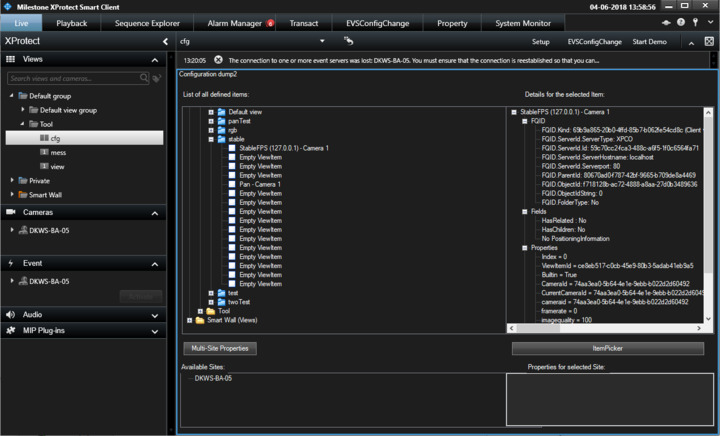
You can read the configured views in the Smart Client environment, you cannot do so in an Event Server plugin. For an overview of what you can do in the Smart Client I suggest you run the Config Dump tool plugin sample in the Smart Client, it can both show you which cameras are in a view and for cameras show related metadata and it might be what you seek.
We tried to get the details using Config Dump DLL. But we didn’t see the Tool in the view panel you mentioned above. We placed DLL in “[C:\Program](file:C:/Program) Files\Milestone\MIPPlugins” folder. We are running Milestone server and Milestone client in different machine.