Hello,
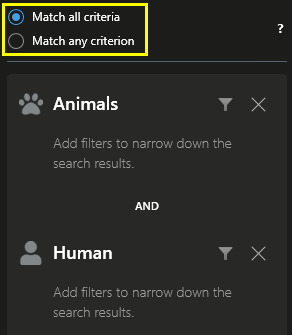
I have studied the sample project SCAnimalsSearchAgent in MIPSDK, then wrote two search agents for animal and human. They works well until add them into a single search, as the below picture.
first, the number of results is more than the total number fired in two plugin.
second, the override function of SearchResultUserControl::Init() is not called.
Is there another sample that could help me? Thank you.
Best regards,
Hi Jasper
First a general comment. The SCAnimalsSearchAgent is a sample illustrating which options you have when creating a search agent, and the results produced by it are not in any way related to the video in the VMS. This may cause some confusion when combination logic is involved; see below.
Now for your 2 questions:
The reason you are seeing a different number of results than the number produced by your search agents, is because the Smart Client tries to combine these search results if they originate from the same camera and overlap in time (in essence, they represent nearly the same video sequence). For more details on the combination logic, please refer to the Smart Client user guide (link).
The second question refers to why the Init() method of your custom result user control is not called. Again, this involves the combination logic. When the Smart Client decides to combine 2 or more search results into a single result, the result tile (user control in the list of results) falls back to a “generic” video result showing a thumbnail of the video for the given camera at the most important event time (based on the event times from the “sub results”).
So in general, I think what is confusing you is the fact that your search agents produce results that are in no way related to the video from the cameras in the VMS, and when results are combined, it is difficult to understand what you see. What could help you get a better understanding, are the result properties. These are shown in the right side under the Details tab. When selecting a result in the list, you will see information from the result in this tab. If the result is a combined result, you will see information from all “sub results” accumulated.
Perhaps if you try to clarify what it is you’re trying to achieve, then we can point you in the right direction.
Best regards,
Nicolai