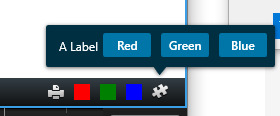
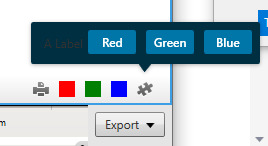
Take for example the SCToolbarPlugin project in the PluginSamples repo, and add a WPF alongside the buttons
When the SC Theme is set to Dark, we can see the label, but when the SC Theme is set to Light, the image is invisible against the background of the ToolbarPluginWpfUserControl (which doesn’t seem to change no matter what theme is selected)
Attempting to override with doesn’t work, as the MIPSDK overwrites this property when the theme is changed.
It it possible to get a Label to be visible all the time, like the (undocumented) VideoOS.Platform.UI.Controls.VideoOSButtonPrimarySmall?
Does Milestone intend to document the controls in VideoOS.Platform.UI.Controls?
The controls in VideoOS.Platform.UI.Controls is sort of an alpha. The controls will be documented and recommended for use in a future version of the MIP SDK, probably in 2023R3. Please keep an eye on the news from Milestone. What it means right now is that you can use the controls but until the official release and documentation the controls can be changed by Milestone without notice. If you use the controls now there is no guarantee they will work the same way in a future version. Once the controls are released Milestone will maintain forward and backward compatibility, that a plugin made for one version will work in the next version etc..
If not using these controls that are not officially there: You can make sure a control is not “themed” by applying a style to it. Simple as that, it overwrites the styles inherited in the environment that makes theming work in the Smart Client. You can see it in use in the Smart Client Theme sample.
https://doc.developer.milestonesys.com/html/index.html?base=samples/pluginsamples/sctheme/readme.html&tree=tree_search.html?search=theme
https://github.com/milestonesys/mipsdk-samples-plugin
Thanks Bo, at first I couldn’t get this work. Applying the style as below, the was still invisible when the SC was in the Light Theme, even though the style appeared to apply properly in the WPF designer.
However, when I changed the to a it did work, and I can use this as a workaround.
I think this might be a pair of bugs in SmartClient:
- Styles on Label components are overridden by SC Theme regardless of them having a Style override
- Theming is applied inconsistently to controls in a ToolbarPluginWpfUserControl. Things like ListBoxes change their Background and Foreground properties as appropriate with the theme. But elements like TextBlocks only change their Foreground. Because the background of a ToolbarPluginWpfUserControl is always dark regardless of theme, this causes them to be invisible.
Also one query: Can we expect ToolbarPluginWpfUserControl Backgrounds to be always dark blue regardless of the theme in future versions?
Thanks!
Now that you are using these new controls please try to use VideoOSTextBlockLabel or one of the other VideoOSTextBlockXxx controls.
On the regular WPF controls like label: If you do use a style nothing is automatic, you will have to subscribe to Theme changes and apply new style when changed.
As you are using the VideoOS… controls please do so also for the label. They will follow the scheme and the theme always, that is the reason Milestone is developing them.
BTW. When I first answered I did not realize that the sample uses these new controls even if they are not officially released. There is new and better functionality in the sample compared to using an older sample from a previous version of the MIP SDK!