Hi,
I’m new to MIP development.
I’m trying to load an Access Control plugin, but it seems it’s not getting loaded.
What I did was
-
building an MIP Access Control plugin from the template
-
and then putting the DLLs in the MIPPlugins folder under the Xprotect Management Client folder.
What happens when I launch the client is nothing.
To test if the client can load other plugins, I also built an MIP plugin and put the DLLs in the folder and I was able to see that the plugin was loading from the log file ([C:\ProgramData\Milestone\XProtect](file:C:/ProgramData/Milestone/XProtect) Management Client\Logs\MIPtrace.log).
What am I missing?
Please take a look at the attached screenshots.
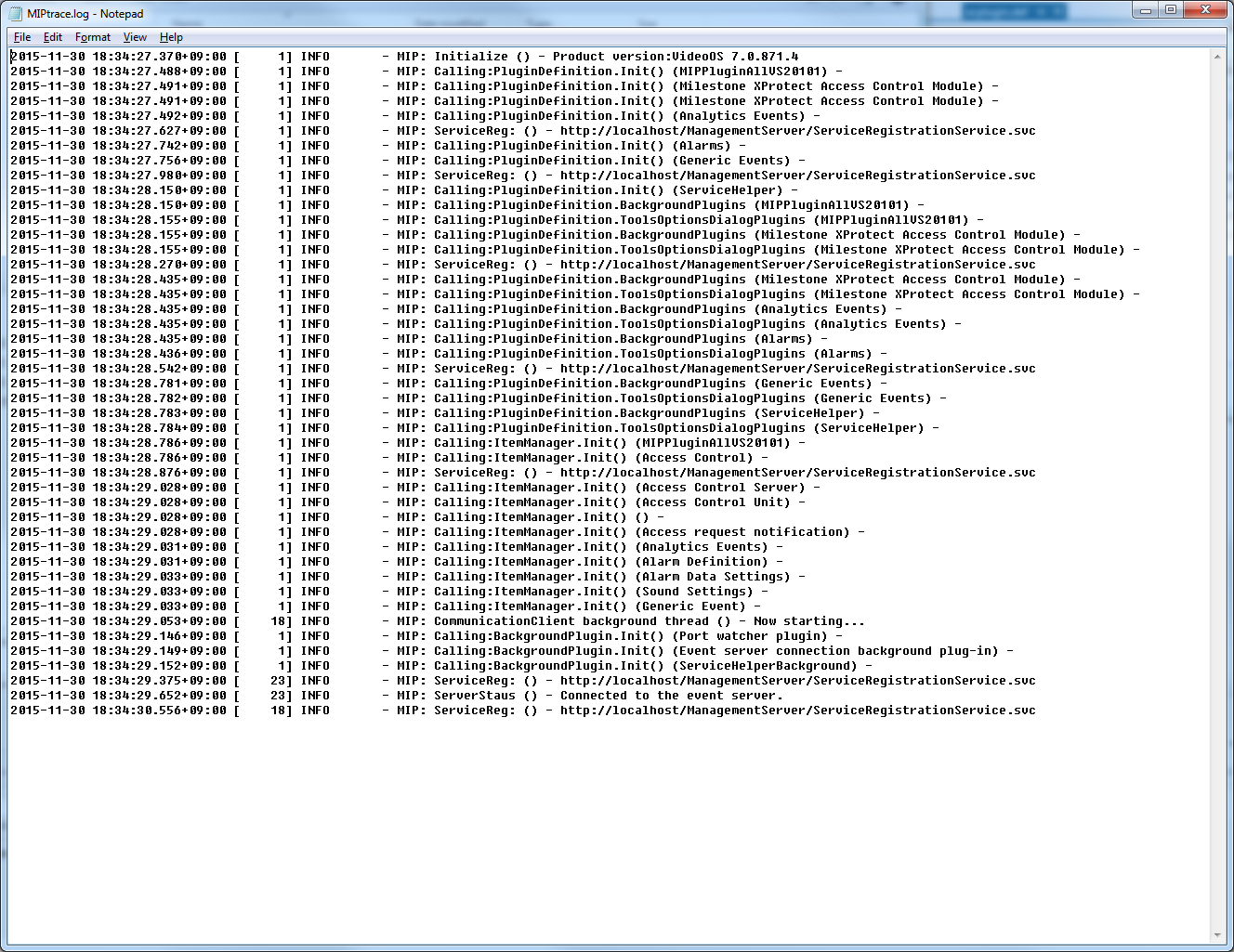
In case you cannot see the log because of the resolution:
As you can see from the below, there’s a line for “MIPPluginAllVS20101” (MIP Plugin) but there’s no line for “SupremaAccessControlPlugin”, which is an MIP Access Control plugin.
2015-11-30 18:34:27.370+09:00 [ 1] INFO - MIP: Initialize () - Product version:VideoOS 7.0.871.4
2015-11-30 18:34:27.488+09:00 [ 1] INFO - MIP: Calling:PluginDefinition.Init() (MIPPluginAllVS20101) -
2015-11-30 18:34:27.491+09:00 [ 1] INFO - MIP: Calling:PluginDefinition.Init() (Milestone XProtect Access Control Module) -
2015-11-30 18:34:27.491+09:00 [ 1] INFO - MIP: Calling:PluginDefinition.Init() (Milestone XProtect Access Control Module) -
2015-11-30 18:34:27.492+09:00 [ 1] INFO - MIP: Calling:PluginDefinition.Init() (Analytics Events) -
2015-11-30 18:34:27.627+09:00 [ 1] INFO - MIP: ServiceReg: () - http://localhost/ManagementServer/ServiceRegistrationService.svc
2015-11-30 18:34:27.742+09:00 [ 1] INFO - MIP: Calling:PluginDefinition.Init() (Alarms) -
2015-11-30 18:34:27.756+09:00 [ 1] INFO - MIP: Calling:PluginDefinition.Init() (Generic Events) -
2015-11-30 18:34:27.980+09:00 [ 1] INFO - MIP: ServiceReg: () - http://localhost/ManagementServer/ServiceRegistrationService.svc
2015-11-30 18:34:28.150+09:00 [ 1] INFO - MIP: Calling:PluginDefinition.Init() (ServiceHelper) -
2015-11-30 18:34:28.150+09:00 [ 1] INFO - MIP: Calling:PluginDefinition.BackgroundPlugins (MIPPluginAllVS20101) -
2015-11-30 18:34:28.155+09:00 [ 1] INFO - MIP: Calling:PluginDefinition.ToolsOptionsDialogPlugins (MIPPluginAllVS20101) -
2015-11-30 18:34:28.155+09:00 [ 1] INFO - MIP: Calling:PluginDefinition.BackgroundPlugins (Milestone XProtect Access Control Module) -
2015-11-30 18:34:28.155+09:00 [ 1] INFO - MIP: Calling:PluginDefinition.ToolsOptionsDialogPlugins (Milestone XProtect Access Control Module) -
2015-11-30 18:34:28.270+09:00 [ 1] INFO - MIP: ServiceReg: () - http://localhost/ManagementServer/ServiceRegistrationService.svc
2015-11-30 18:34:28.435+09:00 [ 1] INFO - MIP: Calling:PluginDefinition.BackgroundPlugins (Milestone XProtect Access Control Module) -
2015-11-30 18:34:28.435+09:00 [ 1] INFO - MIP: Calling:PluginDefinition.ToolsOptionsDialogPlugins (Milestone XProtect Access Control Module) -
2015-11-30 18:34:28.435+09:00 [ 1] INFO - MIP: Calling:PluginDefinition.BackgroundPlugins (Analytics Events) -
2015-11-30 18:34:28.435+09:00 [ 1] INFO - MIP: Calling:PluginDefinition.ToolsOptionsDialogPlugins (Analytics Events) -
2015-11-30 18:34:28.435+09:00 [ 1] INFO - MIP: Calling:PluginDefinition.BackgroundPlugins (Alarms) -
2015-11-30 18:34:28.436+09:00 [ 1] INFO - MIP: Calling:PluginDefinition.ToolsOptionsDialogPlugins (Alarms) -
2015-11-30 18:34:28.542+09:00 [ 1] INFO - MIP: ServiceReg: () - http://localhost/ManagementServer/ServiceRegistrationService.svc
2015-11-30 18:34:28.781+09:00 [ 1] INFO - MIP: Calling:PluginDefinition.BackgroundPlugins (Generic Events) -
2015-11-30 18:34:28.782+09:00 [ 1] INFO - MIP: Calling:PluginDefinition.ToolsOptionsDialogPlugins (Generic Events) -
2015-11-30 18:34:28.783+09:00 [ 1] INFO - MIP: Calling:PluginDefinition.BackgroundPlugins (ServiceHelper) -
2015-11-30 18:34:28.784+09:00 [ 1] INFO - MIP: Calling:PluginDefinition.ToolsOptionsDialogPlugins (ServiceHelper) -
2015-11-30 18:34:28.786+09:00 [ 1] INFO - MIP: Calling:ItemManager.Init() (MIPPluginAllVS20101) -
2015-11-30 18:34:28.786+09:00 [ 1] INFO - MIP: Calling:ItemManager.Init() (Access Control) -
2015-11-30 18:34:28.876+09:00 [ 1] INFO - MIP: ServiceReg: () - http://localhost/ManagementServer/ServiceRegistrationService.svc
2015-11-30 18:34:29.028+09:00 [ 1] INFO - MIP: Calling:ItemManager.Init() (Access Control Server) -
2015-11-30 18:34:29.028+09:00 [ 1] INFO - MIP: Calling:ItemManager.Init() (Access Control Unit) -
2015-11-30 18:34:29.028+09:00 [ 1] INFO - MIP: Calling:ItemManager.Init() () -
2015-11-30 18:34:29.028+09:00 [ 1] INFO - MIP: Calling:ItemManager.Init() (Access request notification) -
2015-11-30 18:34:29.031+09:00 [ 1] INFO - MIP: Calling:ItemManager.Init() (Analytics Events) -
2015-11-30 18:34:29.031+09:00 [ 1] INFO - MIP: Calling:ItemManager.Init() (Alarm Definition) -
2015-11-30 18:34:29.033+09:00 [ 1] INFO - MIP: Calling:ItemManager.Init() (Alarm Data Settings) -
2015-11-30 18:34:29.033+09:00 [ 1] INFO - MIP: Calling:ItemManager.Init() (Sound Settings) -
2015-11-30 18:34:29.033+09:00 [ 1] INFO - MIP: Calling:ItemManager.Init() (Generic Event) -
2015-11-30 18:34:29.053+09:00 [ 18] INFO - MIP: CommunicationClient background thread () - Now starting…
2015-11-30 18:34:29.146+09:00 [ 1] INFO - MIP: Calling:BackgroundPlugin.Init() (Port watcher plugin) -
2015-11-30 18:34:29.149+09:00 [ 1] INFO - MIP: Calling:BackgroundPlugin.Init() (Event server connection background plug-in) -
2015-11-30 18:34:29.152+09:00 [ 1] INFO - MIP: Calling:BackgroundPlugin.Init() (ServiceHelperBackground) -
2015-11-30 18:34:29.375+09:00 [ 23] INFO - MIP: ServiceReg: () - http://localhost/ManagementServer/ServiceRegistrationService.svc
2015-11-30 18:34:29.652+09:00 [ 23] INFO - MIP: ServerStaus () - Connected to the event server.
2015-11-30 18:34:30.556+09:00 [ 18] INFO - MIP: ServiceReg: () - http://localhost/ManagementServer/ServiceRegistrationService.svc