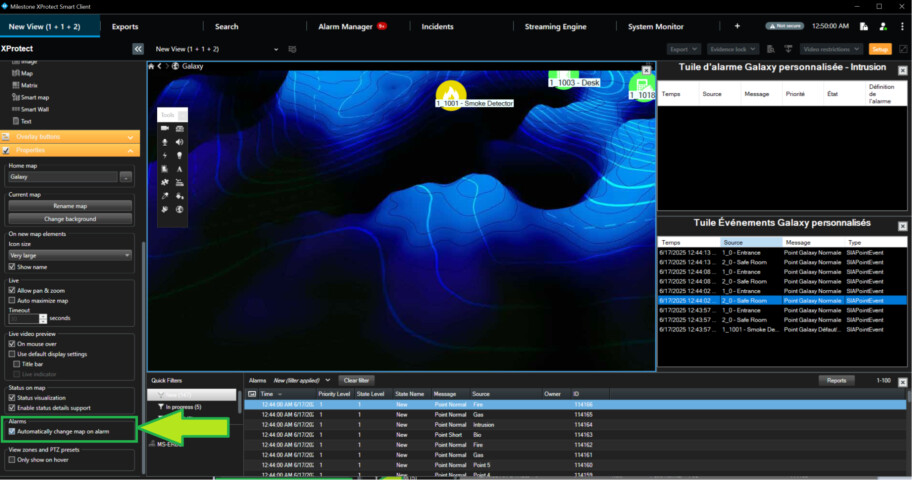
We have designed some custom ViewItems that work similar to the AlarmList but which come with default filters and special behaviors.
Is it possible to make the map react and change to the floorplan associated to the alarm definition when selecting an alarm in the list?
Or we could use this option as long as we don’t need to have a “normal” alarm list in the view.
You can subscribe to the alarm line selection. Smart Client Dynamic View plugin sample shows this. You might already have this in place, I suspect you do.
https://doc.developer.milestonesys.com/html/index.html?base=samples/pluginsamples/dynamicview/readme.html&tree=tree_1.html
There are no methods to build a legacy map using code.
A speculation on my part is whether you can instead build a view, or modify the view, where you put the viewitem as a legacy map. There is a MapBuiltinId. https://doc.developer.milestonesys.com/html/index.html?base=miphelp/class_video_o_s_1_1_platform_1_1_client_1_1_view_and_layout_item.html&tree=tree_search.html?search=mapbuiltinid
The Smart Client Insert Camera plugin sample, shows how to put in a camera view item but not a map item, so you will have to experiment.
https://doc.developer.milestonesys.com/html/index.html?base=samples/pluginsamples/scinsertcamera/readme.html&tree=tree_1.html
Whether you can make it work so that it also fits your requirements is pure guesswork from me.
Hi Bo, thanks for your reply.
I can try it out, but it is not obvious to me how the map would automatically change to the right submap when an alarm is selected.
The goal is to select and alarm and have the map change, so subscribing to the alarm line selection won’t help, we would need to be able to send a message to the Smart Client which a normal map tiel would listen to.
It there a way to perhaps ask dev it is possible to send a message using EnvironmentManager.PostMessage with the alarm defnition ID in such a way that the map view item would recognize it?
I know I have had the question before whether it was possible to control the alarm list and by message or command have it jump to an alarm line. For this question the answer is no, there is currently no interface to do that.
I know that when looking at the Alarm Manager workspace, the map that is displayed is governed by the alarm definition, when the user picks an alarm line the map changes to the map specified in the alarm definition for the alarm. Is this what you want to mimic for your view item? I am trying to text the right context before consulting the Smart Client expert developers.
Yes, and just to be clear, we want it so that the map changes to the map specified in the alarm definition section when an alarm line on our view item is clicked
I will go back to my first reply: A speculation on my part is whether you can instead modify the view, where you put the viewitem as a legacy map.
I am assuming here that you know how to identify the right legacy map, perhaps it can be read from the Alarm Definition.
Take a look at the Smart Client View and Window plugin sample, the Edit tab, start with select view and pick a view where you have a Map, see how you can change this to another map. I have an idea this is the functionality you need..
https://doc.developer.milestonesys.com/html/index.html?base=samples/pluginsamples/scviewandwindow/readme.html&tree=tree_1.html