Continue from my previous post below:
https://developer.milestonesys.com/s/question/0D50O00005aBNLXSA4/focus-near-and-focus-far-with-sdk
I was able to get the control of the camera Lens with the SDK sample provided.
But how to relate focus near and focus far from available command?
The plugins provided is able to add overlay buttons for Focus far and Focus near functions in setup mode and use them in normal mode.
What you describe is a feature that is available already, no development required:
Go into Setup mode on a regular camera view item:
In the left hand side find and expand the “Overlay Button” section. Drag the overlay button you want onto the camera view item.
If you still would like to develop a plugin please elaborate on the question. I do not understand what you are missing given that you have the View and Windows Tool sample and the sample source code.
Thanks for the quick respond!
Apologize for not being clear in my post.
I am well aware that the overlay buttons are already available.
What I not sure if how can I implement two buttons, one [Focus Near] and the other one [Focus Far] on my one UI program when clicked will performed the desired Focus.
In shot, in the following commands:
msg = new Message(MessageId.Control.LensCommand, LensCommandData.FocusDownStart);
EnvironmentManager.Instance.SendMessage(msg, \_camera.FQID);
How and what parameters should I pass in to perform focus near and focus far.
I can only get focusdown and focusup from the LensCommandData set.
hopefully you can guide me the way.
Thanks.
I suggest you single step debug with the Smart Client View and Windows Tool plugin sample if in doubt what it does exactly.
Hi Bo,
I think we are having some miss-communication.
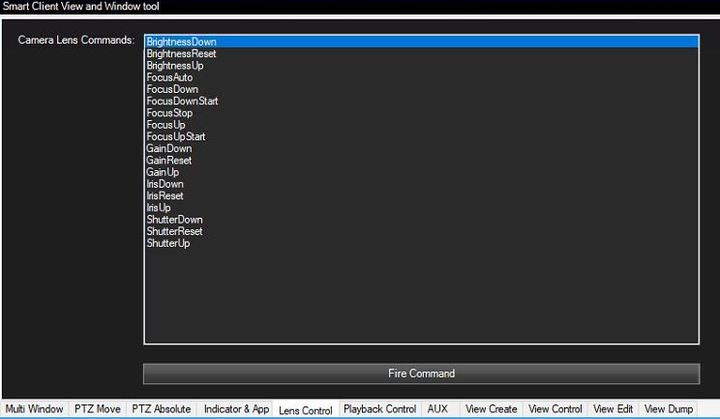
I have spent some times to look through the Smart Client View and Windows Tool plugin sample. I tried firing all the Camera Lens Commands in the list of the following image:
However,
NONE of them, perform the
[FOCUS FAR] and
[FOCUS NEAR] features I wanted as it does with those
overlay buttons, see the following image:
So I guess there is nothing to do with the SCViewAndWindowsTools plugin sample?
Even the documentation in
VideoOS.Platform.Messaging.LensCommandData Class Reference
from https://doc.developer.milestonesys.com/html/
doesn’t really explains well what are FocusUp and FocusDown actually do…
In summary, I mean, when I try firing all the commands available in Smart Client View and Windows Tool plugin sample, none of them does the same things as both the [FOCUS FAR] and [FOCUS NEAR] overlay buttons did.
Two of these [FOCUS FAR] and [FOCUS NEAR] buttons are exactly what I wanted in my developing program, and I’m looking for the code or command(s) to perform them.
Thanks.
Might “Focus far start” be the same as FocusUp? This should be easy to test.
Thanks for pointing it out! I realized there is logical error which caused me to failed the test. Thanks again.