How to retrieve the ACProperty passed as a part of ACEvent

I am passing an ACProperty as below:

ACProperty Message = new ACProperty(“MyMessage” , “This is a custom message from Velocity”);

  List<ACProperty> properties = new List<ACProperty>() ;

  properties.Add(Message);

  var @event = new ACEvent(Guid.NewGuid().ToString(), [eventType.Id](https://eventType.Id), "1", DateTime.UtcNow, sMessage, sReason, null, null, properties);

  FireEventsOccurred(new\[\] { @event });

I would like to retrieve it when a NewEventIndication occurs, but I couldnt find which property of the Base event exposes this property. Have anyone passed and retrieved the ACProperty

var events = message.Data as System.Collections.Generic.IEnumerable;

    foreach (BaseEvent ev in events)

    {

          AccessControlEvent ac = ev as AccessControlEvent;

          string id = ac.AccessControlSystemEventId;

          bool parsingstatus = int.TryParse(id, out velocityAlarmID);

    }

The AccessControlEvent class has a Properties property. It is an array with the properties attached to the Access Control event, so the “Message” property should be somewhere in that array.

An example of how to access the properties:

if (ev is AccessControlEvent ac)
{
   EnvironmentManager.Instance.Log(false, "DemoACSystem::EventReceiver", ac.Properties.Length.ToString());
   foreach (Property prop in ac.Properties)
   {
       EnvironmentManager.Instance.Log(false, "DemoACSystem::EventReceiver", prop.Key);
       EnvironmentManager.Instance.Log(false, "DemoACSystem::EventReceiver", prop.Value);
    }
}

The BaseEvent itself doesn’t have those properties, but your plugin should be interested only in the Access Control ones and filtering for those events should be fairly simple.

I am passing AC property as below

public void SendEvent(string alarmID , string id, string source, string message, string reason, IEnumerable relatedCredentialHolderIds)

{

  ACUtil.Log(false, "sendevent", id.ToString() + source + message + reason);

  IEnumerable<ACProperty> props = new List<ACProperty>();

  ACUtil.Log(false, "Send Event", "\*\*\*\*\*\*\*\*\*\*\*\*\*\*\*\*\*\*\*\*\*\*Here Sending AcProperty");

  ACProperty alarmIDDetails = new ACProperty("AlarmNotes", "This is a sample alarm note");

  props.Append(alarmIDDetails);

  FireEventsOccurred(new\[\] { new ACEvent(alarmID, id, source, DateTime.Now, message, reason, relatedCredentialHolderIds, null, props) });

}

And trying to retrieve the ac property as below:

BaseEvent baseevent = alarmClient.GetEvent(evt.Id);

            AccessControlEvent ac = baseevent as AccessControlEvent;

            string id = ac.AccessControlSystemEventId;

            ACUtil.Log(false, "New Alarm \*\*\*\*\*\*\*\*\*\*\*\*\*\*", id.ToString() + "Length =" + ac.Properties.Length.ToString());

            foreach (Property prop in ac.Properties)

            {

              ACUtil.Log(false, "NewAlarm", prop.Key.ToString() + " " + prop.Value.ToString());

            }

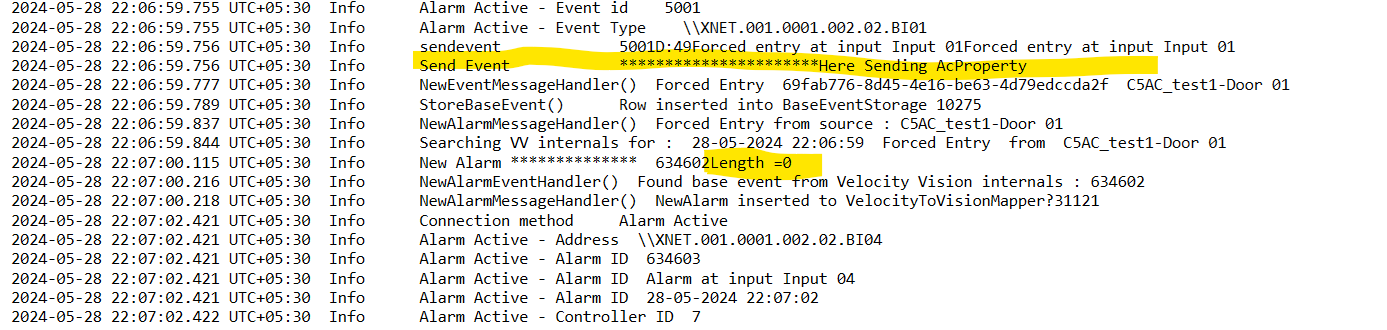
but the property length seems to be zero. I have attached my screenshot below

Are you still registering a receiver for the NewEventIndication message, or are you using only the AlarmClient to retrieve the event?

I am Registering a receiver for “NewEventIndication” and inside the receiver I am retrieveing the Base event and trying to read the “Properties”

If you are using a receiver for that message, then you can directly check if Message.Data is an AccessControlEvent and use that to get the properties. You don’t need to use an alarm client to get the event.

private object CheckEvent(Message message, FQID destination, FQID sender)
{
    if(message.Data is AccessControlEvent ac)
    {                
        ACUtil.Log(false, "New Alarm ************** ", ac.AccessControlSystemId.ToString() + " Length =" + ac.Properties.Length.ToString());
        foreach (Property prop in ac.Properties)
        {
             ACUtil.Log(false, "NewAlarm", prop.Key.ToString() + " " + prop.Value.ToString());
         }
    }
    return null;
}

If that doesn’t work, let me know which version of the SDK you’re using.

I am trying to retrieve the AC property at either of 2 places:

1.private object NewAlarmMessageHandler(VideoOS.Platform.Messaging.Message message, FQID dest, FQID source) → prefered function to retrieve

  1. private object NewEventMessageHandler(Message message, FQID destination, FQID sender)

which are listening to “NewAlarmIndication” and “NewEventIndication” respectively. At both the places the length of Access control Event “Properties” seems to be zero inspite of sending data.

I am using MIP 2020 R3

I am using MIP SDK 2020 R3

Seems like there is an issue with that version of the SDK. Unfortunately, this version is out of support (https://www.milestonesys.com/support/software/product-lifecycle/) and I don’t think there is another way that you can get those properties. If you can, try to use a newer version and see if that helps.

Does this mean , I have to install the latest MIPSDK and redo the project from scratch?

I was trying to dowload the MIPSDK latest version under Technology partner portal “Download Software” page, but I can find only the MIPSDK tools and stable FPS instead of the actual MIPSDK Installer. So where can I download the actual MIPSDK Installer

The newer MIP SDK is available as a NuGet package. You can look for Milestone in the NuGet package manager in Visual Studio.

I don’t expect you would need to redo the entire project, the newer SDKs should maintain previous functionality.

This might help.

Amongst other things explain how you should use Milestone NuGets..

https://doc.milestonesys.com/sysarch/pdf/latest/en-US/MilestoneMIPSDK_GettingStartedGuide_en-US.pdf

In general you should always be able to build with the newest MIP SDK. You only have to change your code in a few cases where Milestone has made breaking changes. These changes should all be listed in the release notes. Going from 2020R3 there are a lot of notes as the current version is 2023R3:

https://doc.developer.milestonesys.com/html/

https://doc.developer.milestonesys.com/html/index.html?base=gettingstarted/mip2023r3_intro.html&tree=tree_home.html

I installed the latested version of Nugets to my plugin project and it pretty much didnot affect anything in the plugin. So I was successfully able to build the project. But still I am not getting any AC Properties in the “NewEventIndication” Listener

I am trying to print ACProperty length as below

ACUtil.Log(false, "New Event ************** “, ac.AccessControlSystemId.ToString() + " Length =” + ac.Properties.Length.ToString());

Can you show me how you attach the properties to the event?

I tried using the code you provided above (pasted here), but the IEnumerable class doesn’t have an append function. Do you have an extension method defined for that class?

public void SendEvent(string alarmID , string id, string source, string message, string reason, IEnumerable<string> relatedCredentialHolderIds)
 
    {
 
      ACUtil.Log(false, "sendevent", id.ToString() + source + message + reason);
 
      IEnumerable<ACProperty> props = new List<ACProperty>();
 
      ACUtil.Log(false, "Send Event", "**********************Here Sending AcProperty");
 
      ACProperty alarmIDDetails = new ACProperty("AlarmNotes", "This is a sample alarm note");
 
      props.Append(alarmIDDetails);
 
      FireEventsOccurred(new[] { new ACEvent(alarmID, id, source, DateTime.Now, message, reason, relatedCredentialHolderIds, null, props) });
 
    }

In my tests I’ve been using just simple lists and adding properties with “Add”, like so

 public static ACEvent ToACEvent(DoorControllerEvent dce)
 {
     var eventId = Guid.NewGuid().ToString();
     var eventTypeId = dce.EventId.ToString();
     var properties = new List<ACProperty>();
 
     var relatedCredentialHolderIds = new List<string>();
     if (dce.CredentialHolderId != Guid.Empty)
     {
         relatedCredentialHolderIds.Add(dce.CredentialHolderId.ToString());
     }
 
     // Check if the event is from the door or the access point
     string sourceId;
     if (dce.AccessPoint != 0)
     {
         sourceId = CreateAccessPointId(dce.DoorId, dce.AccessPoint);
         properties.Add(new ACProperty("AccessPoint", sourceId));
     }
     else
 
     {
         sourceId = dce.DoorId.ToString();
         properties.Add(new ACProperty("door", sourceId));
     }
 
     ACUtil.Log(false, "Send Event", "**********************Here Sending AcProperty");
 
     ACProperty alarmIDDetails = new ACProperty("AlarmNotes", "This is a sample alarm note");
     
     properties.Add(alarmIDDetails);
     return new ACEvent(eventId, eventTypeId, sourceId, dce.Timestamp, string.Empty, dce.Reason, relatedCredentialHolderIds, null, properties);
 }

Got it , Thanks for the help