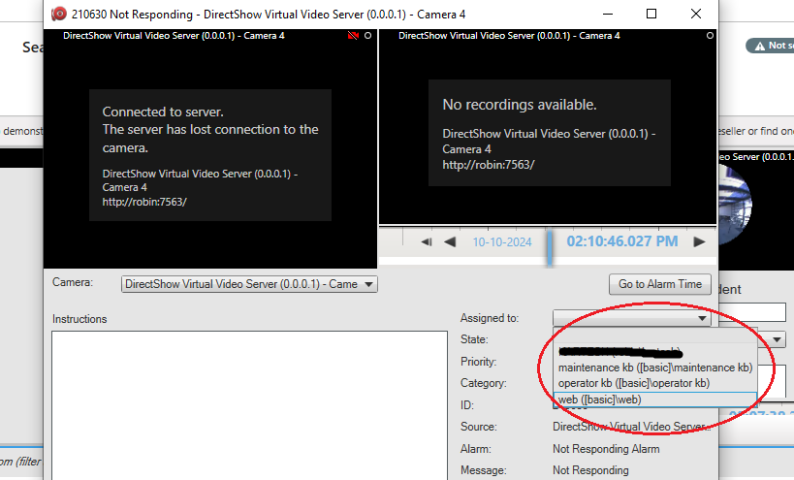
I am trying to update the Assigned To user of an alarm using MIP sdk. I used the following for updating it.
alarmClient.UpdateAlarm(alarmId, comment, alarm.State, alarm.EventHeader.Priority, DateTime.UtcNow, alarmObj.UserName);
This is working. We can see that assigned to field is changed. But we can’t see the changed username in “Assigned to” dropdown in edit of that alarm.
I investigated and for me it works, but I am very much in doubt if I understand where you see no change. Perhaps you can grab a screen capture if something looks wrong in the Smart Client, otherwise try to elaborate how I might observe the same as you.
How do we get the user list which is used in “assign to” dropdown inside the ‘edit alarm’ window in alarm manager?
@Bo Ellegård Andersen (Milestone Systems) @Rie Kiuchi (Milestone Systems) please respond
There is no public method in the MIP SDK to achieve the objects that fill this drop down.
It is possible via Configuration API to read the roles defined in the server. To find which roles are allowed to see the alarm and the source item of the alarm. Then to find the users that belong to those roles. Those users are the ones mentioned in the drop down.