How to use Bounding Box Provider Program ?

Hi Milestone Team,

I started to use Milestone VMS. I am trying to add draw metadata on Smart Client Application. I followed this guide: https://doc.developer.milestonesys.com/html/samples/BoundingBoxMetadataProvider.html

However, i did not see any box as described.

I attached two pictures to help you understanding our current situation.

Please help me to find the wrong point in my run.

I am using XProtect Professional+ 2019 R2 Trial

Hi. Let me understand your question clearly. Does the sample work without your implement? If not, please read “How to use this sample” instructions and try it again. Now I tested professional+ and it worked.

Hi Rie,

Thank for your quickly response,

I never see this sample work. Therefore, i built this sample from MIP SDK code. Then i run this sample with some other setting according to this instruction (https://doc.developer.milestonesys.com/html/samples/BoundingBoxMetadataProvider.html). But i don’t see any things in Smart Client Application, You can see them in attached files.

Thanks,

Hi Dien,

This article might be helpful for you.

https://developer.milestonesys.com/s/article/Can-I-have-multiple-MIP-Driver-based-devices

Hi Rie,

Sorry, but i am abit confusing.

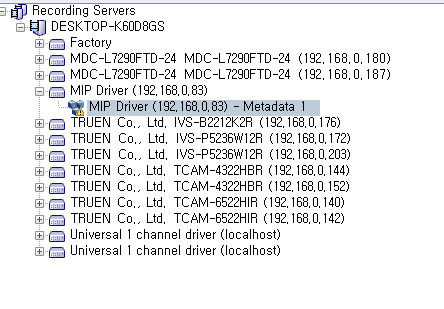
I used only one MIP Driver and i enabled MIP driver succesfully (you can verify in this attached file). Do you need any information from my implementation?

Thanks,

Hi Dien,

Let’s make the sample work. I believe it works. Please check following instructions.

  1. Start the Smart Client.

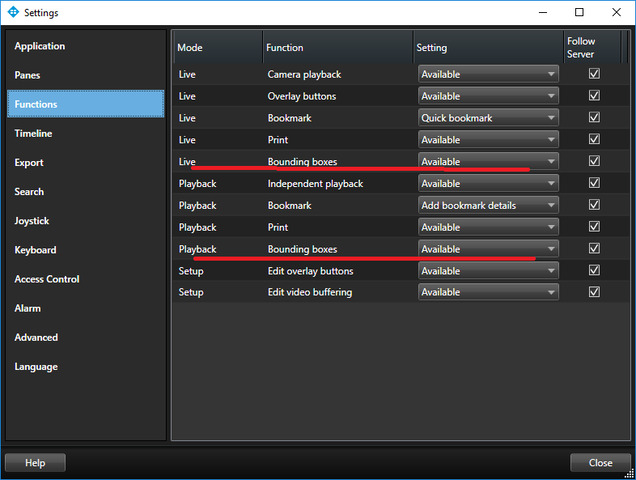
  2. Check if bounding boxes are enabled in “Settings”.

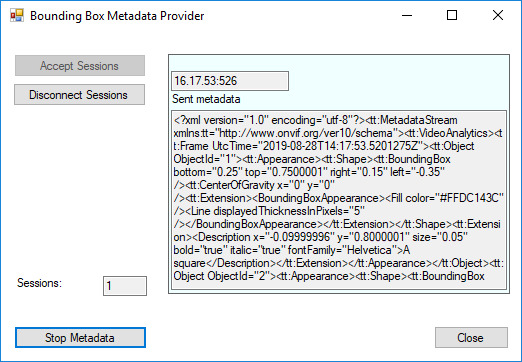
  1. Press the “Start Metadata” button on the sample after a connection has been established. Then you can see that the metadata is sending.

(Regarding your first image, it seemed that the metadata was not sending.)

  1. Click “Setup”(setup mode) in Smart Client. Set the camera (maybe “MDC-L7290FTD-24 MDC-L7290FTD-24(192.168.0.180)”) in a view on Smart Client.

  2. Click “Setup” again (close setup mode). Then you will see metadata.

Hi Rie,

I thought that the connection has not been established yet.

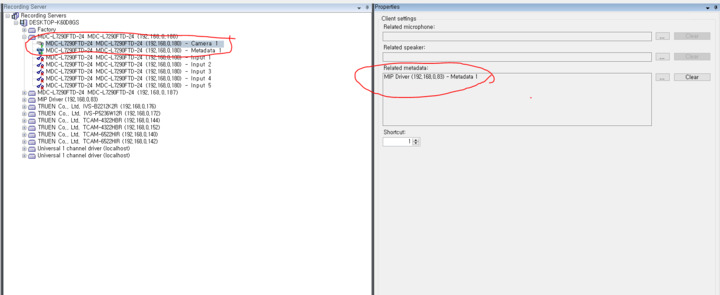
I created the MIP Driver and add Metadata device into camera. You can check in attached pictures.

How to verify the connection ? If not yet, where should i check to correctly the installation of metadata device?

Hi Rie,

Is it support for trial license ?

I am using Professional+ with trial license. I saw error related to MIP Driver in System logs

picture9

Any device that is not licensed will not work. I am guessing that your license is expired. There is no ban on MIP Driver on trial licenses so I simply think you have a bad or expired license.

If you want clarification on the state of your license or help how to handle it please ask the License Chat.

On this page you find the license chat as an applet in the lower right hand side -
https://www.milestonesys.com/support/

Hi Bo,

Thank for your hint.

as you said, i verified my license status using License Chat and found the reason.

Because i am using trial license, so maximum devices can work is 8 devices.

But when i connect Milestone VMS to our company networks, number of cameras is over 8. Therefore, has no space for metadata device made by MIP Driver.

Thank you so much,