We want to use Single Milestone MIP Driver for multiple Milestone cameras to write Metadata bounding boxes depending on the coming Alarms
No, it is not possible. Single Milestone MIP Driver is for a camera. But if you want to write Metadata bounding boxes depending on the coming Alarms, to use Analytics events would be a good idea. Please read and see Analytics Event Trigger via library sample:
A colleague of mine asked whether this could actually be true and I must admit that we misread the question. It is possible to make a single MIP driver with multiple metadata channels and each of those can then potentially be used for a camera. So the answer to the question is yes.
Sorry for the confusion.
Hi Peter, currently we are configuring a single MIP Driver in the Milestone management client. This MIP driver is then assigned to multiple cameras. However, when we publish the metadata (overlay) to a particular camera, it is displayed on the all the camera in the Milestone smart client. So, please can you tell is there any additional configuration required and associated sample code. Thanks in advance.
Now it actually sounds like you are doing what Rie originally answered to: Having just one metadata channel and wanting to utilize that stream for multiple cameras. This cannot be done. You need to have multiple metadata channels, which can potentially be on the same driver hardware instance, and then configure each camera to point to one of the metadata channels (different one for each). Whether the metadata channels then shares the connection to the outside hardware/device is up to your implementation.
Hi Peter, it is Moe here:
Thank you for reinitiating this ticket. Appreciate the support.
I think we have confusion between MIP and Metadata channels.
Our project’s requirement is to use one MIP Driver. We want to use a single MIP driver to distribute the metadata amongst multiple cameras on Milestone’s end.
In your response (a day ago), you mentioned the following:
- It is possible to make a single MIP driver with multiple metadata channels and each of those can then potentially be used for a camera
Anil is enquiring about how to use a single MIP driver with multiple metadata channels so that we can use each channel for a different camera.
Looking forward to your prompt Response.
Kind Regards,
Moe
Hi again,
We unfortunately don’t have a sample with multiple metadata channels, but if you look at the demo driver it contains two video channels (although only one metadata channel). Metadata channels are created in the same way, so it should be pretty straightforward to transfer the same methodology to implement multiple metadata channels.
Hi Peter, You mentioned demo driver in your comments, kindly let us know if you are referring to the Demo Driver under “[C:\Program](file:C:/Program) Files\Milestone\MIPSDK\DriverSamples\DemoDriver”. There is no code for this (refer to the attached screenshot). However, we tried to extend the implementation of MultiChannelMetadataProvider by creating one MetadataProviderChannel per camera and using this for updating the metadata. The main problem we have only one active session.
Source code for all our samples can be found on Github: https://github.com/milestonesys
Demodriver is using the MIP Driver Framework, but I now realize that you are using the build-in MIPDriver for your integration. That approach can also support multiple metadata channels - an example of this is: https://doc.developer.milestonesys.com/html/index.html?base=samples/componentsamples/multichannelmetadataprovider/readme.html&tree=tree_2.html
However, the MIPDriver will always do one connection per channel, so if you want to use that you will have to implement the other end so that it can support multiple sessions.
Alternatively have a look at DemoDriver and add multiple channels to that one, but then implement all of them to use the same communication channel towards the other end.
Hi Peter, As shown in the attached screenshot (Config.png), we are creating a single MIP driver listening on port 52124 and attaching this with two cameras namely Milestone cam 70 and Milestone cam 72. So with this configuration, if we write the metadata using Metadata provider, it is writing the bounding box on both the cameras. Kindly let us know how to avoid bounding box displayed on both the cameras
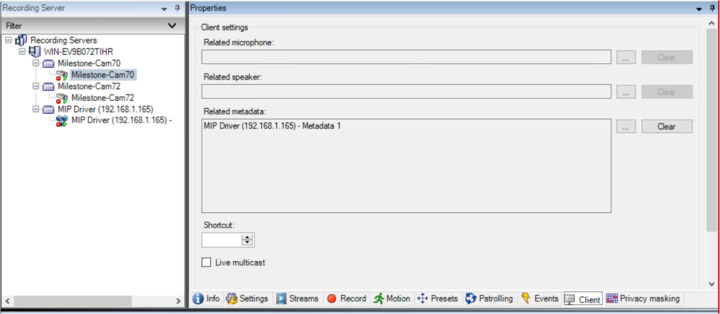
As I wrote in my previous answers you need to have multiple metadata channels (you only have one). Have a look at the sample I linked in my previous answer.
Hi Peter, We have applied the suggestion and able to connect to multiple cameras using metadata channels and single MIP driver. Thanks for all the support.
Hi Peter, Kindly let us know if we can display an arrow to indicate the Object Trajectory / Motion Direction in the Metadata. Thanks in advance
The build-in overlay support in Smart Client only supports bounding boxes. If you want other items to be drawn you will have to make a Smart Client plugin that reads the metadata stream and draw the overlay on the camera itself. It’s quite a bit of work I am afraid.
Hi Peter,
As indicated earlier, we have a requirement to draw a line to indicate the Object Trajectory / Motion Direction in the Metadata. Please can you share the sample Smart Client plugin code snippet. Note: this should happen in the background. Thanks
Hi Anil. We don’t have an example of drawing lines specifically, but the drawing is done using standard .NET methods, so should be fairly easy to find examples out there if needed. As to applying the drawing I would suggest looking at either the Smart Client Overlay Graph on Event
(https://doc.developer.milestonesys.com/html/index.html?base=samples/pluginsamples/scoverlaygraphonevent/readme.html&tree=tree_1.html) or the Active Elements Overlay
Hi Peter,
We are able draw a line using the Analytics overlay plugin (refer to the attached screenshot png file). However, this is not getting saved in the recorded video. So when we perform playback at the specified time this overlay is missing. Also, we need draw lines on multiple cameras. Kindly let us know if this is feasible. Thanks in advance.
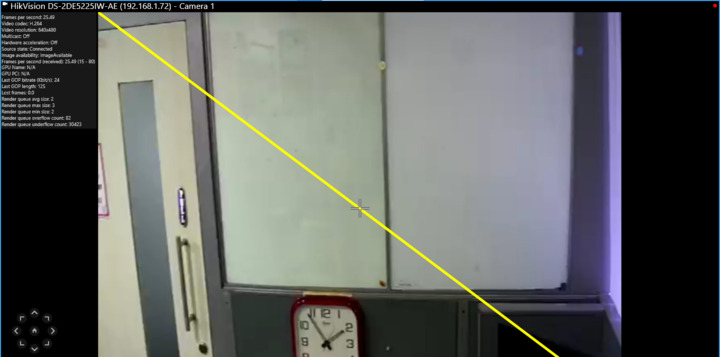
The sample shows how to draw on a single camera, but there is nothing stopping you from doing the same for multiple cameras. The drawing is done on top of the video and will never be embedded in the video as that would be considered tamping with evidence. We do not allow doing any modification to the recorded video.
However, you can also draw on the cameras in playback mode. Of course you need to access the source of the metadata used for the drawing at that time as well, so either you have to ensure that the metadata stream is recorded along with the video, if the data come in a metadata stream, or you should retrieve it from stored alarms (or events) if the data is included in those.
Hi Peter, Does Milestone metadata accepts Object Trajectory / Motion Direction to indicate the direction of motion. If not can we add this in custom field so that we can get it while playing the recorded video. Currently the metadata (bounding box) is saved and can be obtained during the playback. We need the same feature with Object Trajectory / Motion Direction line. Thanks
The metadata supported follows the ONVIF specifications. You can see a bit more detail about it here:
However, the client will not utilize much other than bounding boxes, but it is still totally okay to include it.
I am not very knowledgable about the specification and what it contains, so cannot add much details regarding specific objects unfortunately.