We encountered a problem with one of the customer’s environments. When trying to login using our own SDK application or SDK samples, we’re getting “HTTP status 401: Unauthorized” error for basic/current/domain users (all administrators). However Smart Client authentication works for all those users on a same machine.
Please guide us if you have any ideas on how to debug this problem.
This is very strange, because there is no issue when we test VideoViewer sample with 2019R2 XPCO, 2020R3 SDK and encryption is disabled.
We are suspecting if you use correct user and correct password.
You put “Component Integration” tag but I am wondering why you got an HTTP error? Can you please verify which samples you use, component or protocol? Please mention the name of the sample that you are using.
I am suspecting that you may have a special network setting for example; proxy settings (some company have their own settings). Might be a good idea to check your network configuration.
Also, please let us know the name of the samples that you are using.
Also, please check SDK logs ([C:\ProgramData\Milestone\MIPSDK)](file:C:/ProgramData/Milestone/MIPSDK)) and see if there are any errors or exception log entries there.
Sample application we’ve tried are “VideoViewer” and “LogOnServer”.
When connected from Management Server’s machine there’s only one row in MIPSDK log - “Debug: FindBestAddress ():Address was found: http://10.202.20.74/. Is OAuth server: False”
When connected from client machine nothing was added to log except periodical message that’s not connected to login itself - “Debug: LoginServerbase ():11:11 AM: New token posted [TOKEN#[#FMCSMILMGMsrv2](javascript:void(0); “#FMCSMILMGMsrv2”).corp.//ServerConnector#] – Server: FMCSMILMGMSRV2”
Product version is XProtect Corporate 2019r2. Also tried the same SDK version.
Can you please trace the network communication between a PC running VideoViewer (unmodified sample) and the XProtect VMS server when you get the error?
We are really mystified. Does not make sense that this is XProtect 2019R2 and a Smart Client can log in to this. We will need to try to get deeper. Hopefully we will reach some kind of understanding. Please gather the logs from this server for us to analyze!
Finaly I had a chance to make additional tests and found out that it’s able to connect from Milestone Server machine but there still a problem when connecting from other machines. Now it looks like network configurations issue, but maybe you know what to check first in case Milestone Smart client able to connect and VideoViewer SDK sample not?
You mentioned “there still a problem when connecting from other machines”, can you run Smart Client on those machines? Did you try multiple machines or do you have one acting up?
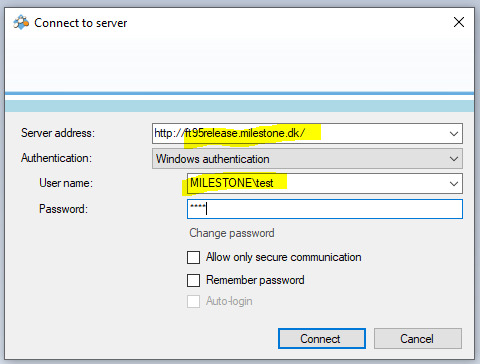
Please try not to use “Allow secure only communication” if you see the checkbox?
Regarding server address, do you use fully qualified domain name (FQDN) or localhost or IP address or hostname?
Also, try to test with a domain name + user name when you login as a Windows user.
It would be great if you could put a screen capture of the login dialog with a username and hostname and so on, but this is public Forum so I don’t know if it is possible for you to do it … but if it is possible please put it here.
You mentioned that it looks like network configuration issue, why do you think so? And how can you figure it out?
Hi, My name is Ina Pick, I am the program director at Briefcam, we would like to schedule a remote session with Milestone SDK Expert to help us troubleshoot this missing permission problem on the customer site. Please advise upon your availability and who can participate in this session. this issue is very urgent for our mutual customer , thank you
It seems like the issue is not a general SDK issue, rather tied to the customer’s installation because we have not been able to reproduce the issue. I believe Briefcam have MyMilestone accounts so can you please create a new support case via MyMilestone? https://www.milestonesys.com/my-milestone/
If you could do, it would be easier to have communication about this case without revealing customer’s information in public.
Hi Bo, I have already opened a ticket via the portal, but they redirected us back to the forum, this is becoming very frustrating, we need someone to join a technical session ASAP!
 Regarding server address, do you use fully qualified domain name (FQDN) or localhost or IP address or hostname?