The setting in the web interface might only apply to the way the web interface renders the video.
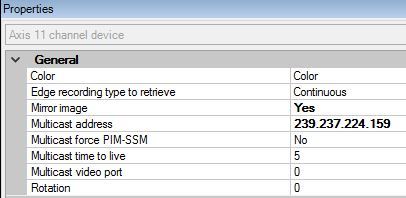
Do you have a “Rotation” property in the General setting section of the camera settings in Management Client?
The setting in the web interface might only apply to the way the web interface renders the video.
Do you have a “Rotation” property in the General setting section of the camera settings in Management Client?
Yes, that appears to have corrected it. I assume this fix will only apply to newly stored images from this point out, right?
Actually, I selected mirror image and that appeared to correct it.
Hi Noah, that is correct - we do not do any image rotation/mirroring ourselves either on the Recording Server or in Smart Client, so any images that have already been recorded will remain in the orientation they were received. But ongoing images should be mirrored/rotated based on your settings since those setting changes made in the Management Client should result in the camera sending us an already-rotated/mirrored image.