I am trying the VpsSamples on windows and receiving { "Error. Did not find the VPS driver with index 20002"}

Hello Christen,

some how the image wasn’t posted previously.

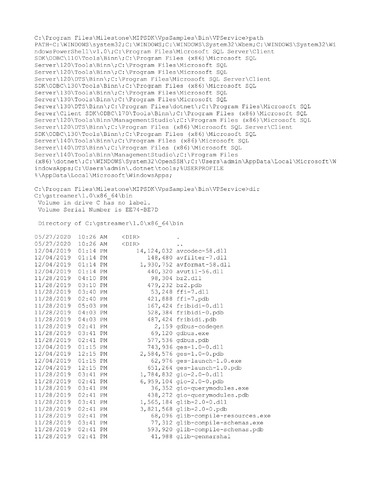
i attached a note containing the result of typing “path” and from typing “dir xxx\bin”, where xxx is where i have installed GStreamer.

i will try this version gstreamer-1.0-devel-msvc-x86_64-1.16.2.msi and get back to you.

thank you Christen,

best regards

i tried gstreamer-1.0-devel-msvc-x86_64-1.16.2.msi still having the same issue.

best regards

Hi Gaby

On my computer, I have GStreamer installed on [D:\gstreamer\1.0\x86_64,](file:D:/gstreamer/1.0/x86_64,) so I have added the bin subdirectory under that directory to the value of my PATH environment variable. When I type “path”, I get the following (shortened) reply:

PATH=…;[D:\gstreamer\1.0\x86_64\bin;](file:D:/gstreamer/1.0/x86_64/bin;)

That makes every process, including the VPService look for DLLs also in that directory. So I do not get the error you get. I believe that if you add <your_path_to_gstreamer>\bin to your PATH environment variable, your VPService will pick up GStreamer dlls.

Christen

Hello Christen,

I added the path to Gstreamer in my case [C:\gstreamer\1.0\x86_64](file:C:/gstreamer/1.0/x86_64)

and now when i type path in the directory [C:\Program](file:C:/Program) Files\Milestone\MIPSDK\VpsSamples\Bin\VPService

(shortened) reply:

PATH=…;[C:\gstreamer\1.0\x86_64\bin;](file:C:/gstreamer/1.0/x86_64/bin;)

however i am still receiving the same error:

16:19:45 Request starting HTTP/1.1 GET http://localhost:5000/gstreamer/pipelines/vpspasstru

16:19:47 Connection id “0HM03QBO701EM”, Request id “0HM03QBO701EM:00000001”: An unhandled exception was thrown by the application. Unable to load DLL ‘vps2gstreamer.dll’ or one of its dependencies: The specified module could not be found. (Exception from HRESULT: 0x8007007E)

16:19:47 Request finished in 2865.9242ms 500

best regards,

Gaby

I Gaby

I have to review this with my colleagues. What I believe you are telling me looks not comprehensible. Most likelythere is a misunderstanding somewhere. My problem is I can’t figure out where that would be. For the review I will need you to confirm that I have understood you correctly.

  1. You have installed gstreamer-1.0-devel-msvc-x86_64-1.16.2.msi and that GStreamer version is located in [C:\gstreamer\1.0\x86_64\bin.](file:C:/gstreamer/1.0/x86_64/bin.) Please confirm or correct.

  2. You have copied the VpsSamples directory from XProtect MIP SDK 2020 R2, and you are typing “dotnet vpservice.dll” in a terminal with VpsSamples\Bin\VpService as your current directory. Please provide the console output from writing DIR in that directory.

  3. You have added [C:\gstreamer\1.0\x86_64\bin](file:C:/gstreamer/1.0/x86_64/bin) to your PATH. Please provide console output from writing PATH in that same terminal.

  4. Please provide console outputs from writing

a) DIR [C:\gstreamer\1.0\x86_64\bin\GStreamer](file:C:/gstreamer/1.0/x86_64/bin/GStreamer)*.dll

b) DIR [C:\gstreamer\1.0\x86_64\bin\GObject](file:C:/gstreamer/1.0/x86_64/bin/GObject)*.dll

c) DIR [C:\gstreamer\1.0\x86_64\bin\Glib](file:C:/gstreamer/1.0/x86_64/bin/Glib)*.dll

  1. Please drop vps2gstreamer.dll from that same directory onto depends.exe and provide

a) A shapshot of the window of depends.exe

b) A DWI file as you provided it earlier, this timejust with what is supposed to be the correct Gstreamer DLLs.

I know you have been most of this before, but in order to brainstorm your situation, we must make sure that we are using our time on coherent, newest observations.

Christen

Hello Christen,

1) i Have installed gstreamer-1.0-devel-msvc-x86_64-1.16.2.msi and that GStreamer version is located in [C:\gstreamer\1.0\x86_64\bin.](file:C:/gstreamer/1.0/x86_64/bin.%C2%A0)

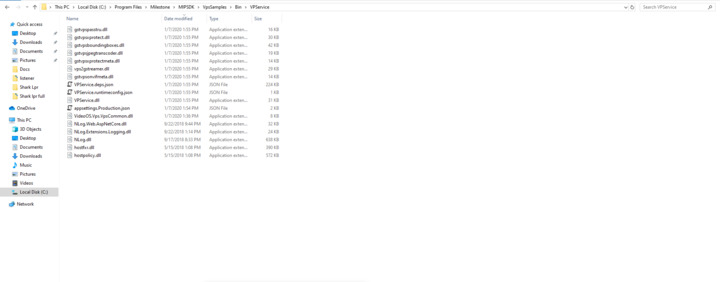
2) The output of typing Dir in directory of the service:

[C:\Program](file:C:/Program) Files\Milestone\MIPSDK\VpsSamples\Bin\VPService>DIR

Volume in drive C has no label.

Volume Serial Number is EE74-BE7D

Directory of [C:\Program](file:C:/Program) Files\Milestone\MIPSDK\VpsSamples\Bin\VPService

05/27/2020 10:37 AM .

05/27/2020 10:37 AM ..

01/07/2020 02:54 PM 1,106 appsettings.Production.json

01/07/2020 02:55 PM 43,008 gstvpsboundingboxes.dll

01/07/2020 02:55 PM 19,456 gstvpsjpegtranscoder.dll

01/07/2020 02:55 PM 13,824 gstvpsonvifmeta.dll

01/07/2020 02:55 PM 16,384 gstvpspasstru.dll

01/07/2020 02:55 PM 30,208 gstvpsxprotect.dll

01/07/2020 02:55 PM 13,824 gstvpsxprotectmeta.dll

05/15/2018 01:08 PM 399,328 hostfxr.dll

05/15/2018 01:08 PM 585,696 hostpolicy.dll

09/17/2018 08:33 PM 653,312 NLog.dll

09/22/2018 01:14 PM 24,064 NLog.Extensions.Logging.dll

09/22/2018 09:44 PM 32,256 NLog.Web.AspNetCore.dll

01/07/2020 02:36 PM 8,192 VideoOS.Vps.VpsCommon.dll

01/07/2020 02:55 PM 29,696 vps2gstreamer.dll

01/07/2020 02:55 PM 229,038 VPService.deps.json

01/07/2020 02:55 PM 31,744 VPService.dll

01/07/2020 02:55 PM 263 VPService.runtimeconfig.json

   17 File(s)   2,131,399 bytes

    2 Dir(s) 22,937,927,680 bytes free

3) Console output from writing PATH :

[C:\Program](file:C:/Program) Files\Milestone\MIPSDK\VpsSamples\Bin\VPService>PATH

PATH=[C:\WINDOWS\system32;C](file:C:/WINDOWS/system32;C):\WINDOWS;[C:\WINDOWS\System32\Wbem;C](file:C:/WINDOWS/System32/Wbem;C):\WINDOWS\System32\WindowsPowerShell\v1.0\;[C:\Program](file:C:/Program) Files\Microsoft SQL Server\Client SDK\ODBC\110\Tools\Binn\;[C:\Program](file:C:/Program) Files (x86)\Microsoft SQL Server\120\Tools\Binn\;[C:\Program](file:C:/Program) Files\Microsoft SQL Server\120\Tools\Binn\;[C:\Program](file:C:/Program) Files\Microsoft SQL Server\120\DTS\Binn\;[C:\Program](file:C:/Program) Files\Microsoft SQL Server\Client SDK\ODBC\130\Tools\Binn\;[C:\Program](file:C:/Program) Files (x86)\Microsoft SQL Server\130\Tools\Binn\;[C:\Program](file:C:/Program) Files\Microsoft SQL Server\130\Tools\Binn\;[C:\Program](file:C:/Program) Files\Microsoft SQL Server\130\DTS\Binn\;[C:\Program](file:C:/Program) Files\dotnet\;[C:\Program](file:C:/Program) Files\Microsoft SQL Server\Client SDK\ODBC\170\Tools\Binn\;[C:\Program](file:C:/Program) Files (x86)\Microsoft SQL Server\120\Tools\Binn\ManagementStudio\;[C:\Program](file:C:/Program) Files (x86)\Microsoft SQL Server\120\DTS\Binn\;[C:\Program](file:C:/Program) Files (x86)\Microsoft SQL Server\Client SDK\ODBC\130\Tools\Binn\;[C:\Program](file:C:/Program) Files (x86)\Microsoft SQL Server\140\Tools\Binn\;[C:\Program](file:C:/Program) Files (x86)\Microsoft SQL Server\140\DTS\Binn\;[C:\Program](file:C:/Program) Files (x86)\Microsoft SQL Server\140\Tools\Binn\ManagementStudio\;[C:\Program](file:C:/Program) Files (x86)\dotnet\;[C:\WINDOWS\System32\OpenSSH\;C](file:C:/WINDOWS/System32/OpenSSH/;C):\gstreamer\1.0\x86_64\bin

  1. This should be the issue

[C:\Users\admin](file:C:/Users/admin)>DIR [C:\gstreamer\1.0\x86_64\bin\GStreamer](file:C:/gstreamer/1.0/x86_64/bin/GStreamer)*.dll

Volume in drive C has no label.

Volume Serial Number is EE74-BE7D

Directory of [C:\gstreamer\1.0\x86_64\bin](file:C:/gstreamer/1.0/x86_64/bin)

File Not Found

[C:\Users\admin](file:C:/Users/admin)>DIR [C:\gstreamer\1.0\x86_64\bin\GObject](file:C:/gstreamer/1.0/x86_64/bin/GObject)*.dll

Volume in drive C has no label.

Volume Serial Number is EE74-BE7D

Directory of [C:\gstreamer\1.0\x86_64\bin](file:C:/gstreamer/1.0/x86_64/bin)

File Not Found

[C:\Users\admin](file:C:/Users/admin)> DIR [C:\gstreamer\1.0\x86_64\bin\Glib](file:C:/gstreamer/1.0/x86_64/bin/Glib)*.dll

Volume in drive C has no label.

Volume Serial Number is EE74-BE7D

Directory of [C:\gstreamer\1.0\x86_64\bin](file:C:/gstreamer/1.0/x86_64/bin)

File Not Found

Those 3 dlls are missing i uninstalled gstreamer and reinstalled using the gstreamer-1.0-devel-msvc-x86_64-1.16.2.msi (Already used before) installer and those libraries are still missing.

I also tried to install gstreamer-1.0-devel-msvc-x86_64-1.16.1.ms and all 3 were still missing.

any insight about this.

best regards,

Gaby

Hi Gaby

Well that explains a lot. Without the GStreamer DLLs, vps2gstreamer.dll will not run. Bent and I have investigated a bit, and it seems that if one installs GStreamer selecting “Typical”, one does not get these DLLs installed. Obviously, GStreamer people don’t consider developers to be typical. If one selects “Complete” when installing GStreamer, one gets the DLLs, at least we get them here. We could consider adding this to the readme.md file, though we then risk providing fake information in the future if GStreamer changes their install procedures.

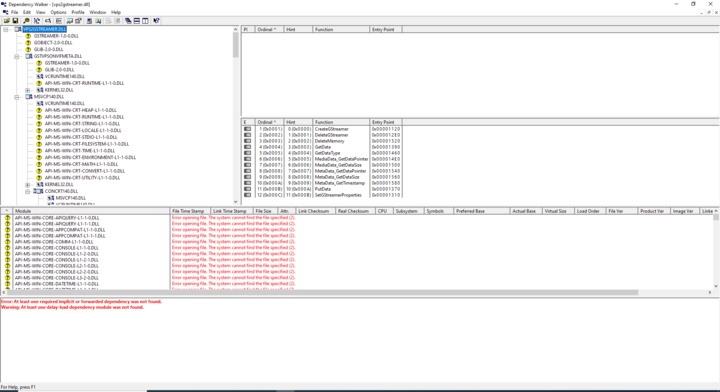
If you in the future experience problems loading DLLs, remember that this is what the “depends.exe” tool is made for. It tells you exactly which DLLs it can’t find. The repair process is then to go find those files, and after having found them, add their location(s) to your PATH. This may very well happen to you again, because when you start developing GStreamer plug-in style DLLs yourself, then those DLLs may reference other DLLs, which then have to be in your PATH.

Christen

Hello Christen,

I selected complete installation during the setup also those dll are still missing , i also tried the custom installation and selected all the features and those dll are still missing. I tried this on 2 different machines and i am facing the same problem.

Any idea how to solve this.

Gaby

Hi Gaby

I hope we at the road’s end now: Here is a direct copy-paste quote from gstreamer.freedesktop.org pointed to by our readme.md

Download and install GStreamer binaries

There are 3 sets of files in GStreamer binaries:

  • The runtime files are needed to run GStreamer applications. You probably want to distribute these files with your application (or the installer below).
  • The development files are additional files you need to create GStreamer applications.
  • The Merge Modules files are additional files you can use to deploy GStreamer binaries alongside your application (see Windows deployment).

Get the Runtime and Development files installers appropriate for your architecture from here:

https://gstreamer.freedesktop.org/data/pkg/windows/

Which, as I read it, means that you have to install two (2) MSI packages. I also tried that myself, and you are correct that when you install the -devel- MSI package only, you don’t get the DLLs. The DLLs are in the corresponding package which does not have -devel- in its name.

Christen

Hello Christen,

I followed this read me and i installed both the development and the runtime msi as mentioned on 2 machines and the problem persisted.

Thank you for your patience .

Gaby

Hi Gaby

How sad. Then we have to repeat steps 3, 4 and 5 to get to know what is wrong at your place

  1. You have added [C:\gstreamer\1.0\x86_64\bin to](file:C:/gstreamer/1.0/x86_64/bin%C2%A0to) your PATH. Please provide console output from writing PATH in that same terminal.

  2. Please provide console outputs from writing

a) DIR [C:\gstreamer\1.0\x86_64\bin\GStreamer](file:C:/gstreamer/1.0/x86_64/bin/GStreamer)*.dll

b) DIR [C:\gstreamer\1.0\x86_64\bin\GObject](file:C:/gstreamer/1.0/x86_64/bin/GObject)*.dll

c) DIR [C:\gstreamer\1.0\x86_64\bin\Glib](file:C:/gstreamer/1.0/x86_64/bin/Glib)*.dll

  1. Please drop vps2gstreamer.dll from that same directory onto depends.exe and provide

a) A shapshot of the window of depends.exe

b) A DWI file as you provided it earlier, this timejust with what is supposed to be the correct Gstreamer DLLs.

Christen

3) output from writing PATH in that same terminal.

[C:\Program](file:C:/Program) Files\Milestone\MIPSDK\VpsSamples\Bin\VPService>PATH

PATH=[C:\WINDOWS\system32;C](file:C:/WINDOWS/system32;C):\WINDOWS;[C:\WINDOWS\System32\Wbem;C](file:C:/WINDOWS/System32/Wbem;C):\WINDOWS\System32\WindowsPowerShell\v1.0\;[C:\Program](file:C:/Program) Files\Microsoft SQL Server\Client SDK\ODBC\110\Tools\Binn\;[C:\Program](file:C:/Program) Files (x86)\Microsoft SQL Server\120\Tools\Binn\;[C:\Program](file:C:/Program) Files\Microsoft SQL Server\120\Tools\Binn\;[C:\Program](file:C:/Program) Files\Microsoft SQL Server\120\DTS\Binn\;[C:\Program](file:C:/Program) Files\Microsoft SQL Server\Client SDK\ODBC\130\Tools\Binn\;[C:\Program](file:C:/Program) Files (x86)\Microsoft SQL Server\130\Tools\Binn\;[C:\Program](file:C:/Program) Files\Microsoft SQL Server\130\Tools\Binn\;[C:\Program](file:C:/Program) Files\Microsoft SQL Server\130\DTS\Binn\;[C:\Program](file:C:/Program) Files\dotnet\;[C:\Program](file:C:/Program) Files\Microsoft SQL Server\Client SDK\ODBC\170\Tools\Binn\;[C:\Program](file:C:/Program) Files (x86)\Microsoft SQL Server\120\Tools\Binn\ManagementStudio\;[C:\Program](file:C:/Program) Files (x86)\Microsoft SQL Server\120\DTS\Binn\;[C:\Program](file:C:/Program) Files (x86)\Microsoft SQL Server\Client SDK\ODBC\130\Tools\Binn\;[C:\Program](file:C:/Program) Files (x86)\Microsoft SQL Server\140\Tools\Binn\;[C:\Program](file:C:/Program) Files (x86)\Microsoft SQL Server\140\DTS\Binn\;[C:\Program](file:C:/Program) Files (x86)\Microsoft SQL Server\140\Tools\Binn\ManagementStudio\;[C:\Program](file:C:/Program) Files (x86)\dotnet\;[C:\WINDOWS\System32\OpenSSH\;C](file:C:/WINDOWS/System32/OpenSSH/;C):\gstreamer\1.0\x86_64\bin

4) console outputs from writing

a) DIR [C:\gstreamer\1.0\x86_64\bin\GStreamer](file:C:/gstreamer/1.0/x86_64/bin/GStreamer)*.dll

[C:\Program](file:C:/Program) Files\Milestone\MIPSDK\VpsSamples\Bin\VPService>DIR [C:\gstreamer\1.0\x86_64\bin\GStreamer](file:C:/gstreamer/1.0/x86_64/bin/GStreamer)*.dll

Volume in drive C has no label.

Volume Serial Number is EE74-BE7D

Directory of [C:\gstreamer\1.0\x86_64\bin](file:C:/gstreamer/1.0/x86_64/bin)

File Not Found

b) DIR [C:\gstreamer\1.0\x86_64\bin\GObject](file:C:/gstreamer/1.0/x86_64/bin/GObject)*.dll

[C:\Program](file:C:/Program) Files\Milestone\MIPSDK\VpsSamples\Bin\VPService>DIR [C:\gstreamer\1.0\x86_64\bin\GObject](file:C:/gstreamer/1.0/x86_64/bin/GObject)*.dll

Volume in drive C has no label.

Volume Serial Number is EE74-BE7D

Directory of [C:\gstreamer\1.0\x86_64\bin](file:C:/gstreamer/1.0/x86_64/bin)

File Not Found

c) DIR [C:\gstreamer\1.0\x86_64\bin\Glib](file:C:/gstreamer/1.0/x86_64/bin/Glib)*.dll

[C:\Program](file:C:/Program) Files\Milestone\MIPSDK\VpsSamples\Bin\VPService>DIR [C:\gstreamer\1.0\x86_64\bin\Glib](file:C:/gstreamer/1.0/x86_64/bin/Glib)*.dll

Volume in drive C has no label.

Volume Serial Number is EE74-BE7D

Directory of [C:\gstreamer\1.0\x86_64\bin](file:C:/gstreamer/1.0/x86_64/bin)

File Not Found

5) a) attached a snapshot and DWI file of vps2gstreamer.dll

Gaby

Hi Gaby

We are two persons here independently of each other installing these two MSI files selecting “Complete”.

https://gstreamer.freedesktop.org/data/pkg/windows/1.16.1/gstreamer-1.0-msvc-x86_64-1.16.1.msi

https://gstreamer.freedesktop.org/data/pkg/windows/1.16.1/gstreamer-1.0-devel-msvc-x86_64-1.16.1.msi

We both get a directory [c:\gstreamer\1.0\x86_64\bin](file:c:/gstreamer/1.0/x86_64/bin) with a DLL in it named gstreamer-1.0-0.dll. If you do not have the same results, I can’t really explain that. If you do a DIR in that bin directory, which files do you have?

Maybe you do not have rights to write DLLs in that specific directory?

Maybe your company has security measures (like a virus scanner) which silently removes such DLLs?

Christen

Hi Christen,

i attached the result of DIR in thebin directory

[C:\Users\admin](file:C:/Users/admin)>cd [C:\gstreamer\1.0\x86_64\bin](file:C:/gstreamer/1.0/x86_64/bin)

I gave permission to read/write for everyone in this path.

The only remaining reason is that files are being deleted.I will investigate if i can find any reason for this to happen.

Thanks again Christen.

Gaby

Hi Gaby

We just had a similar case internally, where someone was missing the gstreamer dlls exactly like you are still missing it. The problem was that it had been installed to another path than the person thought. Bent discovered that if you ever install GStreamer for Windows using “Custom” mode, you can choose your own custom directory for GStreamer, and the GStreamer installer will remember that directory until you change it again, also in the two other modes. In the two other modes, you can’t change nor see the install path. Maybe that is what is happening for you as well. Just a hint or guess.

The directory listing you show me does not include gstreamer-1.0-0.dll as I would expect it to, and which it does when I install GStreamer here. There simply must be a way for you to install GStreamer so you get that DLL into the directory that you believe you are using it from. I can do that here. I have a very hard time explaining to you exactly why the same does not happen for you. GStreamer as such is not delivered by Milestone, but of course we want to help our partners out all we are able to. But from here, I guess you can use Google or your imagination as well as I can to figure out what it is that goes wrong.

I am kind of running out of ideas, Christen